


Planyard and Xero Integration Makes Job Costing Easy

Are you looking for construction job costing software that integrates seamlessly with Xero? Our Xero job costing integration simplifies the entire process!

Using Planyard, integrate your construction job costing seamlessly with Xero. Streamline your budgeting, invoicing, and cost-tracking processes for enhanced project management and automatically forward all relevant information to accounting.

Free 14-day full-featured trial. Full access. No credit card required.

4.75/5 · 39 reviews
Logos of Planyard and Xero construction job costing integration

Read success stories from our customers

See how Planyard helps businesses like yours succeed - read their stories in our blog.

"We had to get our accountant on board and interface it with Xero, so invoices hit the right job number. Now an invoice gets uploaded in Planyard, I sign it off, and it drops into my Xero payment schedule in three or four weeks - it’s perfect."

Read more: E&N Group Ltd
Lee Covington, Owner
Lee Covington Owner  ·  E&N Group Ltd  ·  London, United Kingdom

"All of the financial data and invoices are sent automatically to Xero and emailed to my bookkeeper, who then has all the information she needs to record it correctly in our accounts. It’s sort of job done, as simple as that."

Read more: Higgihaus Developments
Ian Holford, Managing Director
Ian Holford Managing Director  ·  Higgihaus Developments  ·  Bristol, United Kingdom

"When I have been working on cloud accounting like Xero and Quickbooks they don’t have a specific construction-based costing tool. You have project management costing tools but they are not aimed at the level of what construction companies need so I came across Planyard and I was like finally there is something that solves the problem."

Paul Howarth, Experienced FD/Consultant
Paul Howarth Experienced FD/Consultant  ·  Live Management Accounts

"Xero does have a purchase order system, but it wasn't geared towards a construction business or the way we actually operate."

Read more: Rosetta Contracting
Sam Jarman, Director
Sam Jarman Director  ·  Rosetta Contracting  ·  Old Knebworth, United Kingdom

"Planyard's integration with Xero has streamlined our project financials, providing clear insights and saving us valuable time. It's easy to use and keeps all commitments organized for seamless financial tracking."

Read more: Empower Renewables
Sharon Brown, Financial Controller
Sharon Brown Financial Controller  ·  Empower Renewables  ·  Dublin, Ireland

Trusted by construction companies globally

The problem - why Xero alone isn't enough for job costing

Xero wasn’t built for detailed project cost tracking. Manually entering purchase orders, invoices, and expenses into spreadsheets leads to wasted time, duplication, and errors.

“To understand the financial position of a single project, I used to spend 2-3 days exporting data from Xero and matching it in spreadsheets—only to find I wasn’t even sure the numbers were right.”
— Jason Escobar, Quantity Surveyor, The Keane Group

Read the case study

Xero provides an overview of financials but lacks job-level cost tracking. By the time reports are compiled, it’s often too late to react to budget overruns.

“Without real-time cost tracking, it’s easy to mistake being busy for being profitable. We needed a system that told us which projects were actually making money before it was too late.”
— Sam Jarman, Director, Rosetta Contracting

Read the case study

Xero’s purchase order system isn’t designed for the way construction businesses operate. Tracking subcontractor commitments, valuations, and overbilling risks is nearly impossible without a specialised tool.

“Before Planyard, we relied on Excel for subcontractor payment tracking. It was time-consuming and prone to mistakes—overbilling risks were a constant issue.”
— Claire Hill, Quantity Surveyor, Brown & Bancroft

Read the case study

The solution - Planyard + Xero

Unlike other construction software that syncs data back and forth with Xero - leading to confusion - Planyard ensures all job costing and project financials happen in one place. Only approved invoices are sent to Xero with all necessary accounting details, so the finance team doesn't need to guess where costs belong.

Job costs stay in Planyard, accounting stays in Xero

Planyard is built for project teams, while Xero is designed for accounting. Costs, budgets, and commitments are managed in Planyard, and only pre-approved, correctly categorised invoices are sent to Xero.

No duplicate data

Only approved and finalised costs reach Xero

No budget mismatches

Project financials are controlled in one system and by the PMs

No unnecessary discussions

A clear one-way process ensures clarity between project teams and accounting

One source of truth

Project teams track costs in Planyard, accountants finalise books in Xero

No more guesswork for accountants

Instead of sending raw invoices to Xero and forcing accountants to figure out project costs manually, Planyard ensures every invoice is pre-processed before it reaches Xero.

Chart of accounts

Each invoice in Xero has the chart of accounts assignments already done

Linked supplier details

Since the info is already there with the context, it makes for easy verification

Project-related context

Each invoice comes with job, cost code, and responsible quantity surveyor attached

Original invoice document

The original invoice and a Planyard report are sent to Xero for complete transparency

Upload your project budget and follow the financial progress in real-time

No credit card required. No sales or IT support needed.

Eliminate spreadsheet reconciliation

Many construction teams still extract reports from Xero and manually match them to projects. Planyard eliminates this by keeping job costs live and accurate so you always know where you stand.

Real-time cost tracking

Without waiting for reports from the project teams or invoices from accounting

Automatic actuals

All costs get approved in Planyard - the actuals get automatically reported

No monthly adjustments

No need for monthly spreadsheet adjustments since the system does it for you

Prevent human errors

The costs are linked to projects at the source and entered just once

Prevent overbilling and catch cost discrepancies early

Planyard helps prevent overbilling errors and ensures all project costs are validated before payments are made.

Subcontractor invoices

Invoices are matched to purchase orders and subcontracts before approval

Overbilling prevention

Planyard flags invoices exceeding agreed values

Track pending commitments

You always see the committed amounts so you can prevent budget surprises

Automatic alerts

If costs exceed planned or revised budgets, you'll be notified by the system

Upload your project budget and follow the financial progress in real-time

No credit card required. No sales or IT support needed.

Automate subcontractor and supplier payments

Managing subcontractor claims and supplier invoices manually can lead to delays and mistakes. Planyard streamlines the process with automated tracking and approvals.

Reports submitted by subs

No back-and-forth emails or papers - they can just submit the work done this month

Pre-checked invoices

Invoices are compared to the contracts and get checked before reaching Xero

Automatic retainages

Retention amounts are calculated automatically and reduce risks for errors

Faster processing

Invoices only go one way and don't get lost - avoiding fees for delays

Real-time financial reporting without the hassle

Most construction teams rely on manual financial reports that are outdated by the time they’re compiled. With Planyard, financial reporting is live and up to date.

Instant visibility

Into the costs of any project that's ongoing or in the warranty phase

Automatic variance tracking

You can see budget vs. actuals at any time and react to cash flow problems if needed

Portfolio-wide insights

You can see the financial status of your whole portfolio in one dashboard

No more reporting

No more manual exports to do - the data is always accurate in Planyard

Manage Job Costing in Planyard

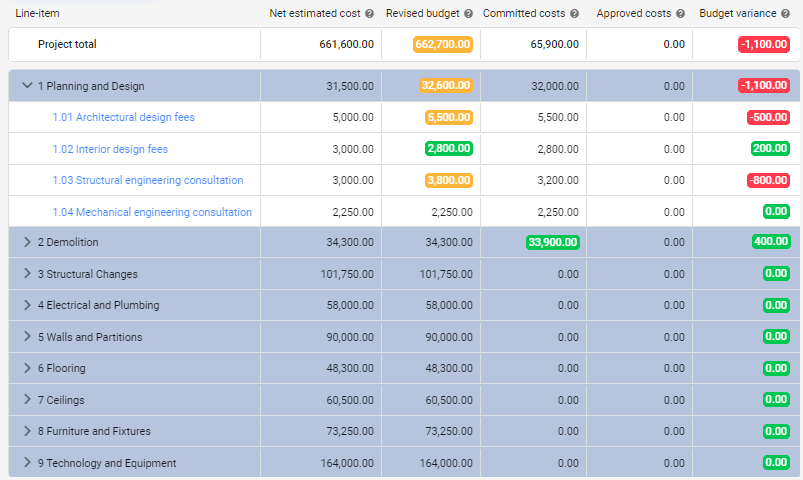
Set up your budget in Planyard with cost headings, subheadings, and line items. Customize cost codes and names to fit your project needs, allowing for detailed category and line-item tracking. This provides clear visibility into project expenses.

Leverage Planyard’s Xero job costing integration workflows for subcontractor, invoice, and purchase order management to track all committed and approved project costs and see exactly where each expense is allocated.

Streamlined Purchase Invoice Management

Automatically collect invoices in Planyard and extract key information such as invoice date, number, and due date. If a corresponding purchase order or subcontract exists, invoices are automatically linked. Allocate the costs to the appropriate cost headings and line items, then approve them.

Once approved, the budget, subcontract, or purchase order is updated, and cost documents are forwarded to Xero.

Upload your project budget and follow the financial progress in real-time

No credit card required. No sales or IT support needed.

Connecting Budgets with Xero’s Chart of Accounts

Planyard receives all available accounts from Xero, ensuring that cost documentation pushed to Xero contains the correct account information. This integration helps maintain accurate financial records and streamlines your accounting processes.

The accountant receives the invoice and can approve and pay the expense with a single click. This workflow ensures invoices are paid precisely as agreed with the supplier, leveraging the project team’s expertise to confirm the correct amounts.

Importing Tracking Categories from Xero to Planyard

Planyard imports tracking categories from Xero, allowing you to add these categories to your projects. The integration accurately categorizes all project costs, making tracking and analyzing expenses across multiple projects easier.

Upload your project budget and follow the financial progress in real-time

No credit card required. No sales or IT support needed.

Importing Contacts from Xero

Planyard imports all contacts from Xero and stores them in the contacts database.

These contacts can be utilized for invoices, purchase orders, subcontracts, and more, ensuring seamless integration and management of all project communications.

Historical job cost information is available for use

Planyard’s detailed job cost breakdown lets you see precisely what each cost consists of. Planyard simplifies profitability tracking and reveals why some jobs were unprofitable.

Additionally, you can make more accurate estimates for new projects by analyzing the budget items and costs of the portfolio projects. You can quickly review job costs across all your previous projects for better planning.

Contractor success stories

E&N Group Ltd
"Planyard is exactly what I’m after as a business owner: a good-value system that keeps everything in one place, saves me money and makes sure I’m not losing any money on projects. As a businessman, that’s a no-brainer."
Lee Covington
Lee Covington
Owner E&N Group Ltd
Read the full story →
Higgihaus Developments
"Planyard takes your project budget and puts it very clearly on screen, allowing you to account for all your costs, invoices, and receipts as you process them before they even reach the accounting department. This gives you a live, real-time picture of exactly where your project budget stands at any given point."
Ian Holford
Ian Holford
Managing Director Higgihaus Developments
Read the full story →
TITN Development
"Team members can jump into the system and immediately see exactly where a project stands without getting confused. It’s so self-explanatory and user-friendly that I don’t have to spend weeks training everyone in the company on how to use it; they can just get to work."
Jordan Cohen
Jordan Cohen
Partner TITN Development
Read the full story →
The Keane Group
"If I were still relying solely on Excel to track and present the financial positions of our projects, I would be losing significant time every single month. By implementing the streamlined processes that Planyard supports, I’m saving at least three to four days of work every month that would have otherwise been spent on manual data entry and reconciliation."
Jason Escobar
Jason Escobar
Project Management / Systems & Process Dev The Keane Group
Read the full story →
Karringtons Ltd
"Using Planyard gives me a lot more certainty that the figures we are looking at are accurate and reflect the true status of the budget."
Graham Eastwood
Graham Eastwood
Office Manager Karringtons Ltd
Read the full story →
Skyler Contracting
"It’s a fantastic visualizer; you can jump onto Planyard at any point and instantly see exactly how the job is performing straight away."
Grant Collins
Grant Collins
Quantity Surveyor Skyler Contracting
Read the full story →

Keep job costing smart. Keep pricing simple.

Planyard keeps job costing in one place, ensuring project teams manage budgets while accountants get clean, pre-approved invoices in Xero.

Estimating
£40
/ month / PM or QS
 

Cost Estimating

  • Create client quotes with markup
  • Estimate using personal cost database
  • Visualise sales pipeline on a dashboard
  • Estimating and terms templates
  • Quote versioning and history
  • Reminders for invitation to tender submission and follow-ups
Try for free
Essential
£82
/ month / PM or QS
£33
for supporting staff
Perfect for support roles or stakeholders: gain access to essential project features and view key financial data without full platform permissions, enabling users to stay informed and contribute without hands-on tasks.

Usually selected for: site engineers, clients, estimators or auditors.

Estimating and Budget Control

  • Everything in Estimating
  • Track budgets and actual spend
  • Manage purchase invoices automatically
  • Reuse active project cost data for estimating
  • Sync invoices to Xero, QuickBooks and MYOB
Try for free
Professional
£123
/ month / PM or QS
£33
for supporting staff
Perfect for support roles or stakeholders: gain access to essential project features and view key financial data without full platform permissions, enabling users to stay informed and contribute without hands-on tasks.

Usually selected for: site engineers, clients, estimators or auditors.

Estimating, Cost Control and Purchase Orders Management

  • Everything in Essential
  • Issue and manage purchase orders
  • Track committed cost on the budget
  • Forecast project profitability in real-time
  • Create cashflow forecasts
  • Manage client contracts and progress reports
Try for free
Ultimate
£164
/ month / PM or QS
£33
for supporting staff
Perfect for support roles or stakeholders: gain access to essential project features and view key financial data without full platform permissions, enabling users to stay informed and contribute without hands-on tasks.

Usually selected for: site engineers, clients, estimators or auditors.

Full Functionality

  • Everything in Professional
  • Automate subcontractor and vendor quoting
  • Track subcontracts and progress
  • Manage subcontractor variations
  • Collect subcontractor valuations
Try for free

Frequently asked questions

We've got your questions covered. If you can't find the answer below, then feel free to contact us via the chat.

Planyard syncs only approved invoices to Xero—complete with chart of accounts, supplier details, project codes, and the original invoice document. This ensures your finance team gets clean, organised data without extra work.

Upload your project budget and follow the financial progress in real-time

No credit card required. No sales or IT support needed.