Last verified: October 2026
Planyard is our product. We rank it where it fits, say what it does not do, and checked every other tool’s price on the vendor’s own site.
Most UK contractors still update their budget in a spreadsheet once a month, which means the first warning of an overrun arrives with the invoice, weeks after the order was placed. The rules around payment have also tightened: from 6 April 2026 HMRC can cancel gross payment status straight away for CIS fraud, and contractors have to file a nil CIS return (or tell HMRC) in months when they pay no subcontractors.
To stay profitable you need a system that connects your target budget to your live commitments (purchase orders and subcontracts) and your actual spend (valuations and invoices).
This guide reviews eight construction budgeting tools against what UK and Ireland contractors need, from lightweight apps that sit on top of Xero or Sage to full construction ERPs. Every price below was checked on the vendor’s own site in October 2026.
"Planyard is exactly what I’m after as a business owner: a good-value system that keeps everything in one place, saves me money and makes sure I’m not losing any money on projects. As a businessman, that’s a no-brainer."
Read more
Construction Budgeting Software UK: Comparison Table
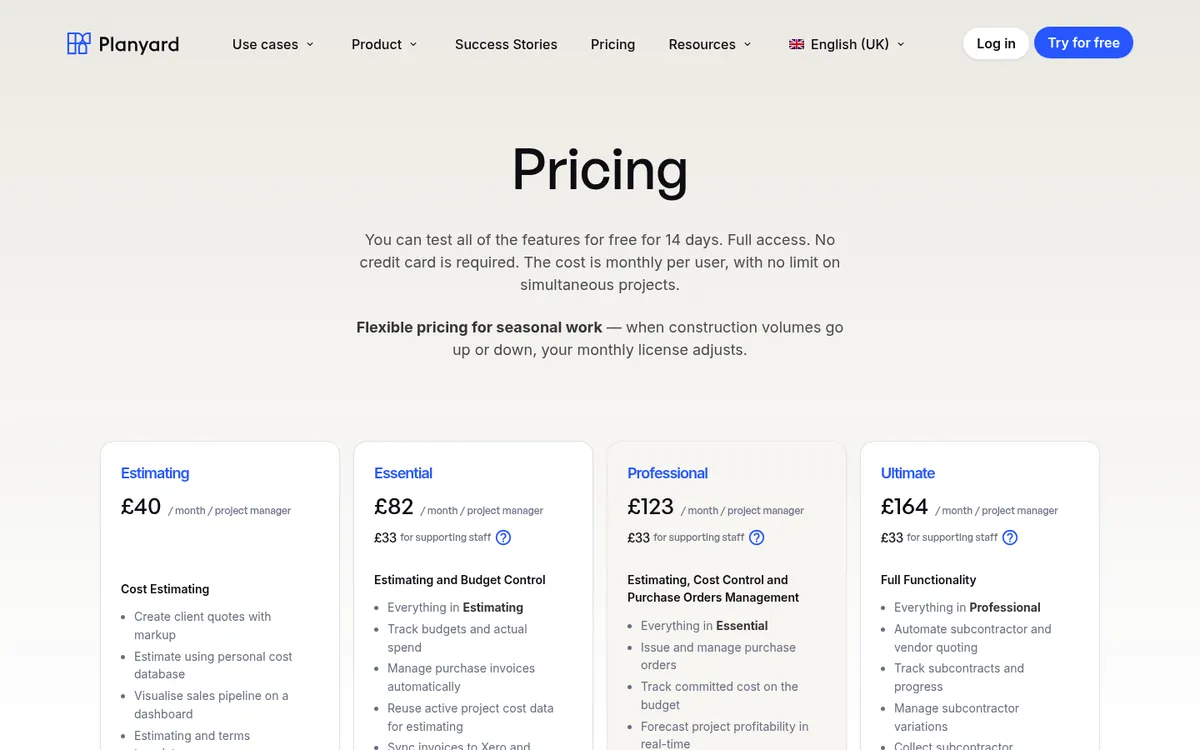
Prices are per month, excluding VAT, as published by each vendor in October 2026. “Quote only” means the vendor publishes no price. Planyard is priced per project manager; supporting staff are £33 each.
| # | Software | Best for | From (Oct 2026) | Accounting link | CIS | Retention and valuations | Verdict |
| 1 | Planyard | SME contractors on Xero, QuickBooks or Sage | £82 per PM (commitments from £123) | Xero, QuickBooks, Sage sync | Sets the labour and materials split; your ledger deducts and files | Client valuations, variations and retention from Professional; subcontractor applications on Ultimate | Live budget and CVR without replacing your accounts |
| 2 | Eque2 Construct | Contractors who want job costing inside Sage or Xero | Quote only | Sage Accounting, 50, 200, Intacct; Xero | Built in | Applications for payment and retentions | Strong UK compliance, more of an accounts tool |
| 3 | Payapps | Main contractors certifying subcontractor applications | Quote only (main contractors) | Integrates with ERPs and accounting software | Not listed | Applications, variations, retention | Fixes valuations; you still need a budget tool |
| 4 | Procore | Large contractors wanting site and office in one platform | Quote only (annual fee on turnover) | Sage, Xero and 200+ systems via integrations | Through your accounting system | Commitments and invoice management | Broadest platform, heaviest rollout |
| 5 | Archdesk | Firms that want one configurable system from enquiry to final account | Quote only | Check in demo | Check in demo | Subcontractor pay applications and CVR reports | Very flexible, longer setup |
| 6 | Access Coins Evo / 4PS Construct | Tier 1 and tier 2 contractors needing a full ERP | Quote only | Own finance ledger | Built in (Coins Evo files CIS returns) | Full ERP coverage | Most complete, biggest investment |
| 7 | Buildxact | Residential builders who estimate and budget in one place | £119 (Foundation) | Accounting integrations | Not listed | Not listed | Good for quoting, light on commercial control |
| 8 | LiveCosts | Contractors wanting cost tracking and POs on top of accounts | Quote only | Xero, Sage, QuickBooks | Not stated | Not stated | Close rival to Planyard on cost tracking |
How We Chose These Tools
We looked for tools that cover what a UK commercial team actually deals with each month:
- Valuations and retentions: cumulative valuations, payment and pay less notices, and retention held and released.
- CIS and VAT: the labour and materials split behind each CIS deduction, and the domestic reverse charge on subcontractor invoices.
- Live CVR reporting: cost value reconciliation built from live data, not from a spreadsheet export at month-end.
Each tool also had to show committed cost against budget, not only invoices. We left out pure estimating tools and general project management apps with no cost control.
What UK Contractors Need From Budgeting Software
Budgeting software built for the US or Australia often handles “retainage” and “progress claims” but misses how UK jobs are paid. Before you book demos, check these four points.
CIS deductions
Under the Construction Industry Scheme you deduct 20% (or 30% for unregistered subcontractors) from the labour part of each payment, unless the subcontractor has gross payment status. Your accounting software usually does the deduction and the monthly return. The budgeting tool has to get the labour and materials split right on the subcontract order so the deduction is right when the bill reaches Sage, Xero or QuickBooks. Our CIS software guide compares the tools that file the return.
Retention
Many JCT and NEC contracts hold back 3% to 5% of each payment, with half released at practical completion and the rest at the end of the defects period. Your budget has to show both sides: retention you hold on subcontractors and retention your client holds on you. Tools that only track gross invoices overstate your cash position.
JCT valuations and payment notices
JCT contracts run on monthly valuations, with payment notices and pay less notices under the Construction Act. A good budgeting tool turns approved valuations into actual cost and keeps variations tied to the right budget line. Planyard’s JCT contract management workflow covers contract sums, variations, retention and subcontractor valuations.
Committed cost and CVR
Commercial teams forecast anticipated final cost: the budget, plus what you have committed through orders and subcontracts, plus what is still to buy. If committed cost only appears when the invoice arrives, your CVR is always a month behind.
"Planyard can save about 15 minutes per subcontractor payment. When I'm dealing with 50 subcontractors, that's 10 to 12 hours a month. Add the CVR reporting and all of a sudden I've got two extra days free."
Read more
1. Planyard – Best for live budgets and CVR on top of your accounting software
Planyard is built for contractors who have outgrown Excel but find a traditional ERP too slow and too expensive. It gives quantity surveyors and project managers a live budget that updates when a purchase order is approved or a variation is signed, so committed cost shows weeks before the invoice.
Your accounts stay where they are. Planyard syncs approved invoices to Xero, QuickBooks or Sage and keeps the labour and materials split on each subcontract order, so the ledger applies CIS correctly. Planyard does not file CIS returns itself, and it has no takeoff: the work starts from your estimate or budget.
At Brown & Bancroft, month-end CVRs used to take three to four days. Claire Hill now checks them in 10 to 15 minutes.
- Import your existing spreadsheet budget and work on a live job the same week.
- Committed cost, variations, client valuations and retention in one place from the Professional plan.
- Published prices, monthly billing and a 14-day free trial.
Best for: SME main contractors and specialist subcontractors who want commercial control without leaving Xero, QuickBooks or Sage.
Watch out for: Planyard is not a site tool: it has no site diaries or task management, so pair it with a field app if you need those. It also does not file CIS returns or do takeoff.
Pricing: Estimating £40, Essential £82, Professional £123 and Ultimate £164 per project manager per month; supporting staff £33. Committed cost tracking, purchase orders, client valuations and retention start on Professional. Subcontractor payment applications and CVR version history are on Ultimate. Enterprise by quote. See Planyard pricing.
See how Planyard compares to the tools you use most
"When we used to do our month-end CVRs it could usually take 3-4 days to put them together. It now takes me 10-15 minutes to just quickly go through the jobs and check that I haven’t missed anything."
Read more
See your budget in real time
Import your spreadsheet budget and track committed costs before the invoices arrive.
2. Eque2 Construct – Best for job costing inside Sage or Xero

Eque2 has served UK contractors for years, and Construct is the product most budgeting buyers will look at. It adds job costing, applications for payment, retentions and CIS to the accounts package you already run, and it now connects to Xero as well as Sage Accounting, Sage 50, Sage 200 and Sage Intacct. Eque2 says more than 3,000 construction businesses use its software.
Larger firms usually move to Evision, Eque2’s commercial and finance platform for large contractors.
- UK compliance is built in: CIS, reverse charge VAT, retentions and applications for payment.
- Keeps your existing Sage or Xero ledger instead of replacing it.
- A product range that grows from small trades up to Evision for large contractors.
Best for: Contractors whose finance team runs Sage or Xero and wants project costing alongside it.
Watch out for: It reads like an accounts tool, so site teams and QSs may find it heavier than a commercial-first product. Prices are not published.
Pricing: Quote only.
Planyard vs Eque2: which suits your workflow? Or see Eque2 alternatives.
3. Payapps – Best for subcontractor applications for payment

Payapps, now an Autodesk company, digitises the application for payment process. Subcontractors submit applications online, the main contractor assesses and certifies them, and variations and retention are tracked against each contract. Its UK site says it helps with UK Construction Act compliance.
It feeds the budgeting cycle by making sure valuations are accurate and certified on time, but it does not hold your budget or forecast your margin.
- Standard application format across all subcontractors.
- Unlimited users, with integrations to construction ERPs and accounting software.
- Every application and certification recorded in one place.
Best for: Main contractors with many subcontract packages who want to fix the valuation process first.
Watch out for: It covers the valuation piece only. You still need a separate tool for budgets, purchase orders and forecasting, and main contractor prices are not published.
Pricing: Quote only for main contractors: a fixed annual fee based on the number of projects and payment claims you assess. Subcontractor plans are listed on the UK pricing page, but the page says the amounts are in Australian dollars.
Planyard vs Payapps: budgeting compared with valuations. See also Payapps alternatives.
4. Procore – Best for an all-in-one platform for large contractors

Procore connects site work and project financials on one platform. Budgets show committed, pending and projected costs, and the Commitments tool manages subcontracts, purchase orders and invoices. For very large UK firms it becomes the single place for every project document and budget line.
Its UK site lists integrations with more than 200 accounting systems, including Sage and Xero. CIS and VAT stay in the accounting system.
- Strong mobile connection between site and office.
- Unlimited users on every contract.
- Very wide feature set and app marketplace.
Best for: Contractors with 50+ staff who want site management, documents and cost control in one system.
Watch out for: High total cost and a long implementation. It usually needs someone in-house to own the platform.
Pricing: Quote only. Procore charges an upfront annual fee per product based on your annual construction turnover, with unlimited users.
Planyard vs Procore: lightweight compared with enterprise. See also Procore alternatives.
5. Archdesk – Best for one configurable system from enquiry to final account

Archdesk is a UK construction ERP with more than 30 modules, from estimating and procurement to CVR and HR. Purchase orders, invoices and subcontractor pay applications track against each cost line, and CVR reports build from the live budget at project and portfolio level.
If your commercial process is unusual, Archdesk can probably be set up to match it.
- Highly configurable workflows.
- CVR, earned value and cost-to-complete reporting.
- Implementation and support included in the quote; subcontractors and clients join free.
Best for: Contractors that want one system across the business and have time to configure it.
Watch out for: Setup takes longer because you are designing your own system. Prices are not published.
Pricing: Quote only. Archdesk prices per user (office and site users counted separately) or as unlimited users priced on annual construction volume.
Planyard vs Archdesk: speed compared with customisation.
6. Access Coins Evo / 4PS Construct – Best for tier 1 and tier 2 contractors needing a full ERP

Coins and 4PS are full ERP suites covering finance, payroll, procurement and project budgeting.
Access Coins Evo verifies subcontractors, calculates CIS deductions and generates CIS returns. It tracks applications and retentions, feeds committed cost from every purchase order into the forecast and updates CVR as variations are approved. 4PS Construct, owned by Hilti, runs on Microsoft Dynamics 365 Business Central and covers finance, projects, plant and service.
- End-to-end coverage, including payroll and CIS returns.
- One dataset across every department.
- Built for large, multi-company groups and housebuilders.
Best for: Large contractors and housebuilders with a finance team and an internal systems owner.
Watch out for: A significant investment in time and money, and often more than a contractor under £50m turnover needs. Coins Evo starts on a three-year initial term.
Pricing: Quote only. Access Coins Evo is priced per user, with core ERP and financials as standard and modules on top; implementation is covered in the first contract. 4PS is quote only.
Planyard vs Coins: a modern layer compared with a traditional ERP. See also Access Coins alternatives.
7. Buildxact – Best for residential builders who estimate and budget in one tool
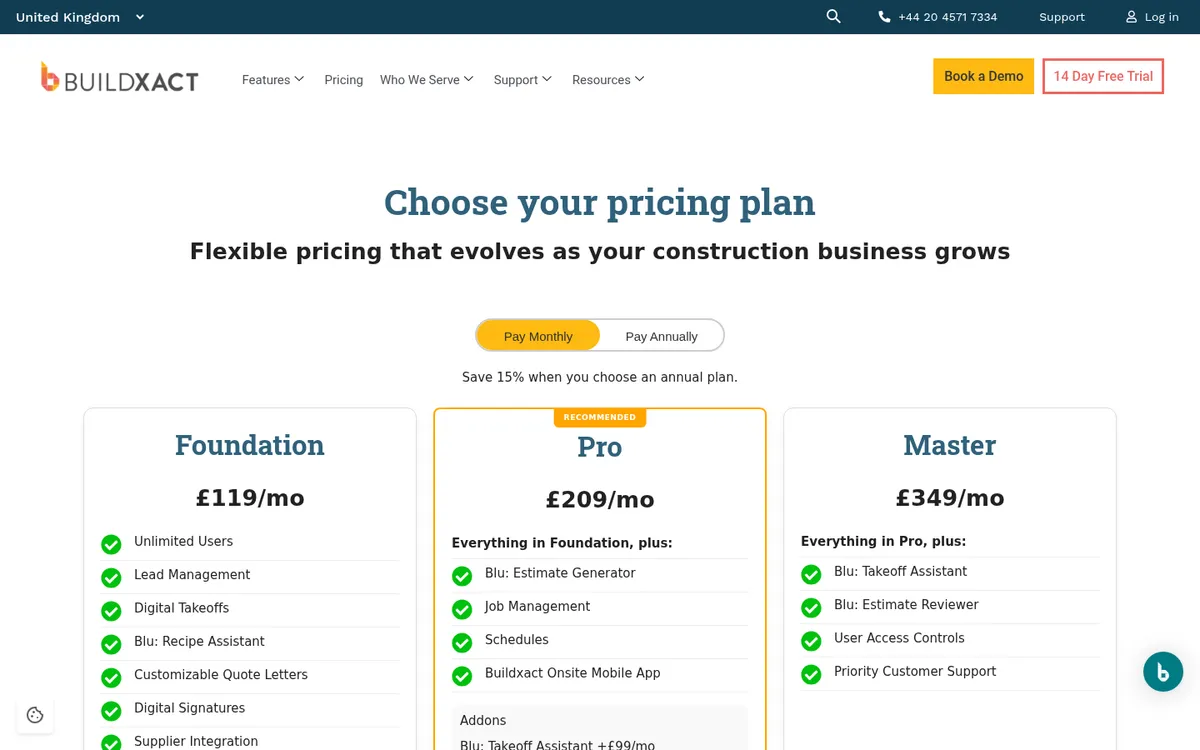
Buildxact started in Australia and sells in the UK with GBP pricing. It is strongest before the job starts: takeoff, estimating, quotes and purchase orders. Job management, schedules and the Onsite app start on the Pro plan.
It suits builders and renovators who want the estimate to become the budget without retyping it.
- Takeoff, estimating and quoting in one place.
- Unlimited users on every plan.
- Published UK prices and a 14-day free trial.
Best for: Small residential builders and renovators.
Watch out for: Its UK site does not mention CIS, JCT valuations or retention, and budget tracking is lighter than in a commercial tool.
Pricing: Foundation £119, Pro £209 and Master £349 per month, excluding VAT, on monthly billing. Annual plans are 15% cheaper.
8. LiveCosts – Best for cost tracking and purchase orders on top of your accounts
LiveCosts is a cost tracking tool from Dublin, with offices in London and Perth. It covers job costing, purchase orders, invoice management, time tracking and budgeting, and its site lists Xero, Sage and QuickBooks integrations.
It is the closest product to Planyard on this list: a cost control layer that leaves the accounting system in place.
- Purchase orders and invoice matching against the budget.
- Time tracking for labour cost.
- Works alongside the main UK accounting packages.
Best for: Contractors and trades who want to track job cost and orders against budget.
Watch out for: Prices are not published, and its site says little about valuations, retention or CIS.
Pricing: Quote only.
Planyard vs LiveCosts. See also LiveCosts alternatives.
Summary: Which Tool Fits Your Goals?
| Your need | Top recommendation |
| Live CVR and a fast rollout on Xero, QuickBooks or Sage | Planyard |
| Sorting out subcontractor applications for payment | Payapps |
| All-in-one site and office platform | Procore |
| Job costing inside Sage or Xero | Eque2 Construct |
| One configurable system for the whole business | Archdesk |
| Full corporate ERP | Access Coins Evo or 4PS |
| Residential estimating and budgets | Buildxact |
"Using Planyard gives me a lot more certainty that the figures we are looking at are accurate and reflect the true status of the budget."
Read more
See your project budgets in real time
Import your existing spreadsheet budget and start tracking commitments against it today.
 Go to site for