
Set the project budget
Import your budget from a spreadsheet or build it from an estimate in Planyard. Every cost code has a financial baseline from day one.
Xero keeps your ledger clean. Planyard gives you live cost value reconciliation across every project – then syncs only approved, fully coded costs back to Xero. No spreadsheets, no month-end data chase.
Free 14-day full-featured trial. No credit card required.

See how Planyard helps businesses like yours succeed - read their stories in our blog.
"We had to get our accountant on board and interface it with Xero, so invoices hit the right job number. Now an invoice gets uploaded in Planyard, I sign it off, and it drops into my Xero payment schedule in three or four weeks - it’s perfect."
Read more
"All of the financial data and invoices are sent automatically to Xero and emailed to my bookkeeper, who then has all the information she needs to record it correctly in our accounts. It’s sort of job done, as simple as that."
Read more
"Planyard has completely replaced my CVR process. Cost Value Reconciliation is essentially about tracking your budget against your actual spend to see exactly what remains, and that functionality is the absolute essence of the central core of Planyard."
Read more
"Xero does have a purchase order system, but it wasn't geared towards a construction business or the way we actually operate."
Read more
"Planyard's integration with Xero has streamlined our project financials, providing clear insights and saving us valuable time. It's easy to use and keeps all commitments organized for seamless financial tracking."
Read more



Main contractors, QSs, and commercial managers who run Xero for accounting but need live CVR reporting across active projects. Ideal for teams in the £5M-£50M turnover range that have outgrown spreadsheet-based month-end CVRs and want committed costs, forecasts, and margin visible in real time – with approved data flowing straight to Xero.
Your QS raises orders, approves invoices, and tracks variations every day – but without a live CVR, none of that feeds into one view of project margin. Most contractors bridge the gap with spreadsheets and spend days each month rebuilding reports that are out of date before they reach the director’s desk.
Claire Hill, QS at Brown & Bancroft: “Month-end CVRs used to take 3-4 days. Now it takes me 10-15 minutes.”
Set your budget in Planyard, track costs and commitments as your team works, and sync approved data to Xero. The CVR updates continuously - not at month-end.
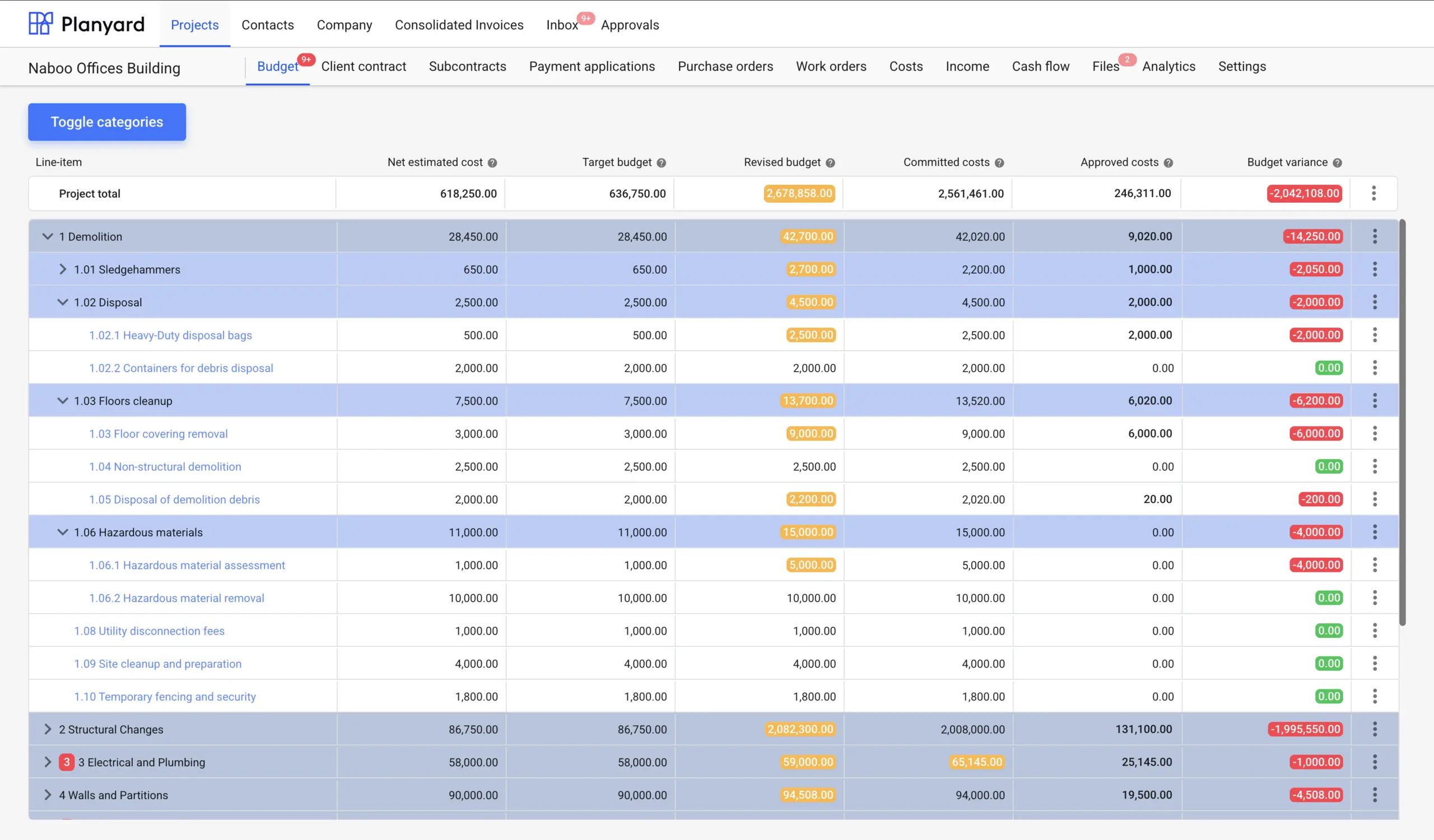
Import your budget from a spreadsheet or build it from an estimate in Planyard. Every cost code has a financial baseline from day one.
Upload an existing Excel budget or convert a Planyard estimate in one click.
Organise by trade, package, or phase to match the way you manage projects.
Link budget lines to your Chart of Accounts and tracking categories upfront.
Original budget is preserved so variance reporting stays meaningful.

Subcontract orders and purchase orders are raised against the budget. Committed costs appear in the CVR immediately – before any invoice arrives.
Every order links to the correct cost code so commitments are tracked from day one.
The CVR shows what you have ordered - not just what you have paid.
Route orders for sign-off before they commit the budget.
Scope changes are recorded against the original budget line for clear audit trail.
No credit card required. No sales or IT support needed.

Incoming invoices match to existing orders automatically. The CVR updates the moment an invoice is approved – no waiting for month-end.
Invoice matched to PO and delivery before approval - blocks duplicates and errors.
Actuals, committed, and forecast figures move as each invoice is processed.
Route by value, project, or role - site to QS to finance.
Every approval, note, and attachment is recorded against the cost.
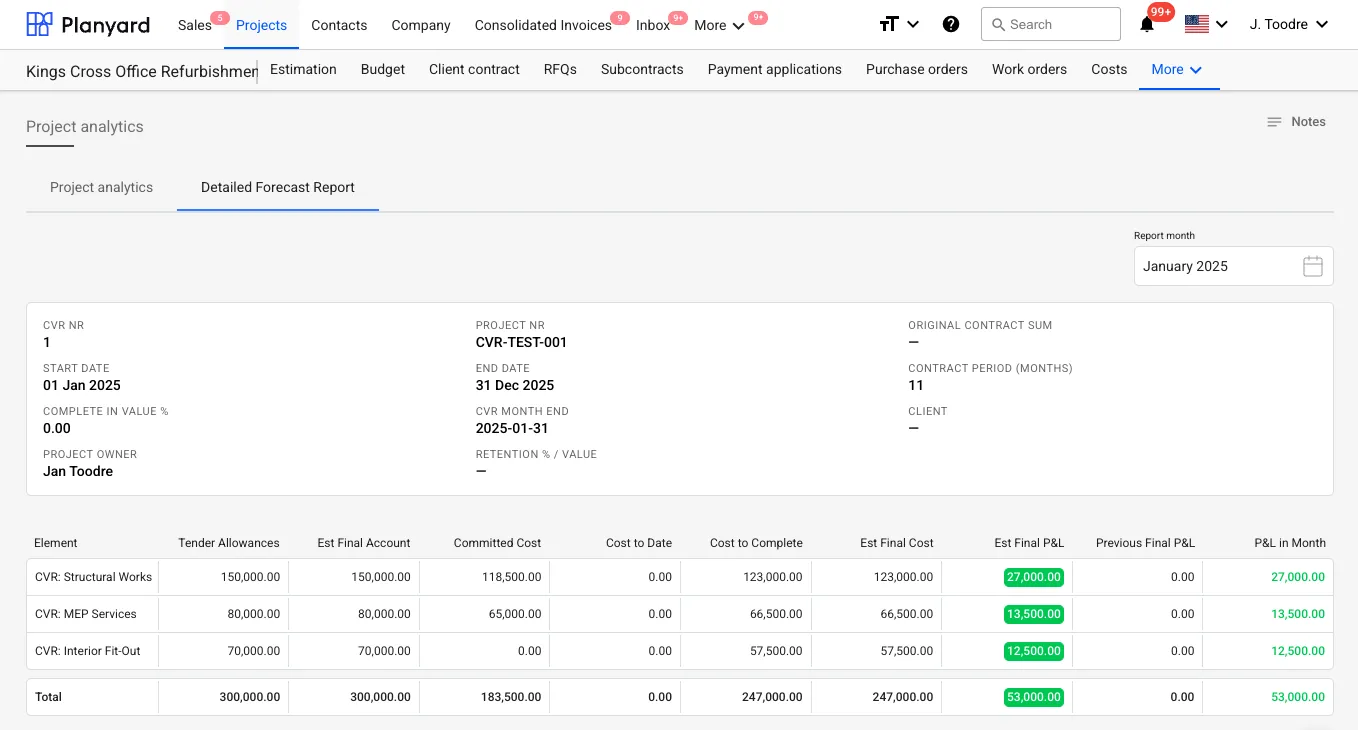
Budget vs committed vs actual by cost code. Forecast final cost and projected margin – updated continuously, not compiled manually.
See budget, committed, actual, forecast, and margin for every cost code.
Directors see all live projects and current margin on one screen.
Spot cost codes trending over budget before they become problems.
The report is always ready - month-end becomes a review, not a data chase.
No credit card required. No sales or IT support needed.

Only approved, fully coded invoices flow to Xero. Budget detail, approval history, and project context stay in Planyard.
Nothing reaches Xero until it has been reviewed and authorised.
Bills arrive in Xero mapped to the correct accounts and tracking categories.
The original invoice document travels with the bill for easy reconciliation.
Payment status in Xero feeds back so project cash flow stays accurate.
"When we used to do our month-end CVRs it could usually take 3-4 days to put them together. It now takes me 10-15 minutes to just quickly go through the jobs and check that I haven’t missed anything."
Read more
Xero tracks what you have paid. Planyard tracks what you have committed, what you expect to spend, and what your margin will be at completion.
| Capability | Xero alone | Xero + Planyard |
|---|---|---|
| Committed costs (orders raised, not yet invoiced) | Not tracked – visible only when invoice arrives |
Visible from the moment a PO is raised |
| Forecast final cost | Manual spreadsheet outside Xero |
Live forecast updated as costs are approved |
| CVR / project margin report | Built manually in Excel each month |
Always current – no month-end rebuild |
| Budget vs actual by cost code | Tracking categories only – limited depth |
Full cost code breakdown with variance |
| Director visibility | Waits for QS to compile and send report |
Live dashboard – log in and see margin per project |
| Invoice approval workflow | Basic or via add-on |
Multi-step, project-configured routes with audit trail |
| Accounting data quality | Manual entry – risk of miscoding |
Pre-coded, approved bills posted automatically |
"Planyard has completely replaced my CVR process. Cost Value Reconciliation is essentially about tracking your budget against your actual spend to see exactly what remains, and that functionality is the absolute essence of the central core of Planyard."
Read more
Posts to Xero: Approved bills with correct vendor, Chart of Accounts mapping, tracking categories, and the original PDF attached. Payment status syncs back from Xero to Planyard.
Stays in Planyard: Budget structure, committed costs, CVR reports, forecast data, approval history, variations, and all project-level context. Xero gets clean accounting data; Planyard keeps the commercial detail.

"Planyard is exactly what I’m after as a business owner: a good-value system that keeps everything in one place, saves me money and makes sure I’m not losing any money on projects. As a businessman, that’s a no-brainer."

"Planyard takes your project budget and puts it very clearly on screen, allowing you to account for all your costs, invoices, and receipts as you process them before they even reach the accounting department. This gives you a live, real-time picture of exactly where your project budget stands at any given point."

"Team members can jump into the system and immediately see exactly where a project stands without getting confused. It’s so self-explanatory and user-friendly that I don’t have to spend weeks training everyone in the company on how to use it; they can just get to work."


"If I were still relying solely on Excel to track and present the financial positions of our projects, I would be losing significant time every single month. By implementing the streamlined processes that Planyard supports, I’m saving at least three to four days of work every month that would have otherwise been spent on manual data entry and reconciliation."


"Using Planyard gives me a lot more certainty that the figures we are looking at are accurate and reflect the true status of the budget."


"It’s a fantastic visualizer; you can jump onto Planyard at any point and instantly see exactly how the job is performing straight away."

We've got your questions covered. If you can't find the answer below, then feel free to contact us via the chat.
No. Xero remains your accounting system. Planyard sits alongside it to manage budgets, orders, approvals, and CVR reporting. Only approved, fully coded costs are posted to Xero – so the ledger stays clean and the commercial team gets live project visibility.
Not without significant manual work. Xero tracks paid invoices but does not track committed costs, forecast final cost, or variance by cost code. Most contractors bridge the gap with Excel – which is why month-end CVRs take days to compile.
Most teams are running their first live project within an hour. Upload your existing budget, connect Xero, and Planyard starts tracking committed costs and building the CVR as your team works.
Planyard keeps the full commercial picture: budget, committed costs, forecast, margin, variations, and approval history. Xero receives the approved bills with correct coding, vendor details, and the original PDF – ready for payment.
Yes. Planyard keeps vendor and cost category information correct so Xero applies the right CIS deduction and reverse charge VAT rules when the bill is posted. See the CIS for contractors with Xero page for details.
Yes. The portfolio dashboard shows live margin, forecast final cost, and budget status for every active project. Directors can log in and see the numbers without waiting for a compiled report – and drill into any project for the full cost value reconciliation breakdown.
No credit card required. No sales or IT support needed.