
Build the estimate once (templates & cost library)
Create estimates faster with reusable templates and a structured cost library; reuse past projects when scopes repeat, then export a polished PDF for clients.
Stop rebuilding numbers in spreadsheets. Create accurate estimates in Planyard, convert them into live budgets and purchase orders, then post only approved bills to Xero with the correct vendor, chart of accounts, and tracking category—so reporting stays clean and consistent.
Free 14-day full-featured trial. No credit card required.

See how Planyard helps businesses like yours succeed - read their stories in our blog.
"We had to get our accountant on board and interface it with Xero, so invoices hit the right job number. Now an invoice gets uploaded in Planyard, I sign it off, and it drops into my Xero payment schedule in three or four weeks - it’s perfect."
Read more
"All of the financial data and invoices are sent automatically to Xero and emailed to my bookkeeper, who then has all the information she needs to record it correctly in our accounts. It’s sort of job done, as simple as that."
Read more
"When I have been working on cloud accounting like Xero and Quickbooks they don’t have a specific construction-based costing tool. You have project management costing tools but they are not aimed at the level of what construction companies need so I came across Planyard and I was like finally there is something that solves the problem."

"Xero does have a purchase order system, but it wasn't geared towards a construction business or the way we actually operate."
Read more
"Planyard's integration with Xero has streamlined our project financials, providing clear insights and saving us valuable time. It's easy to use and keeps all commitments organized for seamless financial tracking."
Read more



Estimators and PMs build estimates in Planyard; delivery teams call off against the agreed budget; Finance receives only approved, correctly coded bills in Xero. That means no duplicate entry, accurate tracking categories/accounts tagging, and fewer AP corrections at the end of the month.
A single flow from estimate to budget, purchasing, approvals, and posting to Xero—so numbers stay consistent from bid to final account.

Create estimates faster with reusable templates and a structured cost library; reuse past projects when scopes repeat, then export a polished PDF for clients.
Start from prefilled templates and adjust to the project—no blank-sheet estimating
Insert standard items from your library for consistent pricing
Copy a previous estimate when scopes are similar to save time
Produce professional, branded estimate PDFs in seconds
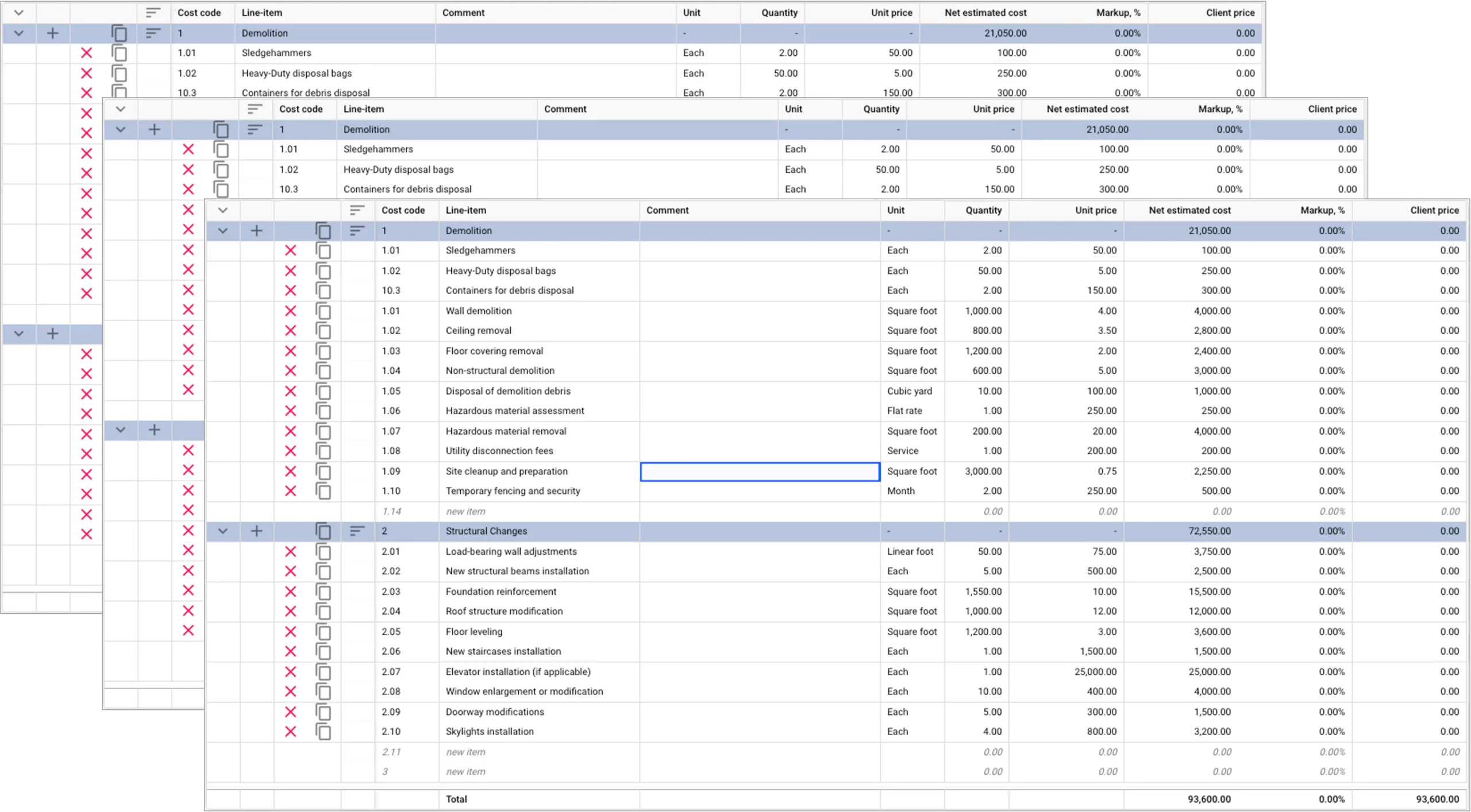
Keep estimates defensible with versions, structured categories, and automated totals—so nothing slips through during revisions.
Track revisions and who changed what throughout the estimate
Use consistent layers and headings for clearer roll-ups
Apply standard markups to maintain target margins
Let the system calculate line, group and grand totals to reduce errors
No credit card required. No sales or IT support needed.

When the price is agreed, convert the estimate into a control budget with cost codes that downstream teams actually use.
Turn estimate lines into budget lines without re-typing
Cost codes flow through to purchasing and AP
Freeze a baseline and measure changes against it
Record approved adjustments with notes for audit

Keep reporting consistent by aligning budget lines to Xero’s chart of accounts and tracking categories from day one.
Bring your accounts and tracking categories into Planyard in minutes
Map budget lines once; mappings are reused project-wide
Tag posted bills to the correct tracking category for job reporting
Block postings without required account/tracking category coding
No credit card required. No sales or IT support needed.

Planyard keeps vendor linkage and coding correct, so Xero applies all taxes correctly as required.
Use the same supplier records that Finance maintains in Xero
Bills land on the right vendor so the correct tax rates are used
Retention amounts are calculated automatically and reduce risks for errors
Invoice PDFs and PO refs travel with the bill for audit

Planyard posts a ready-to-pay bill to Xero once it passes coding, 3-way matching, and approvals—no drafts, no duplicates.
Planyard posts a ready-to-pay bill to Xero Online once it passes coding, 3-way matching, and approvals
Nothing syncs until coding, matching, and required sign-offs are complete
Each bill carries the correct supplier, account, tracking category, and tax/currency
Original documents and references go with the bill for finance/audit
Capture → Auto-link to PO → Approve → Sync
Capture: Email invoices to the project inbox or scan via mobile; key fields are extracted automatically.
Auto-link to PO: If a PO is referenced, pair with orders and deliveries; flag quantity/price variances.
Approve: Route by project or on demand (e.g., Site → QS → Finance) with thresholds; approve on web or mobile.
Sync: Approved bills post to Xero with vendor, COA, tracking category, tax/currency, and attachments.
| Capability | Xero Alone | Xero + Planyard |
|---|---|---|
| Estimating (templates, libraries) | Spreadsheets/add-ons |
Built-in templates and cost library |
| Estimate → budget conversion | Manual re-typing |
One-click conversion with codes |
| COA/tracking category tagging | Manual |
Auto-mapped from budget lines |
| Purchase orders & goods received | Basic/limited |
Full PO issuance and receipt tracking |
| 3-way matching (PO ↔ receipt ↔ invoice) | Not enforced |
Enforced with variance blocks |
| Multi-step approvals | Email/manual |
Project-configured or ad-hoc workflows |
| Invoice capture & pre-coding | Re-typing into Xero |
Email-in/OCR with default coding |
| Job variance & EAC visibility | After posting/reports |
Live variance alerts and EAC updates |
| Duplicate entry | Common |
Eliminated (approval-only sync) |
| Attachments & audit trail | Manual uploads |
Bills post with PDF and references |
| Taxes & multi-currency handling | Manual checks |
Clean, coded bills respect Xero tax/currency settings |

"Planyard is exactly what I’m after as a business owner: a good-value system that keeps everything in one place, saves me money and makes sure I’m not losing any money on projects. As a businessman, that’s a no-brainer."

"Planyard takes your project budget and puts it very clearly on screen, allowing you to account for all your costs, invoices, and receipts as you process them before they even reach the accounting department. This gives you a live, real-time picture of exactly where your project budget stands at any given point."

"Team members can jump into the system and immediately see exactly where a project stands without getting confused. It’s so self-explanatory and user-friendly that I don’t have to spend weeks training everyone in the company on how to use it; they can just get to work."


"If I were still relying solely on Excel to track and present the financial positions of our projects, I would be losing significant time every single month. By implementing the streamlined processes that Planyard supports, I’m saving at least three to four days of work every month that would have otherwise been spent on manual data entry and reconciliation."


"Using Planyard gives me a lot more certainty that the figures we are looking at are accurate and reflect the true status of the budget."


"It’s a fantastic visualizer; you can jump onto Planyard at any point and instantly see exactly how the job is performing straight away."

Start with estimating and budget conversion; add purchasing, approvals, and 3-way match as you standardise processes.
Cost estimating
Estimating and budget control
Estimating, cost control and purchase orders management
Full functionality
We've got your questions covered. If you can't find the answer below, then feel free to contact us via the chat.
Yes. Planyard integrates with Xero and posts only approved, coded bills to Accounts Payable with the correct Chart of Accounts, Tracking categories, supplier, and the invoice PDF attached.
Yes—turn estimate lines into a live control budget in one click; quantities, rates, and cost codes carry forward to POs and approvals.
No—estimates and budgets stay in Planyard for project control. Only approved supplier bills/credit notes post to Xero with accounts, tracking categorie,s and attachments.
Yes—budget/cost codes map to Xero Tracking categories (e.g., Project/Phase), so posted bills are already tagged for accurate job and phase reporting in Xero.
Yes—PO / delivery (goods received) / invoice 3-way match and project-configured approval routes are enforced before anything can post to Xero.
Xero applies VAT, CIS, and domestic reverse charge rules on posted bills; Planyard ensures correct supplier linkage and coding. Retention/holdbacks are supported in the project workflow and reflected in documents; multi-currency is handled by Xero.
Yes—map estimate items to Xero account codes and Tracking categories once; the same mapping is reused when costs are approved and posted to Xero.
No credit card required. No sales or IT support needed.