
Stop spreadsheet timesheets
Replace manual sheets and inbox chaos with a single flow that goes from the site to the budget to accounting—without duplicate entry.
Xero handles your accounting. Planyard captures the work: site hours submitted against the right project and cost code, reviewed and approved, then posted to Xero as clean, accountant-ready summaries. That means fewer AP errors and earlier visibility into job margins.
Free 14-day full-featured trial. No credit card required.

See how Planyard helps businesses like yours succeed - read their stories in our blog.
"We had to get our accountant on board and interface it with Xero, so invoices hit the right job number. Now an invoice gets uploaded in Planyard, I sign it off, and it drops into my Xero payment schedule in three or four weeks - it’s perfect."
Read more
"All of the financial data and invoices are sent automatically to Xero and emailed to my bookkeeper, who then has all the information she needs to record it correctly in our accounts. It’s sort of job done, as simple as that."
Read more
"When I have been working on cloud accounting like Xero and Quickbooks they don’t have a specific construction-based costing tool. You have project management costing tools but they are not aimed at the level of what construction companies need so I came across Planyard and I was like finally there is something that solves the problem."

"Xero does have a purchase order system, but it wasn't geared towards a construction business or the way we actually operate."
Read more
"Planyard's integration with Xero has streamlined our project financials, providing clear insights and saving us valuable time. It's easy to use and keeps all commitments organized for seamless financial tracking."
Read more



Most teams don’t struggle to "track time"; they struggle to track it to the right job, catch overruns early, and avoid re-typing the same data later. Planyard fixes that by tying timesheets directly to the budget and approvals flow.
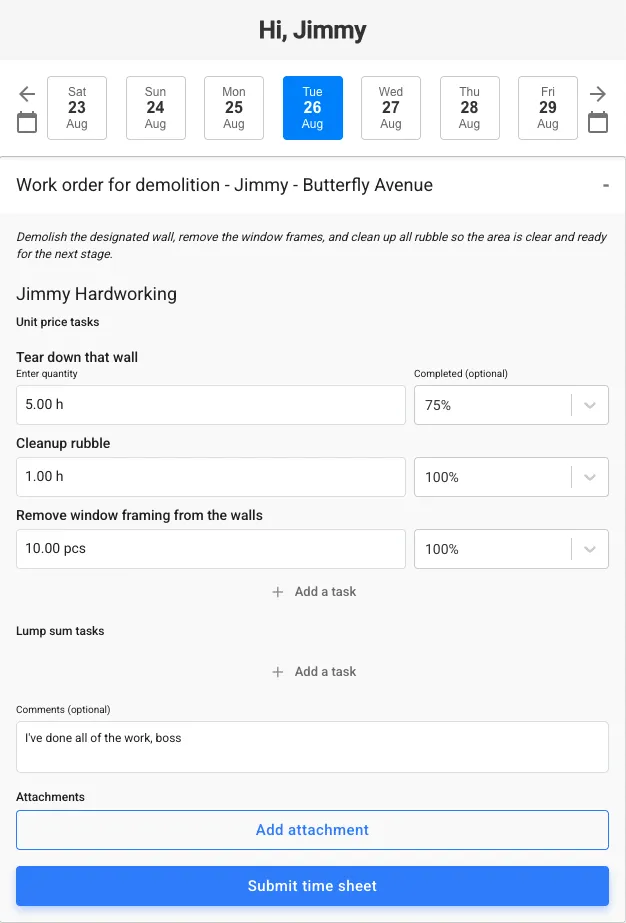
Replace manual sheets and inbox chaos with a single flow that goes from the site to the budget to accounting—without duplicate entry.
Workers receive reminders and submit hours without extra logins, so adoption actually sticks.
Hours are entered against the right task/code from day one, not fixed weeks later.
Notes and daily summaries (even photos) ride along for context and audit.
The same entry powers job costing, forecasting, and the accounting summary.
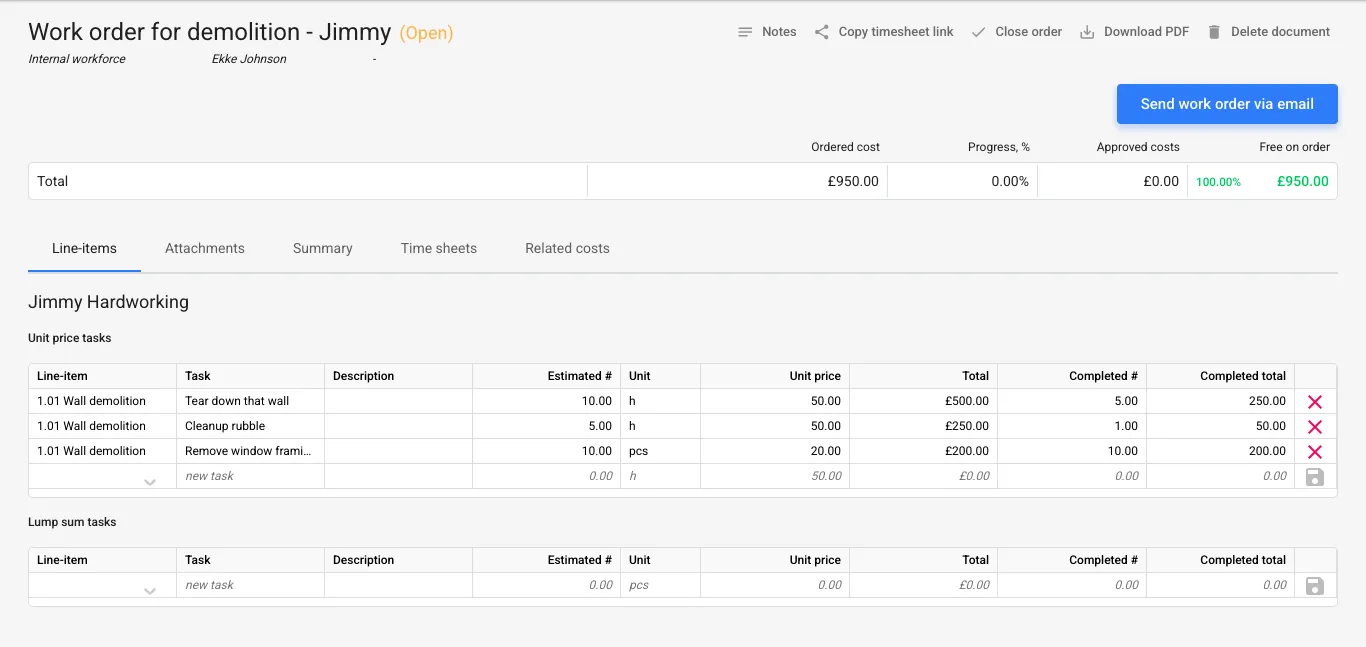
Timesheets feed the control budget instantly, so PM/QS see labour burn and variances while there’s still time to act.
See planned vs. actual labour the moment hours are submitted.
% complete and productivity history update EAC automatically.
Spot over-consumption early and re-plan before costs snowball.
Reuse real-world data to price future jobs more accurately.
No credit card required. No sales or IT support needed.
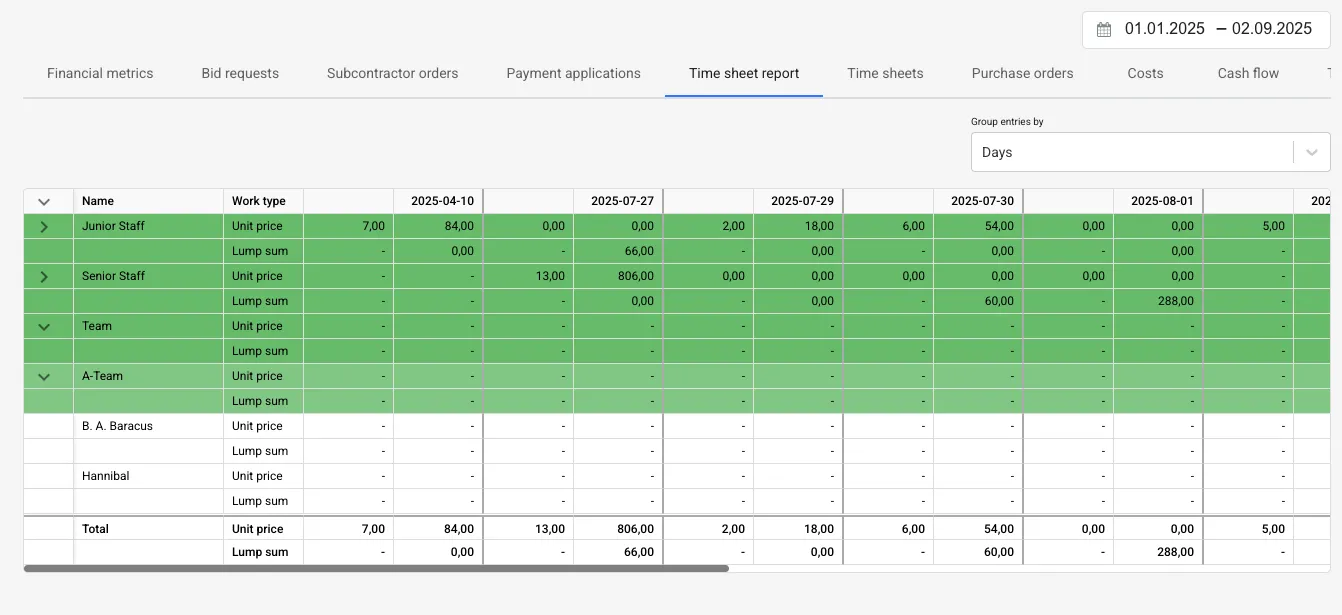
Accountants get a clean, periodic summary per project/per worker for payroll and reporting in Xero—no chasing, no re-coding.
Monthly or weekly roll-ups by project, worker, and cost code.
Only reviewed entries make it into the accounting pack.
Budgets and labour are in sync; reports align with the GL.
Finance stops fixing miscoded hours after the fact.
A simple chain everyone respects: capture → review → approve → post cleanly to Xero.
Capture: Workers get email prompts and log time by task from any device—no separate app accounts to manage.
Review: QS/PM can review submissions and apply project-specific thresholds before anything affects costs or accounting.
Approve: Approved hours hit the control budget and update committed and forecast costs in real time.
Sync: Planyard produces a clean accounting report per project/per worker/per week or month for Xero.
If you only track hours, you’ll still fix coding later and spot variances late; add Planyard to make the data job-ready from the start.
| Capability | Xero (alone) | Xero + Planyard |
|---|---|---|
| Hours tied to cost codes from day one | Manual coding later |
Enforced at entry against budget cost codes |
| Approvals matched to each project | Email/manual or external |
Project-configured routes & thresholds |
| Job-cost visibility during the job | After posting/reports |
Live variance & EAC as hours are approved |
| Accounting-ready summaries | Manual prep for payroll/job reports |
Per project/worker/period; approval-only; mapped to COA & Tracking categories |
| Evidence & audit trail | Limited detail |
Notes/photos + full approval log per entry |
| Duplicate handling / re-typing | Common when re-keying |
Single flow: site → budget → Xero (no re-typing) |
| Forecast finish cost (EAC) from labour | Not available |
Hours feed EAC to predict final labour cost |
| Control budget & cost-code integration | Not connected to project budget |
Timesheets drive the live control budget |
| Per-project / per-worker rollups | Manual spreadsheets |
Approval-only rollups aligned to accounting periods |
| Mobile / on-site capture | No coherent mobile flow |
Fast email/web capture; reminders keep entries current |
Posts: Per-project/worker summaries (weekly/monthly), mapped to COA/tracking category; approved entries only.
Stays: Detailed entries, notes/photos, approval logs, budget & forecasts (in Planyard).

"Planyard is exactly what I’m after as a business owner: a good-value system that keeps everything in one place, saves me money and makes sure I’m not losing any money on projects. As a businessman, that’s a no-brainer."

"Planyard takes your project budget and puts it very clearly on screen, allowing you to account for all your costs, invoices, and receipts as you process them before they even reach the accounting department. This gives you a live, real-time picture of exactly where your project budget stands at any given point."

"Team members can jump into the system and immediately see exactly where a project stands without getting confused. It’s so self-explanatory and user-friendly that I don’t have to spend weeks training everyone in the company on how to use it; they can just get to work."


"If I were still relying solely on Excel to track and present the financial positions of our projects, I would be losing significant time every single month. By implementing the streamlined processes that Planyard supports, I’m saving at least three to four days of work every month that would have otherwise been spent on manual data entry and reconciliation."


"Using Planyard gives me a lot more certainty that the figures we are looking at are accurate and reflect the true status of the budget."


"It’s a fantastic visualizer; you can jump onto Planyard at any point and instantly see exactly how the job is performing straight away."

We've got your questions covered. If you can't find the answer below, then feel free to contact us via the chat.
Planyard enforces cost-code accuracy and multi-step approvals, updates live variance/EAC on the project, and then sends accountant-ready summaries to Xero—so payroll and job costs stay aligned without re-typing.
Planyard doesn’t replace your accounting; Xero remains the system of record. Planyard can replace Xero’s built-in time tracking if you want tighter cost codes, approvals and forecasting; we send approved summaries to Xero for payroll and job reporting.
Workers get email prompts and enter hours against project/cost codes—no extra app accounts to manage—so adoption stays high even with small crews and subcontractors.
Yes. Set project-specific routes with optional value thresholds; only approved entries are included in the summary that’s sent to Xero.
Yes. Approved timesheets update the control budget and estimate-at-completion (EAC) in real time, so you can act before a job overruns.
Yes. Track equipment hours and consolidate rented labour; validate supplier invoices against the hours recorded in Planyard.
A clean summary per project / per worker / per period aligned to your Chart of Accounts and Tracking categories; operational detail and evidence stay in Planyard.
No credit card required. No sales or IT support needed.