
Last verified: October 2026
A builder’s phone already does half the admin: photos of the job, WhatsApp threads with subbies, a camera roll full of receipts, and a calculator for the odd pitch or volume. The right apps put that work somewhere the office can find it, so drawings, snags, hours and costs stop living in one person’s pocket.
This guide compares the construction apps UK builders actually use, grouped by the job each one does on site or in the van. Every app was checked on the UK App Store and Google Play in October 2026, prices come from each vendor’s own pricing page, and ratings are UK App Store ratings on the day we checked. It is written for UK contractors and trades, with a short note at the end for readers in the US and Australia.
Where Planyard Fits
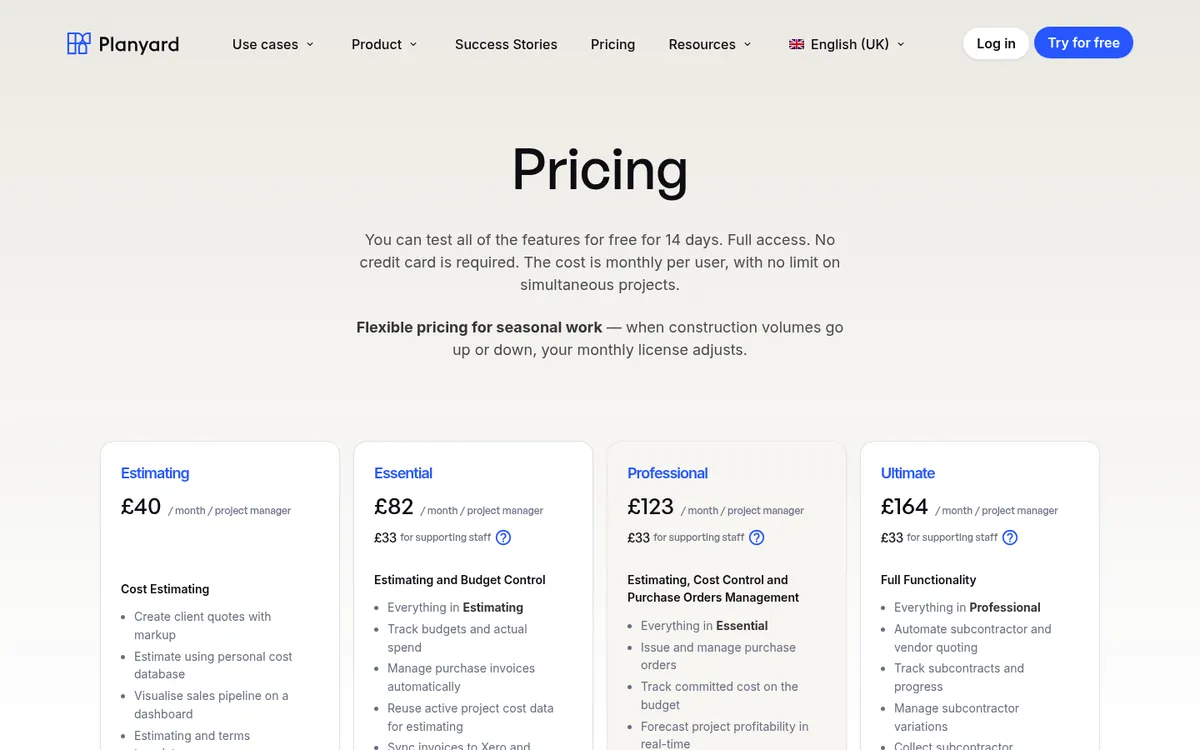
Planyard is not ranked below because it handles the office side of each job: the budget, purchase orders, subcontractor applications and supplier invoices. It runs in the browser on a phone, tablet or laptop and has no separate app to install. Crews submit timesheets from a link sent by email, SMS or WhatsApp without downloading anything or logging in, and supplier invoices reach the right job through a project email address or the Outlook and Gmail add-ins. Pair it with one of the apps below for the site side.
"Because it is online, it gives me the opportunity to use it on the site. I could be on-site with a subcontractor and we are discussing the change orders and I can just add them to the subcontract right as we are discussing them."
Read more
Construction Apps Compared
Prices are per month excluding VAT, as published in October 2026, for the cheapest paid plan. Ratings are from the UK App Store on 8 October 2026.
| App | Best for | iPhone and Android | Free plan or trial | From (per month) | App Store rating |
| Fieldwire | Drawings, tasks and snag lists | Yes | Free plan, 5 users | £33 per user, billed annually | 4.8 (894) |
| PlanRadar | Defects, inspections and handover | Yes | Free trial | £23 for 1 user; £80 per user for teams | 4.4 (261) |
| Tradify | Quotes, jobs and invoices for trade firms | Yes | 14-day trial | £34 per user | 4.8 (2,705) |
| Powered Now | UK sole traders and small trade teams | Yes | 14-day trial | £28 for 1 user | 4.1 (243) |
| Procore | Main contractors on large projects | Yes | No | Quote only | 4.6 (1,128) |
| Clockify | Simple timesheets | Yes | Free plan, 5 users | $3.99 per user (USD), billed annually | 4.5 (599) |
| Dext | Receipts and supplier invoices | Yes | Free trial | £24.17, billed annually | 4.8 (28,280) |
| Xero and QuickBooks apps | Invoicing and the bank on the go | Yes | Included in subscription | £18 (Xero), £16 (QuickBooks) | 4.8 (22,233) and 4.7 (39,081) |
How We Chose
We started from what UK builders ask for in Reddit threads and trade forums, and from the apps that appear on the UK results page for this search. Each app had to be live on both the App Store and Google Play in October 2026, built for or widely used in construction, and priced on the vendor’s own site or clearly sold on quote. We dropped apps that were iPhone only or had no update in the past year, and general tools such as Trello or Google Drive that take more setting up than they save.
Best Apps for Site Work
1. Fieldwire – Best for Drawings and Snag Lists
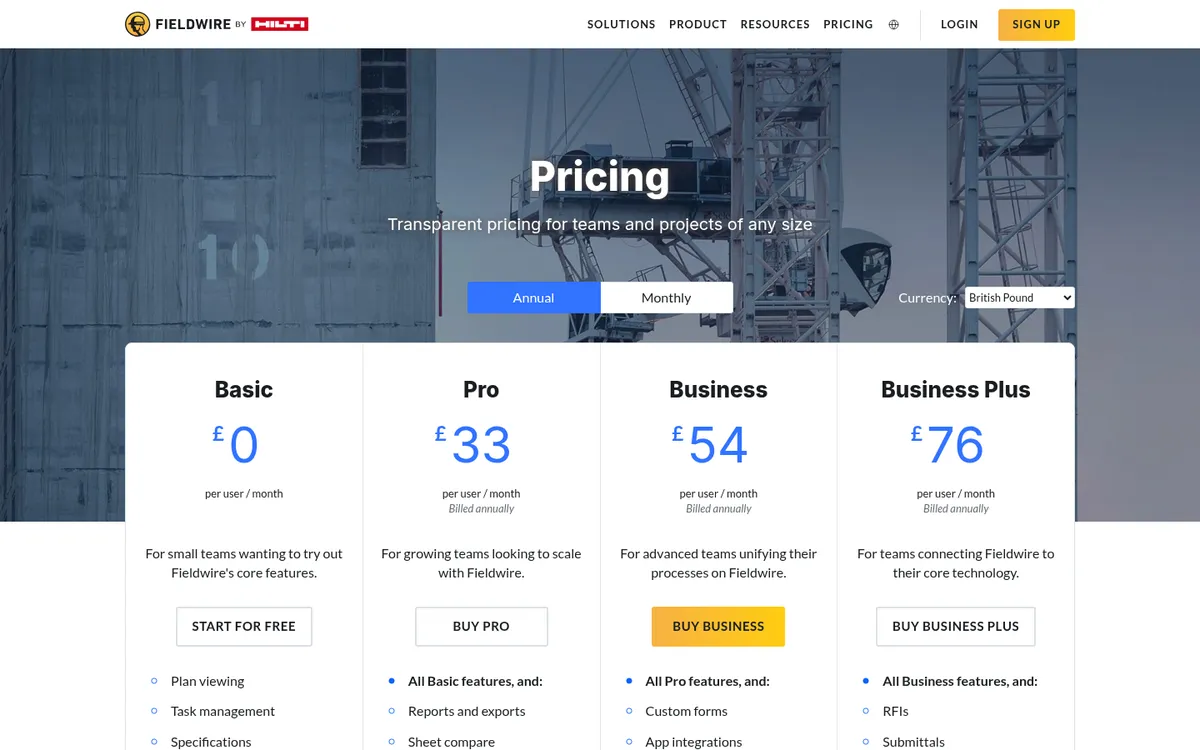
Fieldwire, owned by Hilti, puts the current drawing set on every phone on site. Its plan viewer works offline, tasks and snags are pinned to the drawing with photos, and the foreman and each trade see only what they need. Daily reports, checklists and timesheet forms sit in the same app.
The free Basic plan covers five users, three projects and 100 sheets, which is enough to run a real job before paying. Pro adds reports, exports and sheet comparison. RFIs, change orders and a budget only arrive on Business Plus. If you want to compare it with cost control software, see Fieldwire vs Planyard.
Best for: Builders and specialist contractors who want drawings, tasks and snags on every phone without a long setup.
Watch out for: Reports and exports need Pro, and the money side (budget, change orders) needs the top plan at £76 per user.
Pricing: Basic free (5 users, 3 projects). Pro £33, Business £54, Business Plus £76 per user per month, billed annually.
2. PlanRadar – Best for Defects, Inspections and Handover
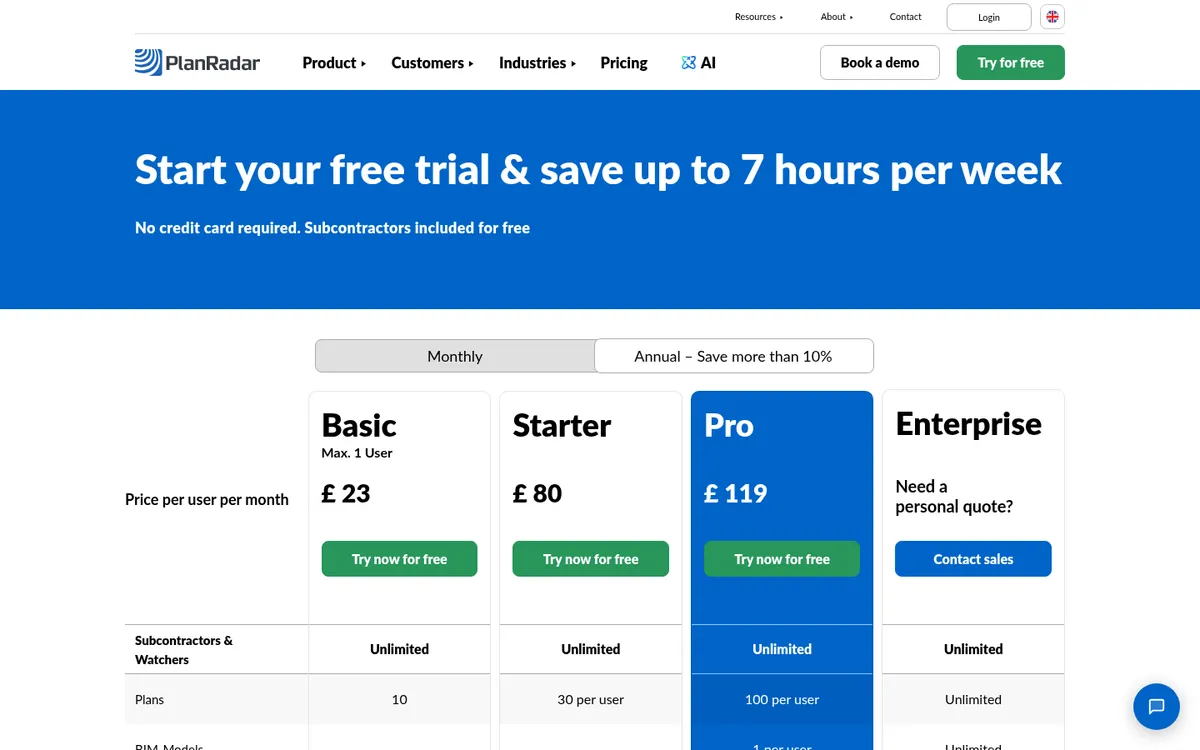
PlanRadar is built around tickets pinned to the plan: a defect, an inspection point or a site diary entry, with photos, a responsible party and a status. Reports for snagging and handover come out of the same tickets, so the final defects list is the one the site team has been working from.
Subcontractors and watchers are unlimited and free on every plan, which matters when a dozen trades need to close out their own snags. The Basic plan is limited to one user and ten plans, so it suits a site manager working alone.
Best for: Contractors and developers who live in snag lists, inspections and handover packs.
Watch out for: Per-user prices climb quickly for a team: Starter is £80 and Pro £119 per user per month. Custom report templates are on Pro only.
Pricing: Basic £23 (1 user), Starter £80 and Pro £119 per user per month. Enterprise on quote.
3. Procore – Best for Main Contractors on Large Projects

Procore covers drawings, RFIs, submittals, snags, site diaries and document control across a whole project team, with a mobile app that the site uses daily. Users are unlimited, so every subcontractor can be on the project at no extra cost.
Pricing is an annual fee per product based on your annual construction turnover. See Procore alternatives and Procore vs Planyard for the cost-control side.
Best for: Main contractors running large or multi-party projects who want one system for the whole team.
Watch out for: No published price, an annual contract, and a setup effort that only pays back at scale.
Pricing: Quote only. Annual fee by product, based on annual construction turnover. Unlimited users.
Best Apps for Running Jobs from the Van
4. Tradify – Best for Small Trade Firms

Tradify handles the run of a trade job on the phone: quote, schedule, job notes and photos, timesheets, invoice. It syncs with Xero, QuickBooks and Sage, and the Pro plan adds progress invoicing with deposits and retentions, which helps on extensions and fit-outs paid in stages.
It is aimed at businesses of one to 20 people and includes electrical and gas safety certificates, so electricians and heating engineers can finish the paperwork on site.
Best for: Trade businesses and small builders who quote and invoice lots of jobs and want the office and the van on one system.
Watch out for: Priced per user, so a team of eight on Pro costs about £296 a month. Purchase orders need the Plus plan.
Pricing: Lite £34, Pro £37, Plus £44 per user per month, month to month. 14-day free trial.
5. Powered Now – Best UK-Built App for Sole Traders

Powered Now is built in the UK for UK trades. Quotes, invoices, job sheets, a diary, expenses and supplier invoices are on every plan, and it is HMRC recognised for Making Tax Digital, so a sole trader can keep digital records without separate accounting software.
Professional adds certificates and custom forms, team tracking, unlimited users and the Xero and QuickBooks integration. Premium adds a customer portal, a receipt scanner and drawing annotations. Offline working is listed as a feature, which helps in poor signal.
Best for: Sole traders and small UK trade teams who want quoting, invoicing and MTD in one app.
Watch out for: The Xero and QuickBooks integration starts on Professional, not the entry plan, and the UK App Store rating (4.1) trails Tradify’s.
Pricing: Business £28 (1 user), Professional £32 and Premium £40 per user per month, excluding VAT. Two months free on annual billing.
"The integration works quite simply; all receipts and invoices come through me, and then I process them directly through Planyard. That’s made very easy by the app, as well as the Outlook add-in that I use for my emails."
Read more
Put site costs against the right job budget
Planyard takes supplier invoices, subcontractor applications and crew timesheets and puts each one against the right job and cost code. 14-day free trial, no credit card.
Best Apps for Hours, Receipts and Invoices
6. Clockify – Best Free Timesheet App
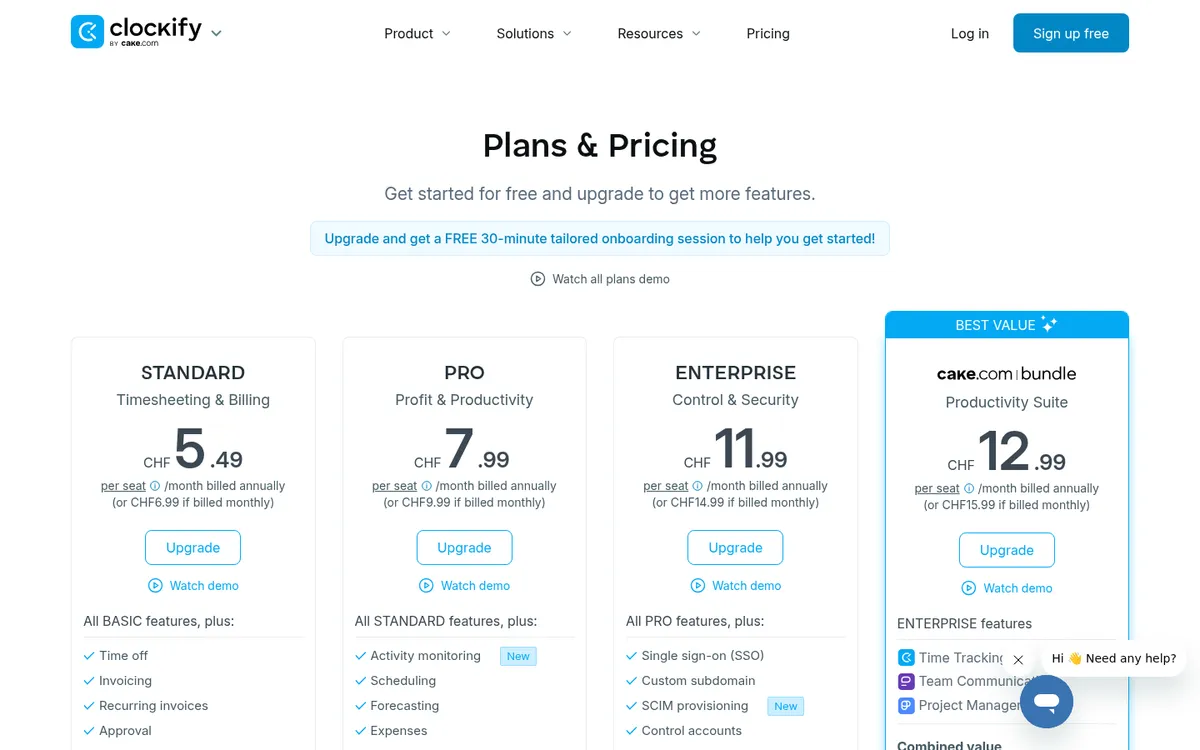
Clockify is a general time tracker, and one of the simplest ways to get hours off paper. Staff start a timer or enter hours by job and task on the phone, and the office runs reports by project.
The free plan now covers up to five users. Timesheet approval, locking past entries and a QuickBooks integration start on Standard.
Best for: Small firms that want hours by job on a phone for little or no money.
Watch out for: Not built for construction: no drawings, no cost codes tied to a budget, and prices are in US dollars.
Pricing: Free for up to 5 users. Basic $3.99, Standard $5.49, Pro $7.99, Enterprise $11.99 per user per month, billed annually.
7. Dext – Best for Receipts and Supplier Invoices
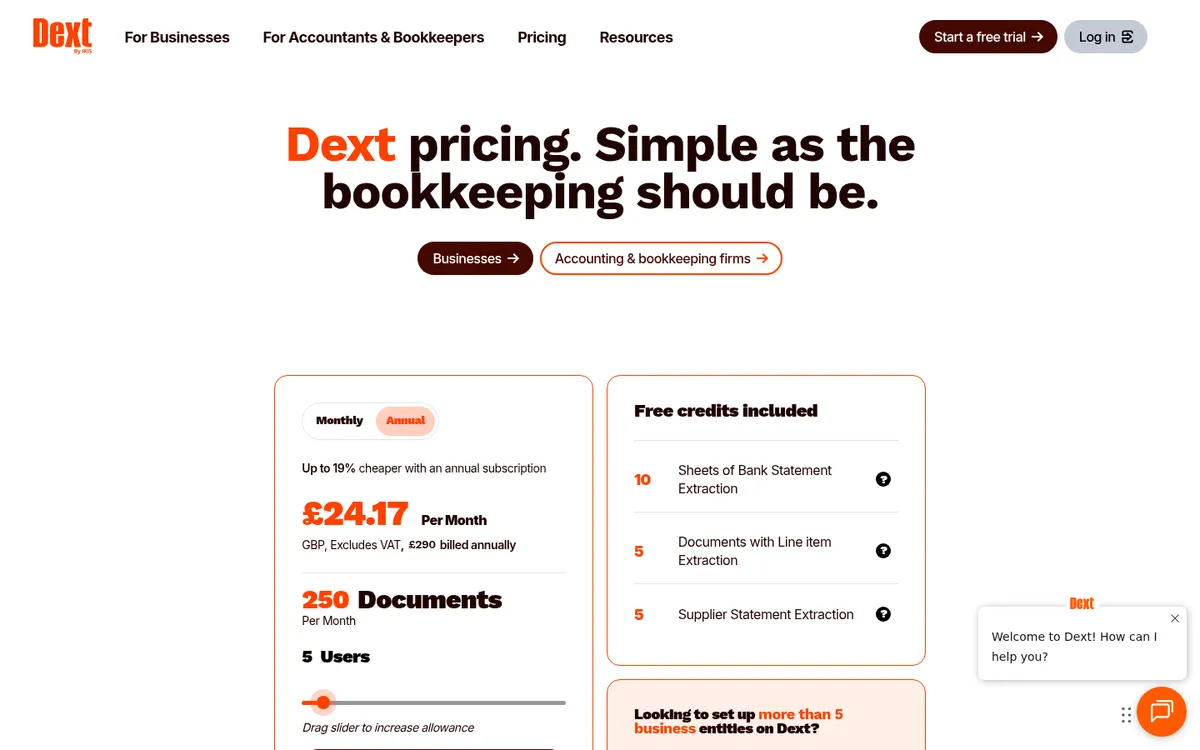
Dext reads a photo of a receipt or invoice, pulls out the supplier, date, amount and VAT, and sends it to your accounting software. Site staff photograph the fuel receipt or the merchant’s ticket at the counter and the paper can go in the bin.
It codes costs to ledger accounts, so it shows what was spent without showing which job is over budget. Dext vs Planyard and Dext alternatives for construction cover that gap.
Best for: Firms whose bookkeeper wants every receipt captured on the day it is spent.
Watch out for: The entry plan covers 250 documents a month for five users; busy contractors will need a bigger plan.
Pricing: From £24.17 per month billed annually (£290 a year) or £30 monthly, for 250 documents and 5 users.
8. Xero and QuickBooks Apps – Best for Invoicing on the Go
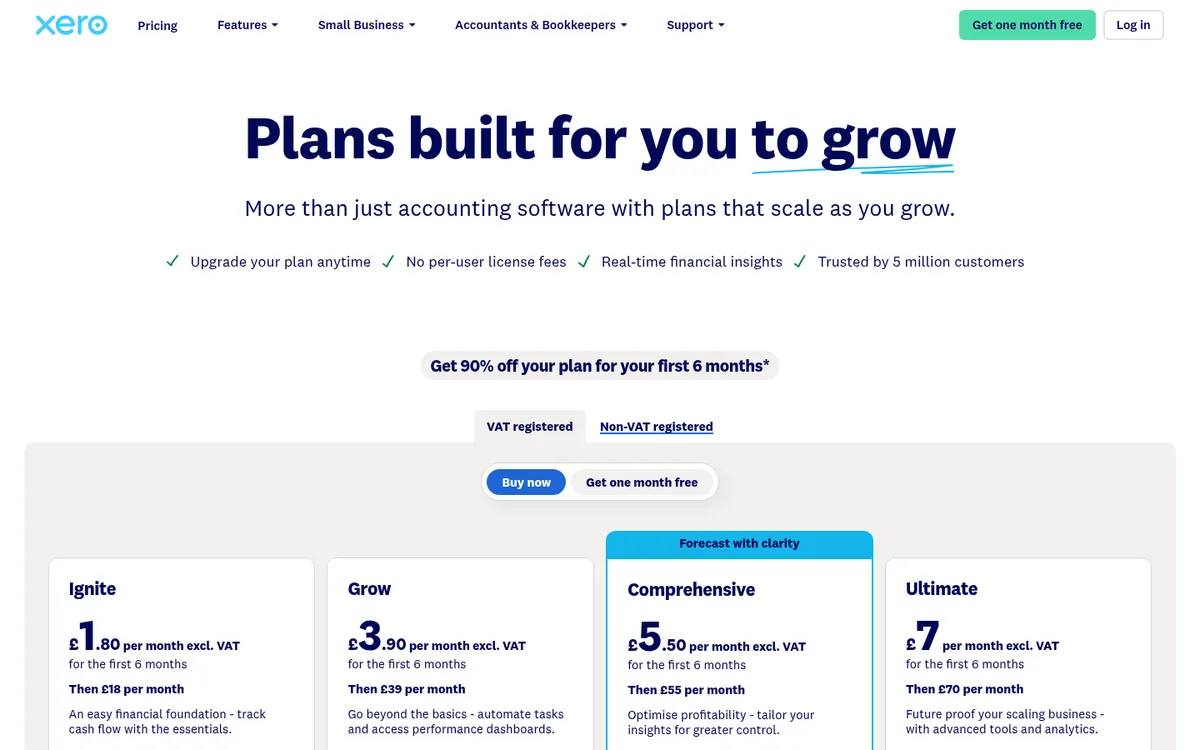
If you already pay for Xero or QuickBooks, their phone apps are free. Both let you raise quotes and invoices, check who has paid and look at the bank from site. The QuickBooks app adds mileage tracking and Self Assessment estimates for sole traders.
Neither app is a construction app: there are no drawings, snags or subcontract packages, and job costing stays basic. Best construction accounting software compares the two for UK builders, including CIS.
Best for: Builders who want to invoice and check payments from the van without another subscription.
Watch out for: Quote and invoice only; anything to do with the job itself needs another app.
Pricing: Included in the subscription. Xero from £18 (Ignite); QuickBooks from £10 (Sole Trader Plus) or £16 (Simple Start).
Cheap Extras Worth Having
- Site Audit Pro (£12.90 on the App Store, with in-app purchases): snag and inspection reports with annotated photos, shared as a finished report. Rated 4.8 from over 22,000 UK App Store ratings.
- CITB Op/Spec HS&E test (£7.29): the official revision app for the health, safety and environment test that most CSCS cards need.
- WhatsApp Business (free): you are on WhatsApp with your subbies anyway, and labels and a separate business number keep work chats apart from family ones.
How to Choose
Sole trader or two-person firm: Powered Now or Tradify for quotes and invoices, Site Audit Pro for snags, Dext if receipts are piling up.
Small builder with a site team (3 to 15 people): Fieldwire Basic or Pro on site, Tradify or the Xero or QuickBooks app for invoicing, Clockify or a timesheet tool for hours.
Main contractor with subcontract packages: Procore, Fieldwire Business Plus or PlanRadar on site. Valuations, variations and supplier invoices decide the margin on those jobs, and that is where Planyard sits.
"Timewise, on a single project, I'd probably save 6 to 8 hours—essentially a full day every month. When it comes to processing monthly payments, it saves me a solid day, perhaps even a day and a half, just in sorting through the invoices. Saving a day and a half of my time means the system pays for itself time and time again."
Read more
Construction Apps in the US and Australia
Most of the apps above work outside the UK, but prices change by country. In the US, Fieldwire costs $39, $64 and $89 per user per month on annual billing. Buildertrend, the most common app for US home builders, starts at $499 per month, with 10% off if you pay annually up front (see Buildertrend vs Planyard). Raken, popular for daily reports, costs $23 per user on Basic and $59 on Performance, billed annually with a three-user minimum.
In Australia, Buildxact is the common choice for residential builders: Foundation A$199, Pro A$399 and Master A$599 a month excluding GST, with its Onsite mobile app included from Pro. ServiceM8 has a free plan for solo tradies covering up to 30 jobs a month, and its paid plans are not priced per user.
Next Step
Pick one app for the site and one for invoicing, and run both on a real job for the length of the trial. When the photos, hours and invoices start arriving faster than the office can put them against the budget, see how Planyard handles job costing and pricing.
Keep the budget as current as the site
Supplier invoices, subcontractor applications and crew timesheets land on the right job and sync to Xero, QuickBooks or Sage. From £82 per project manager per month. 14-day free trial.