See overruns when you order, not when you’re invoiced.
Purchase orders and subcontract orders update committed costs instantly. A red warning shows the moment orders exceed a budget line.
See every job’s forecast margin while it’s still live. Planyard tracks committed costs the moment an order goes out, checks every invoice against the budget, and keeps your accounts in Xero or QuickBooks. No more finding the loss at final account.


Each line shows its budget, committed costs and actual costs. Problems show up when a material order or subcontract is signed, not when the invoices reach accounts and it is too late.
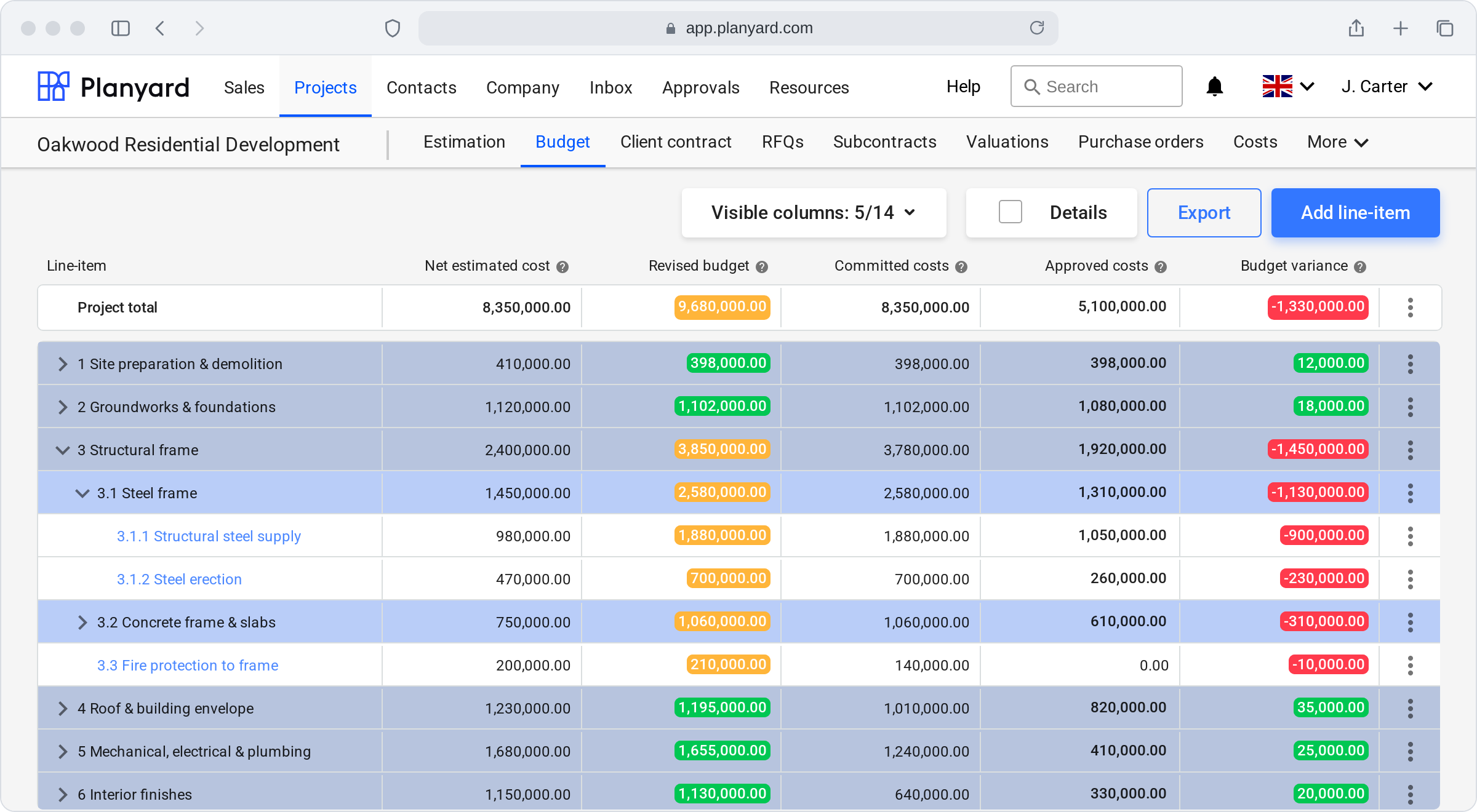
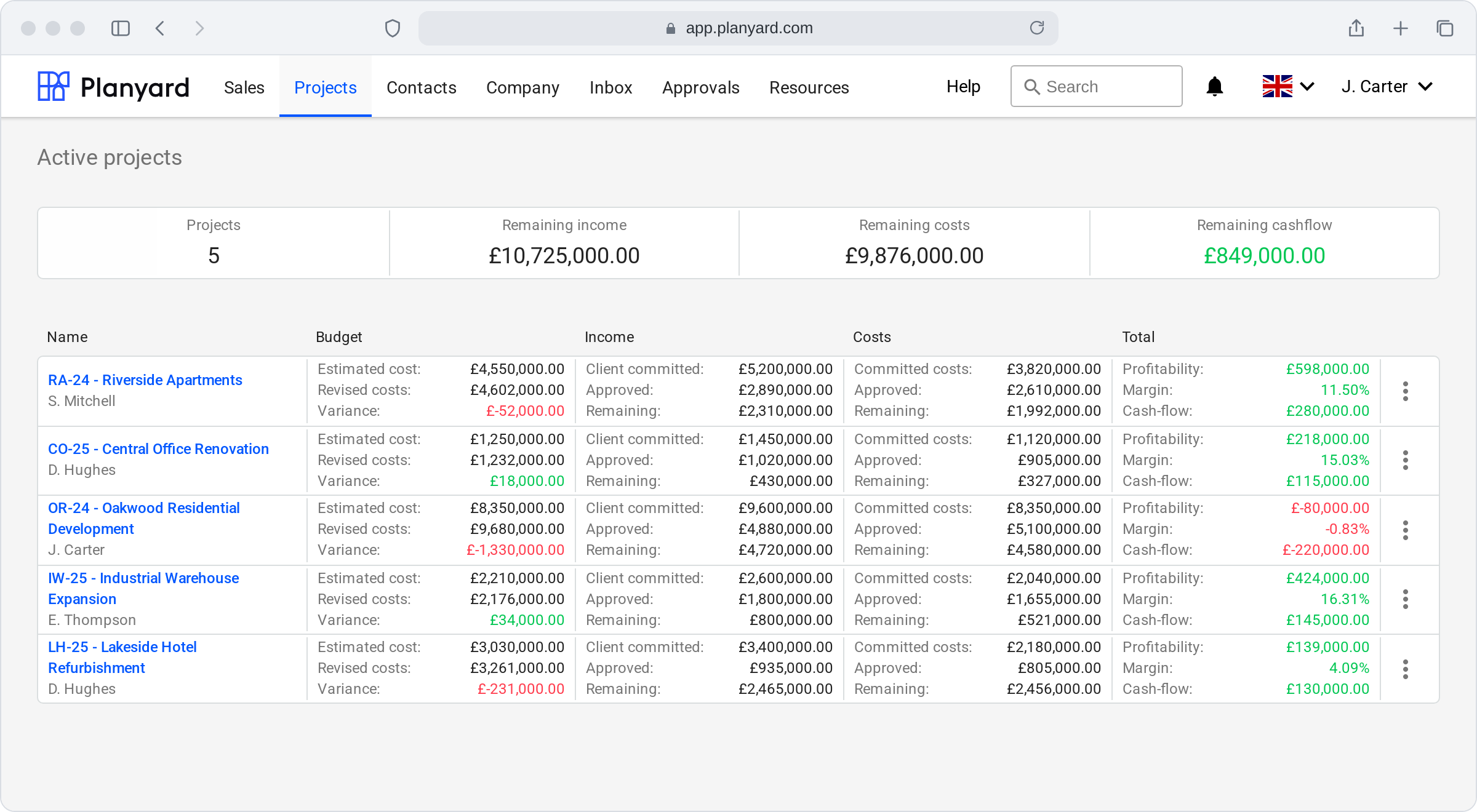
Three simple, colour-coded KPIs that everyone knows management is tracking. They keep the whole team focused on positive project cash flow and the expected profit on every job.
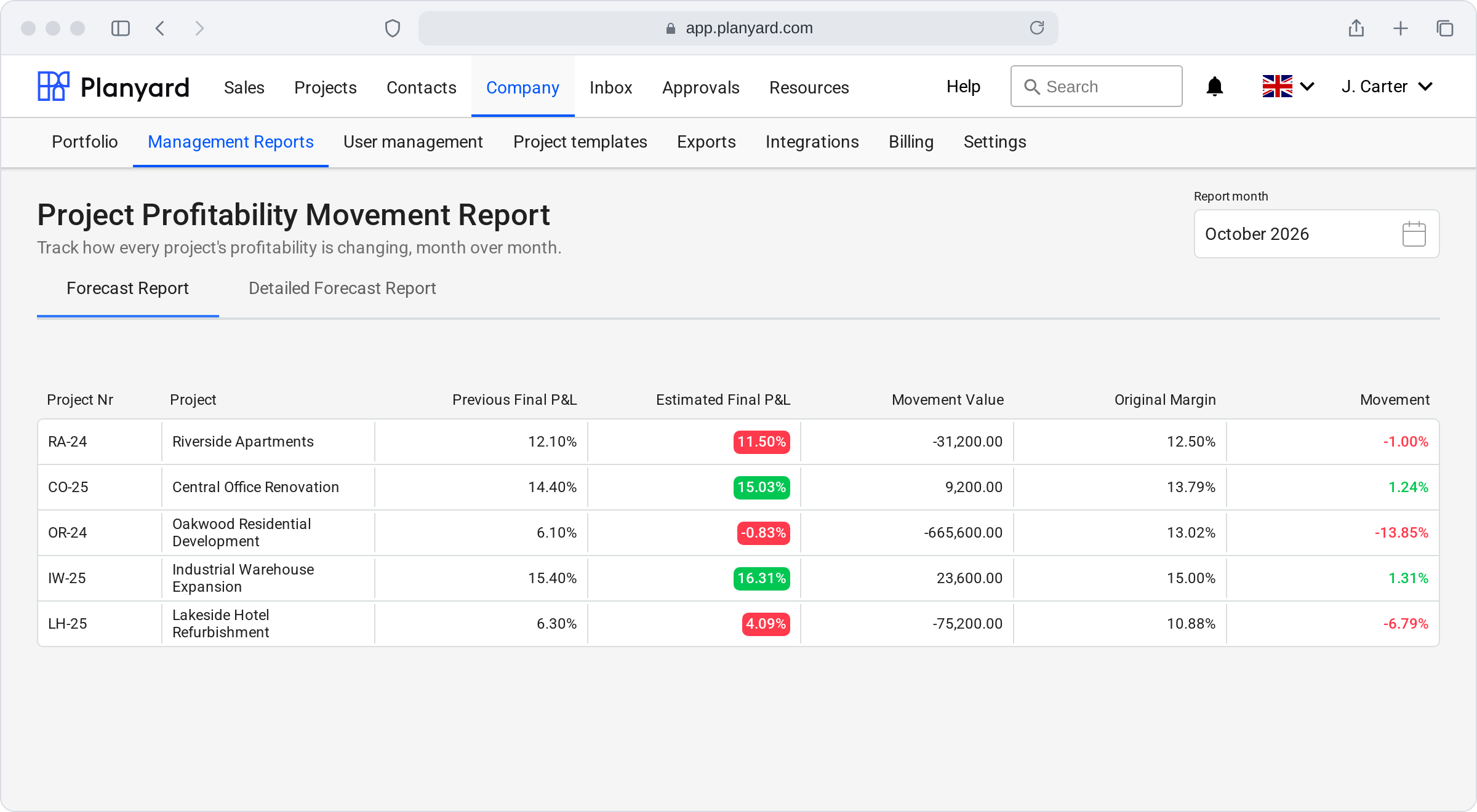
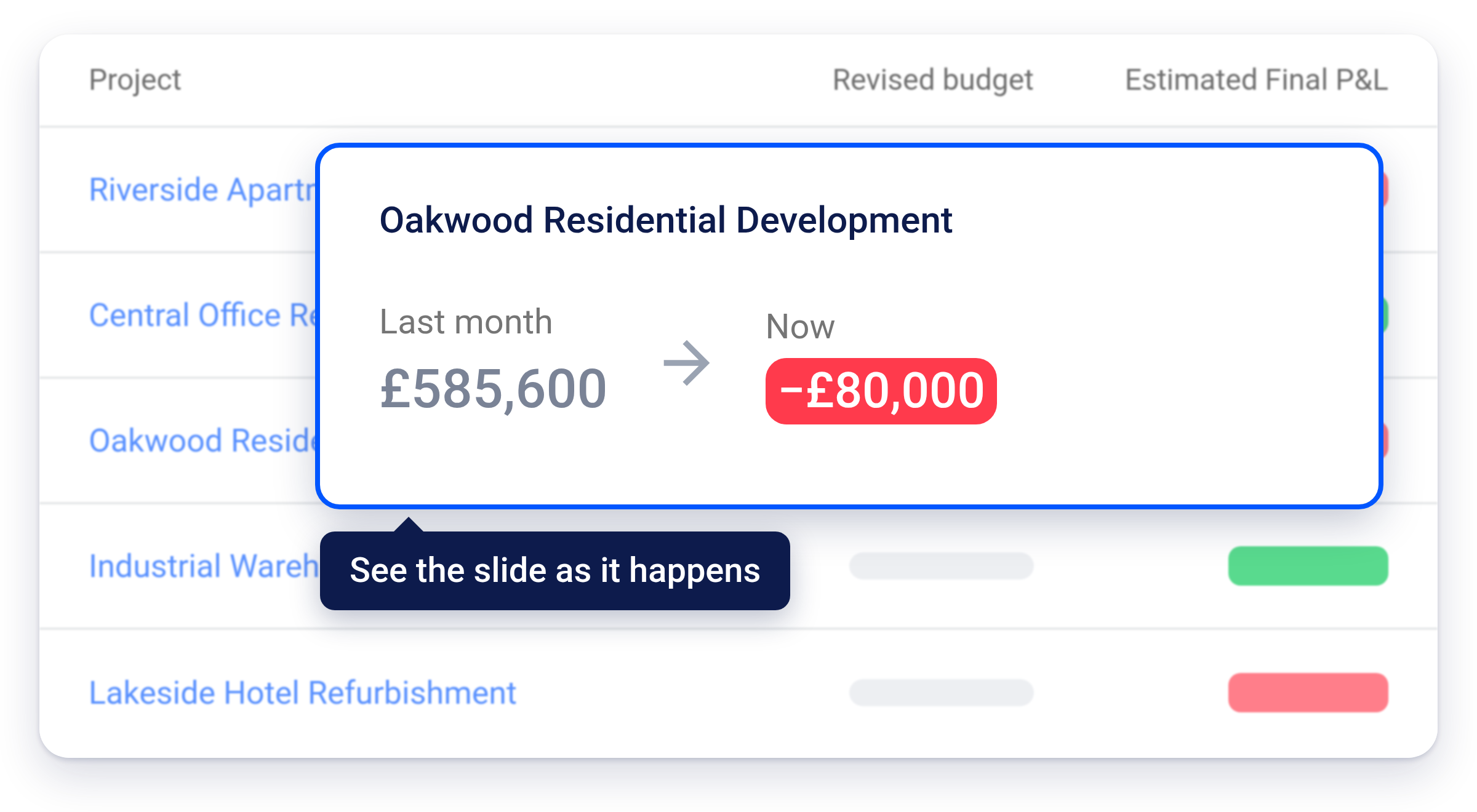
A live report for the board: last month’s forecast margin against this month’s, and how far each job has moved from the margin it was won at.
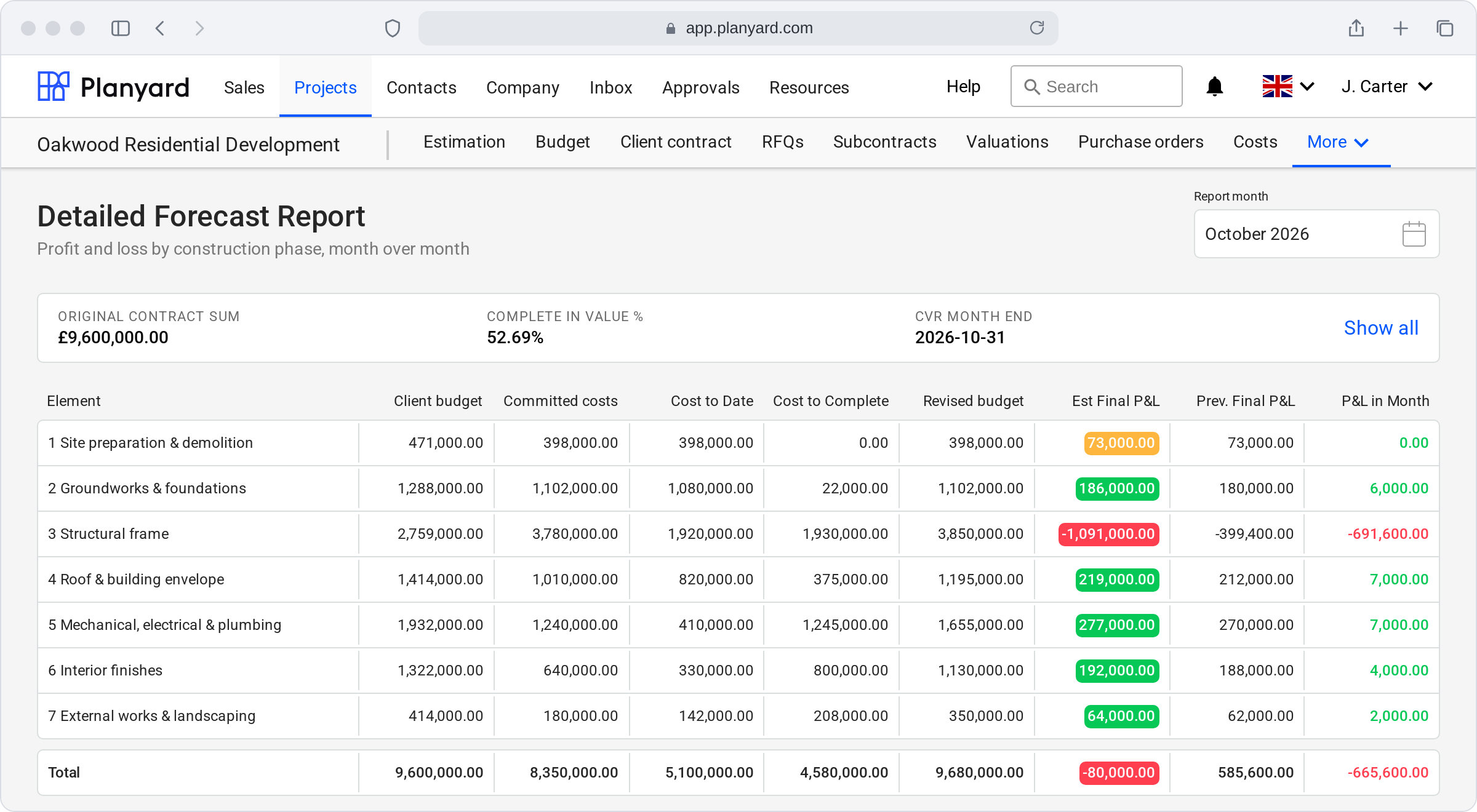
Client budget, committed costs, cost to date and cost to complete by construction phase, with the profit or loss for the month.






"You don't make profit through what you win. You make profit through holding on to what you've won. Planyard helps you do just that."
 4.8/5 · 45 reviews


Most growing contractors don’t have a sales problem. They have a control problem. The margin you tendered leaks away on live jobs, and the spreadsheet cost report only shows it weeks later.
The overrun was there for months. Nobody saw it until the job closed.
Costs only show up when the invoice arrives, after the money is committed.
Extra work nobody approved, and invoices for work that wasn’t done.
If your month-end cost report takes days, still isn’t right, and lives in five different spreadsheets, you’re not alone. That’s where Planyard starts.
One system for budgets, orders, subcontractor payment applications, invoices and forecasts, so you see the true margin on every job, live.
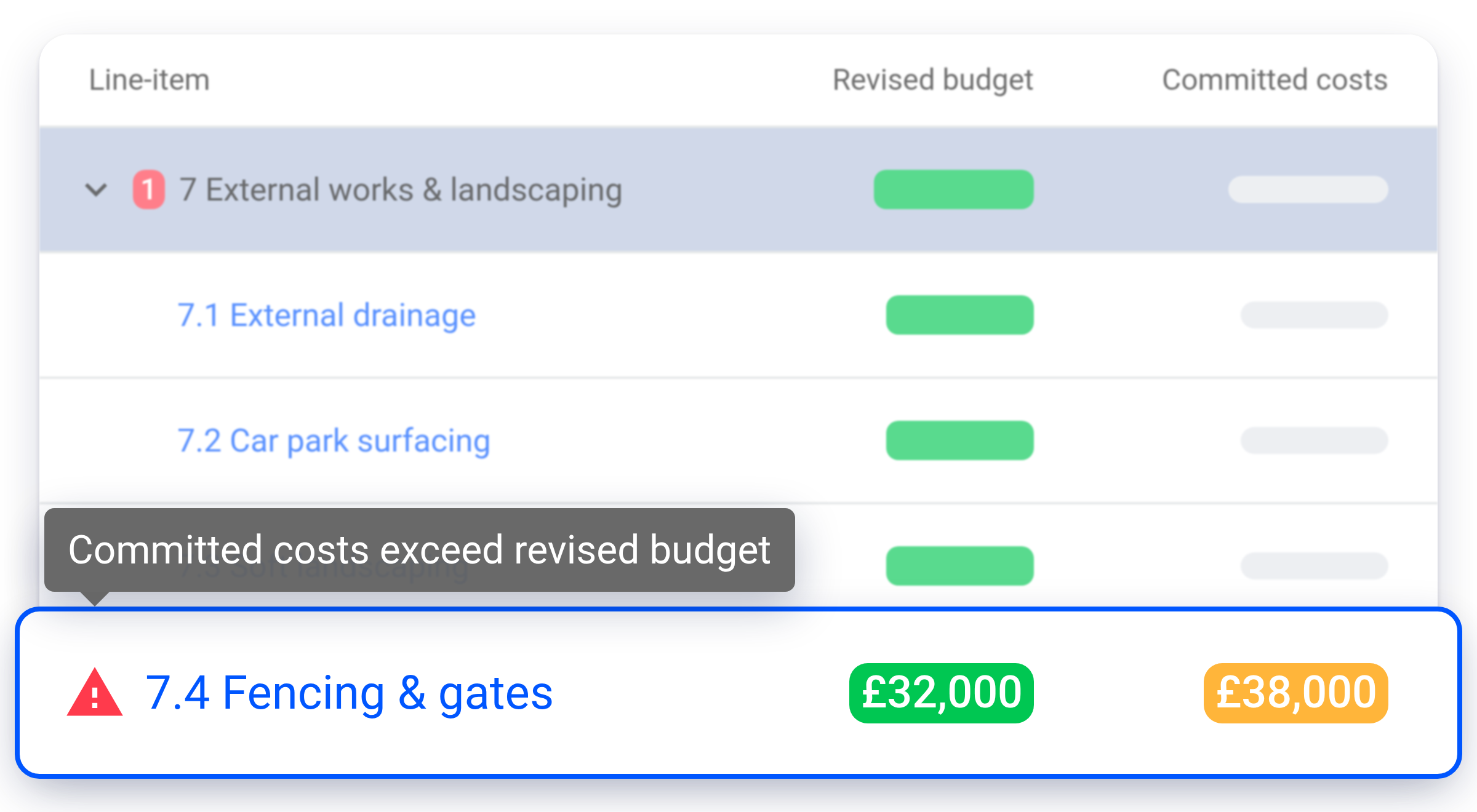
Purchase orders and subcontract orders update committed costs instantly. A red warning shows the moment orders exceed a budget line.
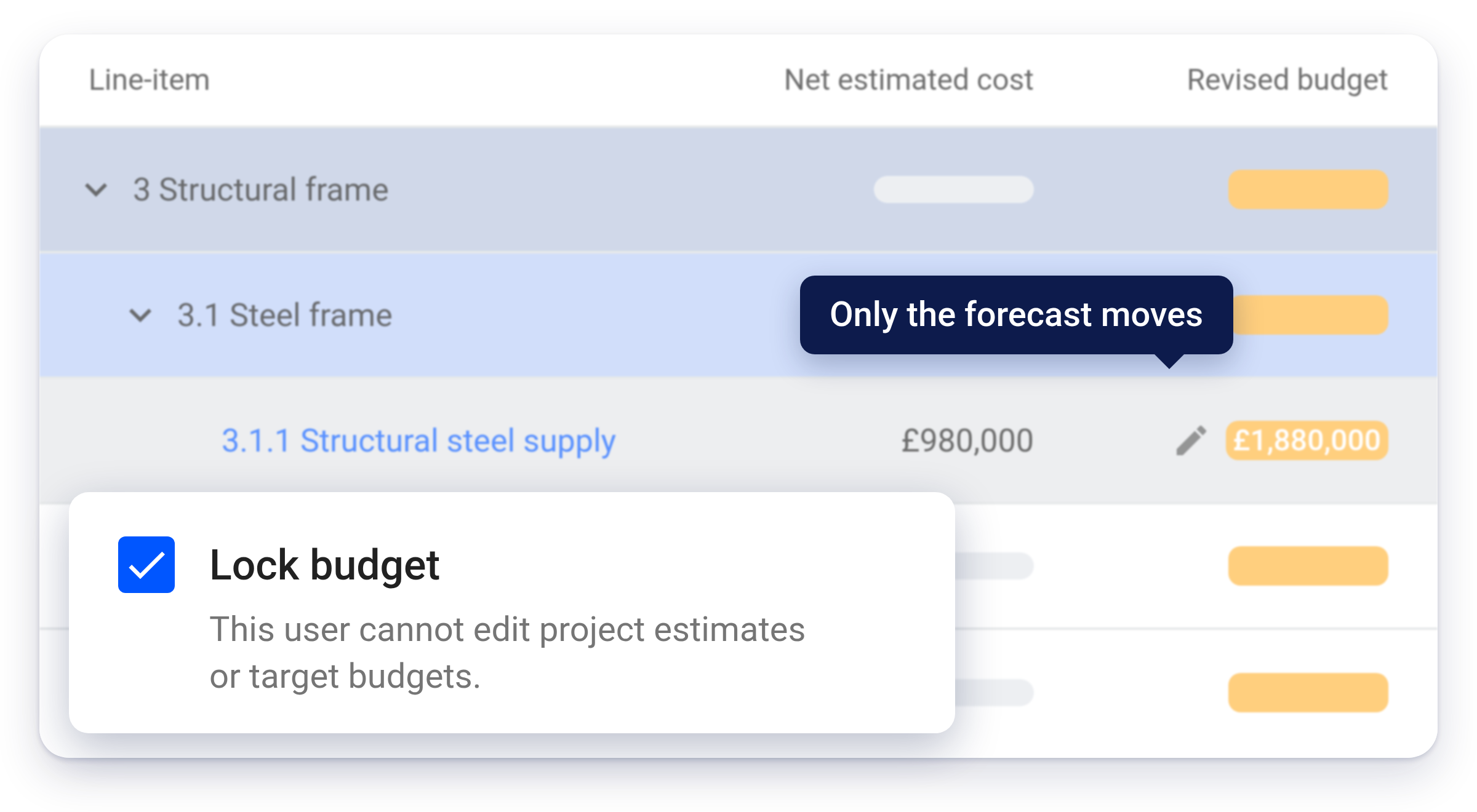
The original budget is locked. QSs update only the revised forecast, so the margin you see is the margin you’ll get.
Budget, committed, actual and forecast final cost on one screen for every job. No month-end spreadsheet panic.
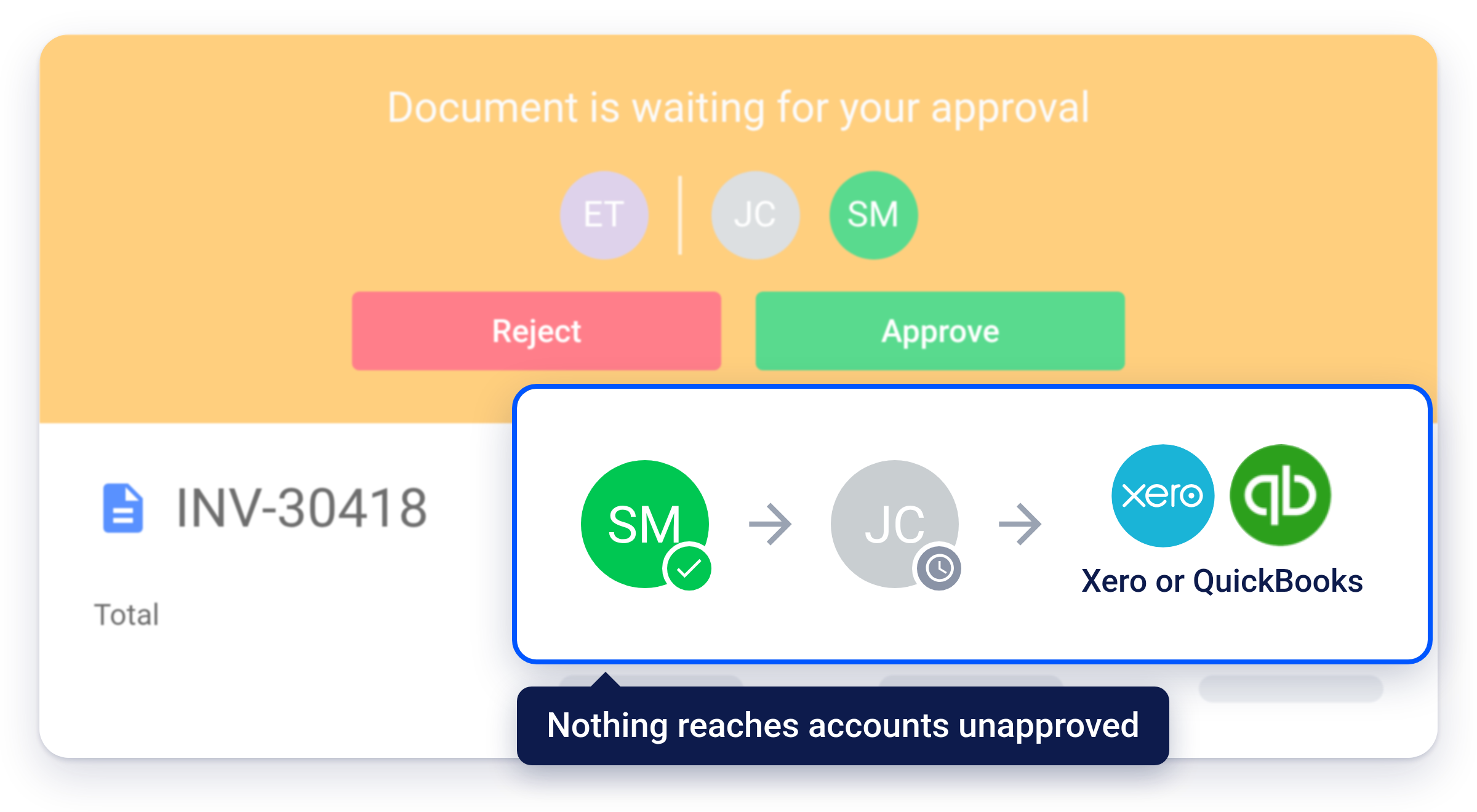
Every invoice is checked against its order and budget line and approved in steps by value before it reaches your accounts.
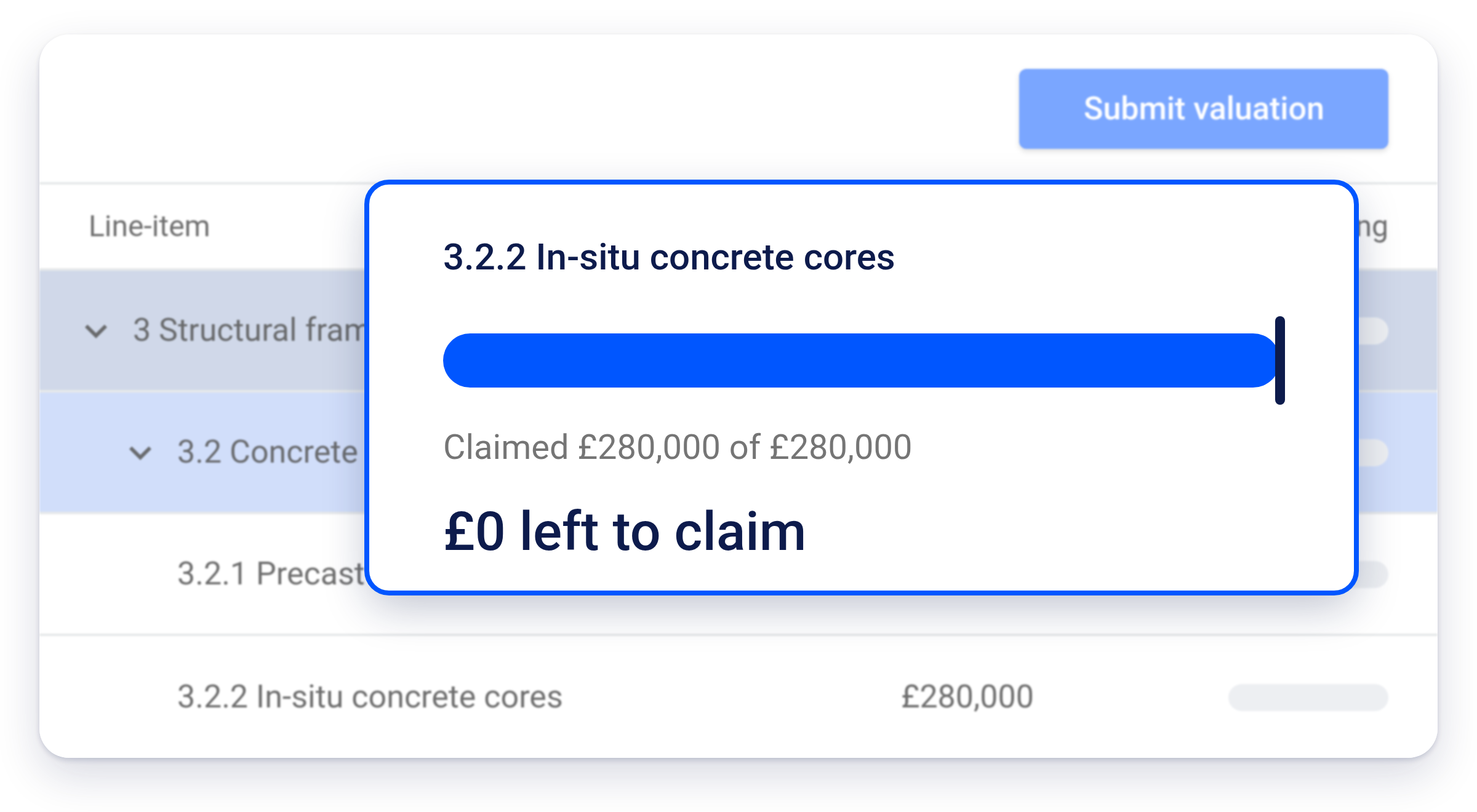
They submit payment applications through an email link, no login needed. No line can be claimed beyond its order value, and retention is calculated for you.
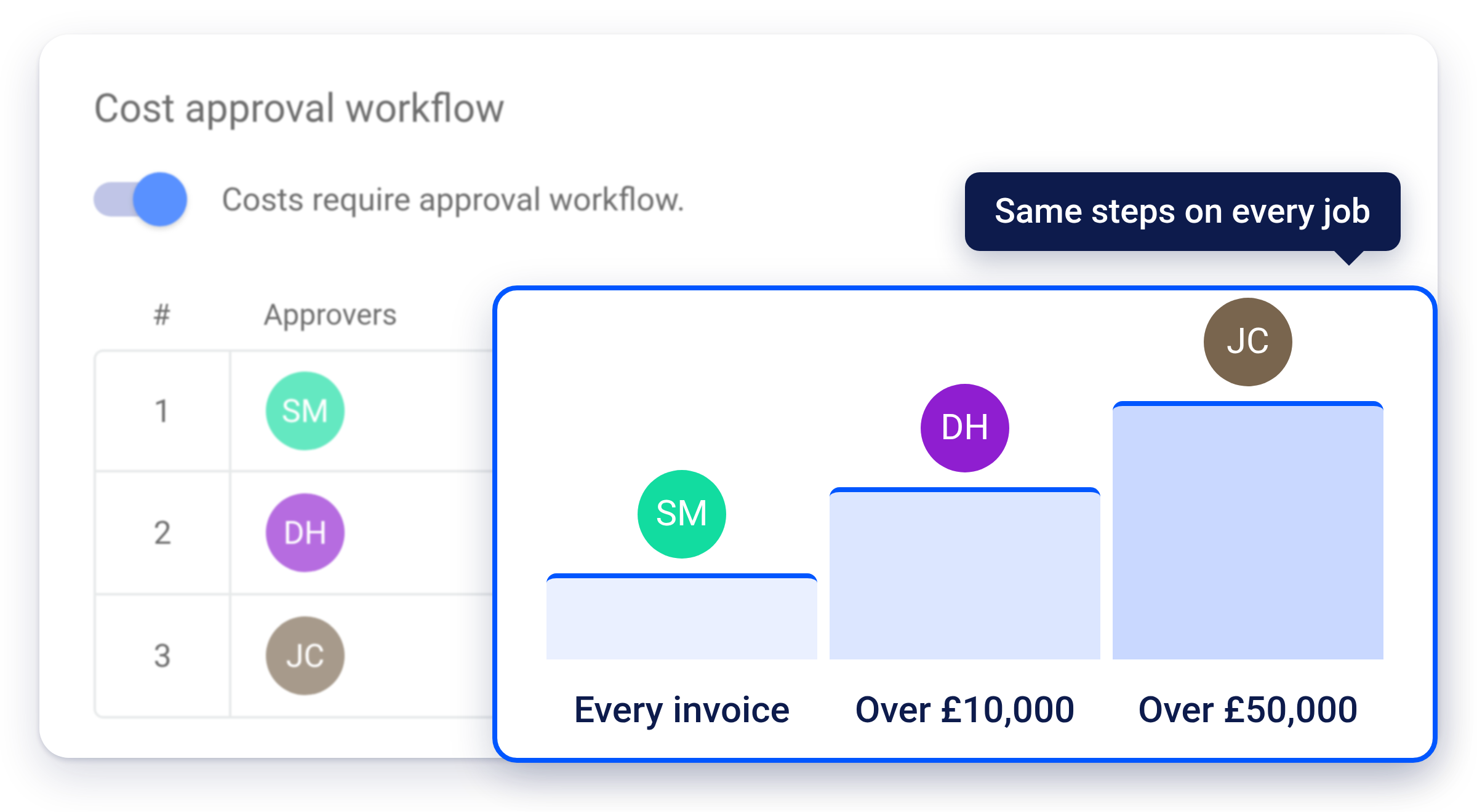
Same cost codes, roles and approval steps on every job. “Process beats skill,” says Ben Kirby of Parias.
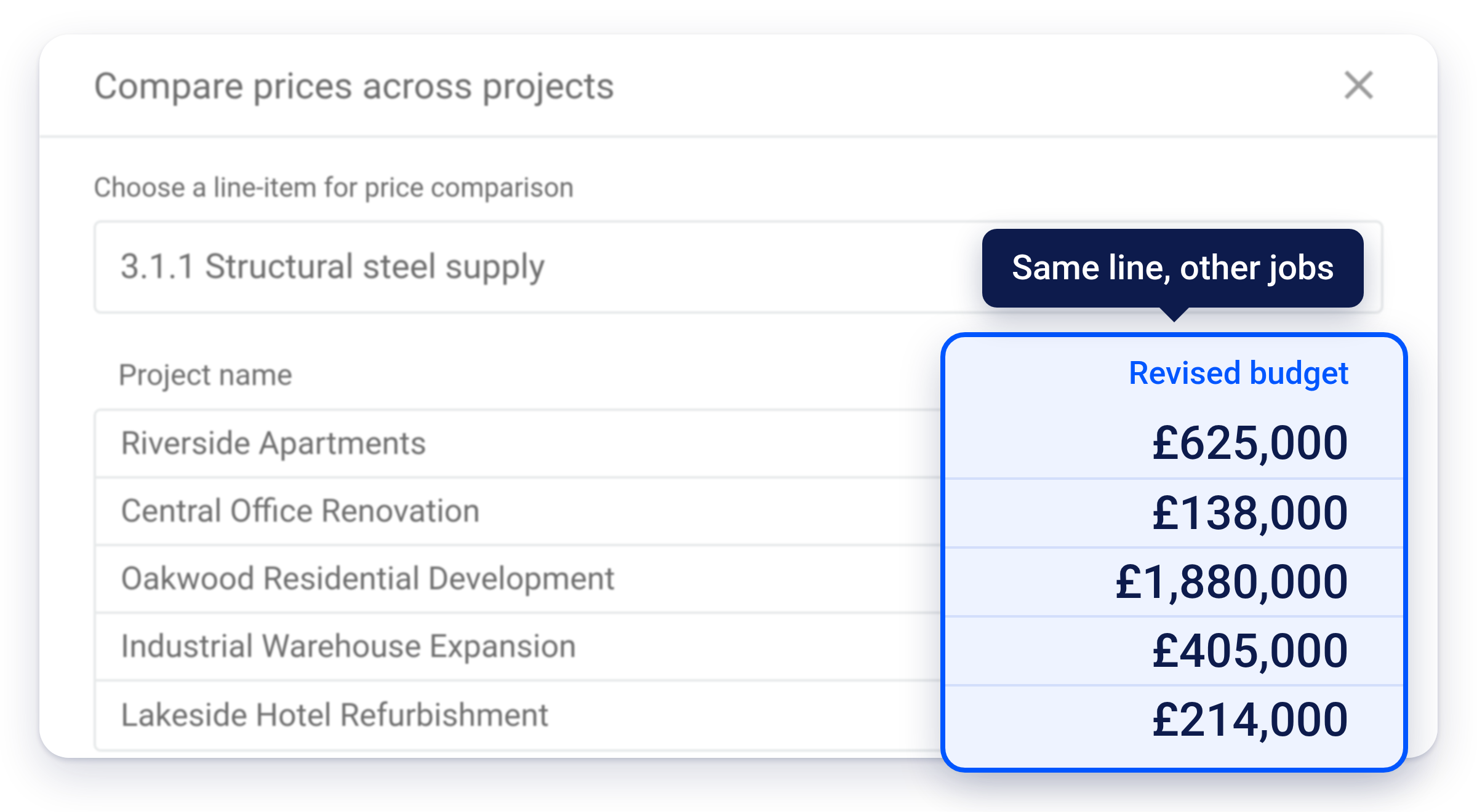
See what the same cost code cost on your other projects, straight from the budget.
Xero or QuickBooks goes back to being your accounting ledger. Budgets, orders, payment applications and forecasts are managed per job in Planyard. Only approved invoices reach your accounts, as drafts with the project reference, and CIS and VAT are handled for you.


Planyard is built for UK main contractors, specialist subcontractors and fit-out contractors, typically £5–30M turnover, running many jobs at once with heavy subcontract and material spend, and still running cost control in Excel.
Also used by house builders and developers →

Budgets, orders and invoices in one place. Forecast margin before costs overrun.
Read the case studyEnter data once, from quote to profit. Hours of admin saved every week.
Read the case studyWorks on top of Xero or QuickBooks. No ERP rollout and no training blocks.
Read the case studySee how Planyard helps businesses like yours succeed - read their stories in our blog.
"Planyard's integration with Xero has streamlined our project financials, providing clear insights and saving us valuable time. It's easy to use and keeps all commitments organized for seamless financial tracking."
Read more: Empower Renewables
"Planyard is basically a live CVR and saves time by making Excel unnecessary. Once a project’s set up, I can rely on Planyard to stay organized without spreadsheets."
Read more: Brown & Bancroft Interiors
"If there’s some problem with the budget, it just tells you what you need to fix and you’ll be fine. It really just kind of thinks a step ahead for you."
Read more: TITN Development
"Planyard saves us 3-4 days per project by simplifying financial tracking and cutting out double data entry. It’s user-friendly and lets us focus on our main tasks."
Read more: The Keane Group
"Planyard is exactly what I’m after as a business owner: a good-value system that keeps everything in one place, saves me money and makes sure I’m not losing any money on projects. As a businessman, that’s a no-brainer."
Read more: E&N Group Ltd
"I’m confident that we can manage multiple projects effectively. We’re currently running three fairly large ones, and the system makes it very clear and easy to manage all of them at once."
Read more: Karringtons Ltd
"I chose Planyard because it stood out as the most straightforward and intuitive option on the market. I really wanted a tool that would simplify our existing processes and make everything more efficient, rather than switching to a system that was far too complicated for us to use on a daily basis."
Read more: Skyler Contracting
"Planyard has completely replaced my CVR process. Cost Value Reconciliation is essentially about tracking your budget against your actual spend to see exactly what remains, and that functionality is the absolute essence of the central core of Planyard."
Read more: Higgihaus Developments
"For me Planyard is essentially the go to software for SMBs. There are other software packages out there that are a large investment upfront with a significant monthly cost. These are all potential solutions once you get to a very large business but they are not a solution for SMBs."

"Timewise, on a single project, I'd probably save 6 to 8 hours—essentially a full day every month. When it comes to processing monthly payments, it saves me a solid day, perhaps even a day and a half, just in sorting through the invoices. Saving a day and a half of my time means the system pays for itself time and time again."
Read more: DPTQS Ltd
| What it is | Construction cost control and forecasting software |
|---|---|
| Built for | UK main contractors, specialist subcontractors and fit-out contractors, typically £5–30M turnover |
| Replaces | Excel cost reports, email invoice approvals, manual subcontractor payment applications, and ERP cost modules such as COINS |
| Works with | Xero, QuickBooks, Sage, MYOB |
| Core features | Budgets, committed costs, purchase and subcontract orders, subcontractor payment applications and retention, invoice approval, live project P&L, margin and cash flow forecasting, CIS and VAT |
| Not built for | Running alongside an ERP such as COINS. Planyard replaces it, together with Xero or QuickBooks. |
| Trial | Free 14 days, full features, no credit card · Pricing → |
| Customer proof | Parias: from bare break-even to meeting the margin · G2 4.7/5 · Capterra 4.7/5 · Xero App Store 4.9/5 |
We've got your questions covered. If you can't find the answer below, then feel free to contact us via the chat.
Planyard is construction cost control and forecasting software for contractors. It sits on top of Xero or QuickBooks and shows the live budget, committed costs, actual costs and forecast margin for every job in one place.
Planyard is built for UK main contractors, specialist subcontractors and fit-out contractors, typically with £5–30M turnover, many jobs running at once and heavy subcontract and material spend. It suits teams that have outgrown Excel but don’t want a full ERP.
Planyard stops margin leaking away unseen on live jobs. It shows overruns when orders are raised rather than when invoices arrive, stops payment for work that wasn’t ordered or done, tracks variations and retention, and replaces slow, error-prone spreadsheet cost reports.
A project P&L (profit and loss) compares the value earned on a construction job with its costs to show the true profit or loss. Planyard keeps it live, from budgets, committed costs, invoices and payment applications, instead of rebuilding it in Excel every month.
Committed costs show money you’ve already promised through orders and subcontracts, before any invoice arrives. Without them, a project P&L shows overruns weeks or months late, when it’s too late to act.
Yes. Budgets, orders, payment applications and invoices all feed the live project P&L automatically, so there’s no monthly spreadsheet to rebuild. You can upload your existing Excel budget to get started.
Xero or QuickBooks stays your accounting system. Planyard manages the project side and sends approved invoices to your accounts as drafts with the project reference, so nothing is entered twice.
Yes. Most teams start by uploading one live project’s budget and are working in hours, not months. Short videos cover each task, and our team helps with set-up decisions like cost codes and approvals.
No. Subcontractors receive an email link, submit their payment application in the browser and can’t claim more than their order.
For most contractors, yes. Planyard with Xero or QuickBooks replaces COINS for cost control and forecasting, without an ERP implementation. It is not designed to run alongside COINS. Contractors who need the wider ERP modules, such as payroll or HR, may still need a full ERP. Planyard as an Access COINS alternative →
Yes, a free 14-day trial with all features and no credit card. You can also book a demo with our team.
Email info@planyard.com or book a demo from this page.
You don’t need an ERP rollout to get started. Put one live job in and see its margin while you can still do something about it.
"After half an hour with Planyard we set up our cost codes ourselves. The first job was live in a couple of hours."
Read more: Parias Construction & Interiors Ltd
Choose the cost codes, approvals and sign-off rules that fit how your company works. Our team helps with the decisions.
Run one live job through Planyard, with real orders, invoices and approvals, and see how it works day to day before you go further.
Bring every live job in. Upload budgets straight from Excel and give each job a cost owner. Short how-to videos get your team up to speed.
Bring committed cost and forecast margin on every job to your next cost control meeting, before the final invoices land.
 Go to site for