
Last verified: October 2026
A main contractor in the Midlands running eight jobs has Sage for the books, WhatsApp groups for the site teams, a folder of PDF drawings and a CVR spreadsheet the QS rebuilds at every month end. Somebody suggests “proper construction management software”, and the shortlist ends up with an ERP, two site apps and a trades invoicing app on it.
Those products do two different jobs. Running the job means drawings, snagging, site reports, scheduling and quotes. Controlling the money means budgets, orders, subcontracts, valuations and CVRs, either on top of Xero, Sage or QuickBooks or inside a construction ERP. When someone asked r/ConstructionUK what software UK construction firms actually use, one reply was blunt: “Honestly the real answer is Excel.” This guide splits nine tools along that line, with GBP prices checked on each vendor’s site in October 2026, so you can go straight to the half that matches your problem.
How We Chose
We started from what UK contractors search for and what currently ranks, then checked every tool on its own website: plan names, published GBP prices, the accounting packages it connects to, and whether it handles CIS, valuations and retention. Where a vendor does not publish a price, we say so. Prices are per month in GBP, excluding VAT, as published by each vendor in October 2026. Planyard is our product. We rank it only in the cost control half of the list, where it fits, and say what it does not do.
What to Look For
Start with the problem that costs you most
If quotes eat your evenings, you need estimating. If the site team loses paperwork and snags drag on, you need a site platform. If jobs finish and you only learn the margin when the accountant closes the year, you need cost control. The tools that try to do all three are usually priced for companies with a systems person on staff.
Sage, Xero or QuickBooks, and what flows between them
Most UK contractors already run Sage, Xero or QuickBooks for VAT, CIS and payroll. Check which one the tool connects to, which way data moves, and what lands in the ledger: approved supplier invoices coded to the job, sales invoices, or only contacts. An ERP such as Access Coins Evo replaces the accounts package altogether, which is a bigger decision than buying an app. Our construction accounting software guide covers that layer.
Valuations, CIS, variations and retention
Commercial work in the UK runs on monthly valuations or applications for payment under JCT or NEC contracts, variations, retention and CIS deductions on subcontractor payments. Look for applications that pull from the contract and approved variations, retention tracked per contract until it is released, and a clear split between what the construction tool does and what your accounts package does for CIS. Contractors who pay subcontractors need the same in reverse: collecting and assessing their applications.
Price model
Some tools charge per business (Buildxact), some per user (Fieldwire, PlanRadar, Powered Now, Planyard) and some by quote on annual contracts (Procore, Archdesk, Access, Eque2). Count who actually needs a seat. A site manager who only uploads photos is cheap on some models and expensive on others.
Best Construction Management Software for Running the Job
These tools run the work itself: quotes, scheduling, drawings, snagging and site records. They are ranked best first for a UK contractor.
| Software | Best for | Starting price | Accounting | CIS, valuations and retention | Verdict |
| Procore | Large main contractors | Quote only, annual fee based on turnover | Xero; Sage Intacct connector | Budgets, commitments and changes; CIS stays in your accounts | Most complete platform, priced for big projects |
| Buildxact | Residential builders and renovators | £119 a month, unlimited users (£89 billed annually) | Xero, QuickBooks, MYOB | Client invoicing; no CIS | Estimating-led, for builders who quote a lot |
| PlanRadar | Snagging, defects and site reports | £23 a month for one user; Starter £80 per user | None listed | None | Strong for snagging and handover records |
| Fieldwire | Field teams, drawings and tasks | Free for 5 users; £33 per user billed annually | None listed | Change orders and budget on Business Plus | Best free start for site coordination |
| Powered Now | Small builders and trades | £28 a month for one user | Xero, QuickBooks (Professional) | Quotes, invoices, part payments; VAT returns | Simple job and invoice app for trades |
1. Procore – Best for Large Main Contractors

Procore has a UK site with a UK phone line and support. It covers drawings, RFIs, submittals, quality and safety, and project financials: budgets, commitments, change events and cost forecasts. Every plan includes unlimited users, so subcontractors, consultants and clients can work in it at no extra cost.
Procore connects to Xero and has a connector for Sage Intacct, but CIS, VAT and payroll stay in your accounts. For a tier 1 or tier 2 contractor that is normal. For a business turning over a few million a year, the annual contract and implementation are usually more than it needs. See Procore vs Planyard and Procore alternatives.
Best for: Main contractors running large projects with many parties who all need drawings, RFIs and documents in one place.
Watch out for: Annual contracts, quote-only pricing and a real implementation project. It is overkill for a small builder.
Pricing: Quote only. Procore charges an upfront annual fee per product based on your annual construction turnover, with unlimited users and support.
2. Buildxact – Best for Residential Builders and Renovators
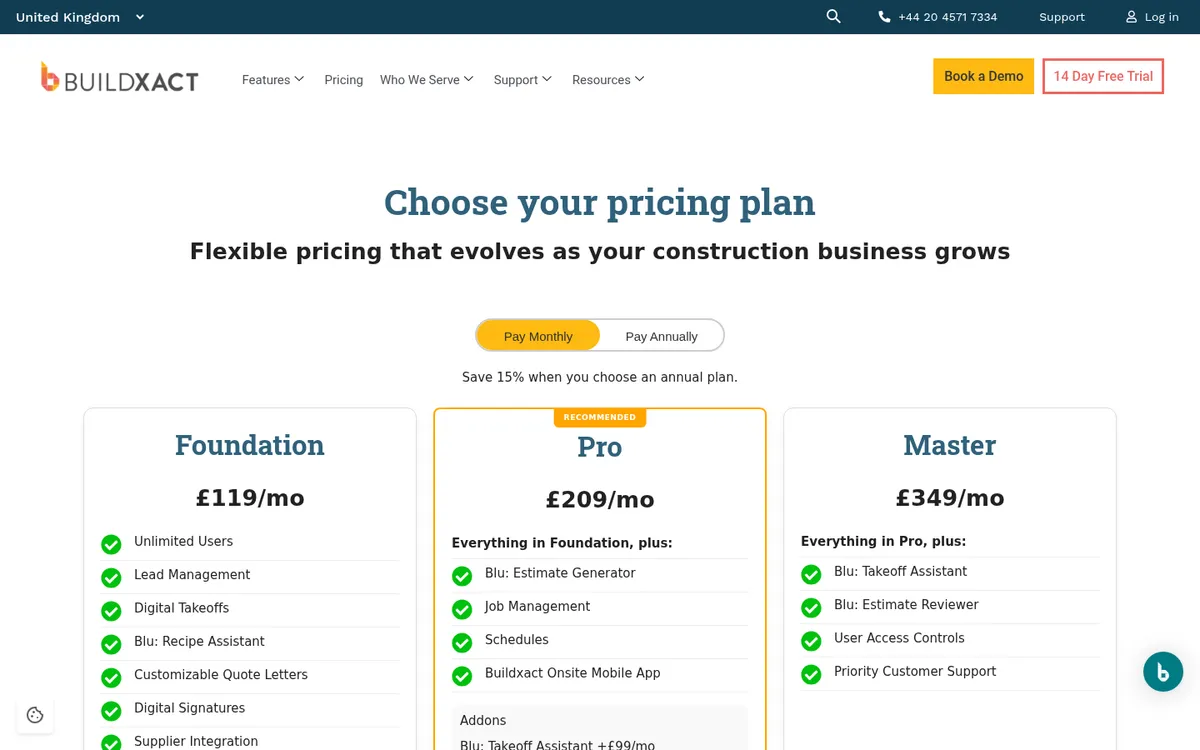
Buildxact is an estimating and job management platform used by residential builders and renovators, with a UK site and UK pricing. It covers digital takeoff, estimating with supplier price files, quotes with digital signatures, purchase orders, schedules and a mobile app for site, cost tracking and invoicing. Its AI assistant, Blu, adds estimate generation and takeoff help, as paid add-ons on the lower plans.
Every plan includes unlimited users. It syncs with Xero, QuickBooks and MYOB, but not Sage, and it has no CIS handling. Builders tend to outgrow it on commercial work with many subcontracts and month-end valuations. Buildxact vs Planyard covers that line.
Best for: Residential builders and renovators who quote a lot of jobs and want estimating, scheduling and invoicing in one system.
Watch out for: Schedules, job management and the site app start on Pro, not Foundation. No Sage integration.
Pricing: Foundation £119, Pro £209 and Master £349 a month excluding VAT, with unlimited users. Annual plans save 15% (£89, £160 and £262 a month). 14-day free trial.
3. PlanRadar – Best for Snagging, Defects and Site Reports
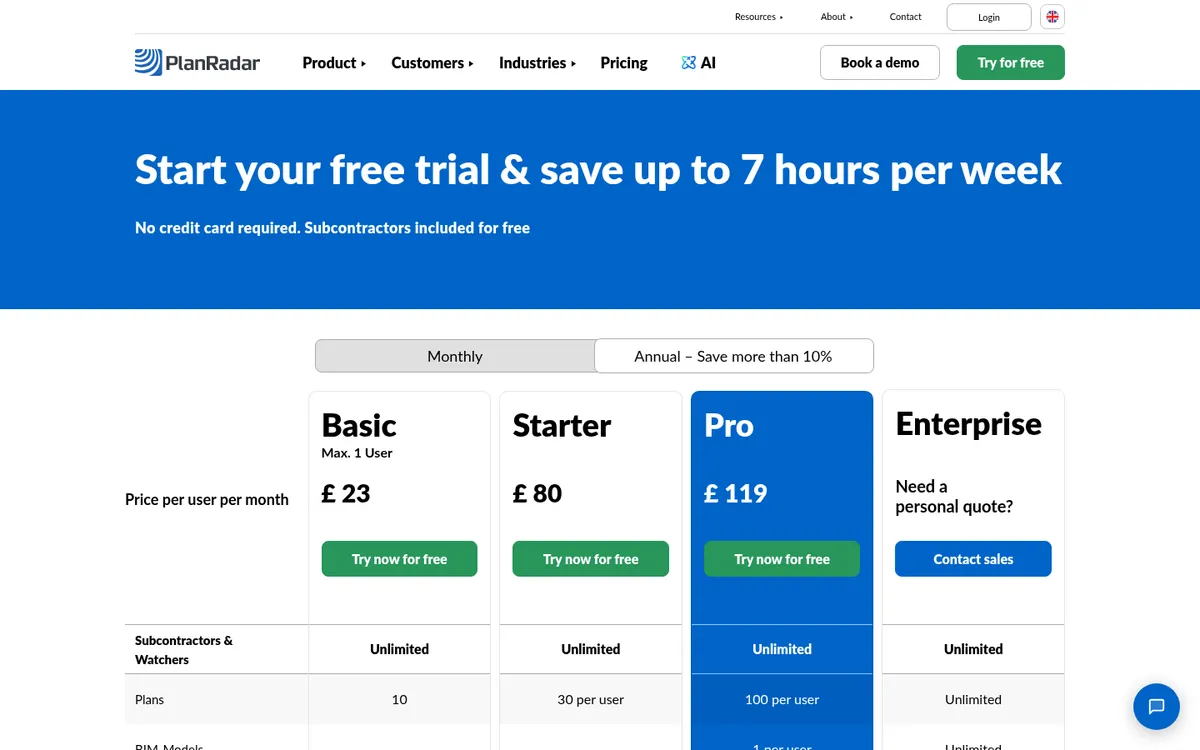
PlanRadar is a site documentation platform used across construction and property in more than 60 countries. You pin tickets for defects, snags and tasks to the drawing, add photos on site, and produce reports for clients and handover. Subcontractors and watchers can be added free on every plan. Pro adds BIM models, custom report templates, approval workflows for RFIs and change orders, and scheduling.
It does not do budgets, valuations or accounting, so it pairs with a cost tool or an ERP.
Best for: Contractors, developers and fit-out firms whose biggest headache is snagging, defects and site records at handover.
Watch out for: Per-user pricing, a minimum annual contract value on some plans, and a 4% innovation fee on the annual fee from the second billing period.
Pricing: Basic £23 a month for one user, Starter £80 and Pro £119 per user per month, as listed on PlanRadar’s UK pricing page. Annual billing saves more than 10%. Enterprise is quote only. Free trial.
4. Fieldwire – Best Free Start for Field Teams

Fieldwire, owned by Hilti, is a field management app for drawings, tasks, punch lists, inspections and forms. The free Basic plan covers up to five users, three projects and 100 sheets. Pro adds reports, sheet compare and project templates. Business adds custom forms, integrations and a BIM viewer, and Business Plus adds RFIs, submittals, change orders and a budget tool.
It is site coordination software, not a cost or accounting tool. See Fieldwire vs Planyard.
Best for: Site teams that need drawings and tasks on a tablet, and small teams that want to start for free.
Watch out for: Per-user pricing adds up for large site teams, and job costing needs another tool.
Pricing: Basic free for up to 5 users and 3 projects. Pro £33, Business £54 and Business Plus £76 per user per month, billed annually.
5. Powered Now – Best for Small Builders and Trades

Powered Now is a UK app for tradespeople and small builders: quotes, invoices with payment links, job sheets, a diary, expenses, supplier invoices and purchase orders, and certificates. It is HMRC-recognised for Making Tax Digital, and Professional adds VAT return submission, unlimited users, staff time tracking and Xero and QuickBooks integration.
It runs jobs and paperwork for a small firm. It has no budgets against a contract, no committed costs and no valuations, so it suits domestic work more than commercial contracts. Our invoicing software guide compares it with other trade apps.
Best for: Sole traders, small builders and trade firms that want quotes, invoices and certificates on a phone.
Watch out for: Built for jobs rather than contracts. Contractors running subcontractors and applications for payment will outgrow it.
Pricing: Business £28 a month for one user, Professional £32 and Premium £40 per user per month, excluding VAT. Two months free on annual billing. 14-day free trial, no card needed.
Already on Xero or Sage? Add cost control on top.
Load a live job's budget, raise a purchase order and see committed costs update. 14-day free trial, no credit card.
Best Software for Job Cost Control and Commercial Management
These tools control what each job costs and earns: budgets, orders, subcontracts, supplier invoices, valuations and CVRs. Planyard and Eque2 Construct sit on top of Xero or Sage. Archdesk syncs with your accounts and adds site modules, and Access Coins Evo replaces the accounts package altogether.
| Software | Best for | Starting price | Accounting | CIS, valuations and retention | Verdict |
| Planyard | Cost control on top of Xero, Sage or QuickBooks | £82 per project manager; £40 estimating only | Xero, Sage, QuickBooks | Valuations, variations and retention from Professional; CIS in your accounts | Best for margin, CVR and job costing; no site tools |
| Eque2 Construct | Contractors on Sage or Xero | Quote only | Sage 50, Sage 200, Sage Intacct, Xero | Applications, retentions, CIS deductions and returns | Strongest UK compliance add-on for Sage users |
| Archdesk | UK SME contractors wanting one system | Quote only, per user or by annual volume | Accounting and ERP sync | Payment applications, CVR and WIP | All-in-one with free external users |
| Access Coins Evo and Fonn | Large contractors and housebuilders | Quote only | Built-in ERP | CIS in payroll, CVR, variations | ERP that Access says most top UK housebuilders use |
"All in all, between the two of us on the finance side, we are saving 10 to 12 hours every single day. The administrative time savings have been immense."
Read more
1. Planyard – Best for Cost Control on Top of Xero, Sage or QuickBooks
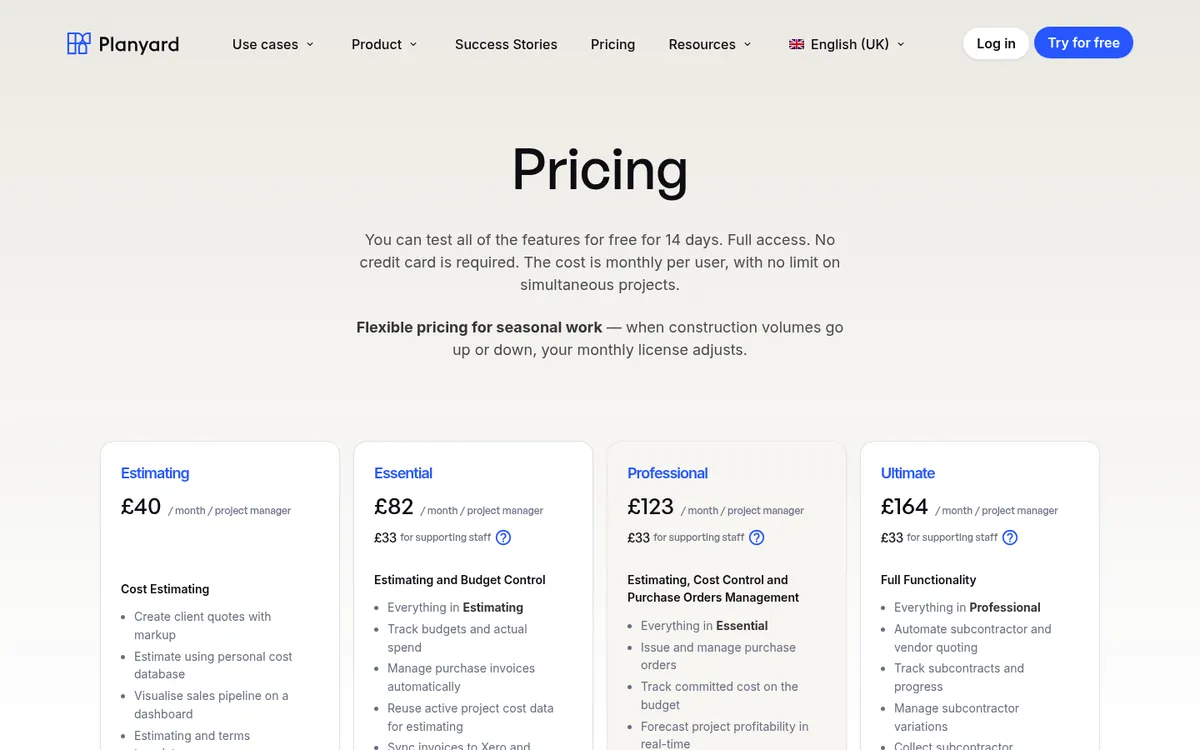
Planyard is cost control software for contractors, and it does not try to run the site. You set up the budget per job, and every commitment runs against it: purchase orders, subcontract orders, variations and supplier invoices matched to the order they belong to. Committed and actual costs show against each budget line as they happen, so the forecast final cost, the margin and the CVR are current on any day of the month. Approved invoices sync to Xero, Sage or QuickBooks, which keep doing VAT, payroll and the CIS deduction and return.
On the income side, Professional adds client contracts with valuations, client invoices, variations and retention, plus cash flow forecasts. Ultimate adds subcontractor tendering, subcontract orders and subcontractor payment applications collected through a link, with no login needed on their side.
Claire Hill at Brown & Bancroft in Bolton used to spend three to four days putting together month-end CVRs. It now takes her 10 to 15 minutes to check the jobs. At Vale Southern Construction in Portsmouth, Gareth Evans saves about 15 minutes per subcontractor payment, which comes to 10 to 12 hours a month across 50 subcontractors.
Best for: Main contractors and builders on Xero, Sage or QuickBooks who run several jobs at once and want live job costs, committed costs, valuations and CVRs without moving to an ERP.
Pair it with: A site app such as PlanRadar or Fieldwire for snagging, site diaries and drawings, and your accounts package for the CIS deduction and return. Planyard has no scheduling or takeoff.
Pricing: Estimating £40, Essential £82, Professional £123 and Ultimate £164 per project manager per month, with supporting staff at £33. Xero, Sage and QuickBooks sync from Essential; purchase orders, valuations and retention from Professional; subcontractor payment applications and tendering on Ultimate. 14-day free trial, see pricing.
"When you look at your margin without using Planyard, you might think you’re making 21%. But are you really if things have been missed and you can’t see them? Planyard lets you see a true margin all the time."
Read more
2. Eque2 Construct – Best for Contractors on Sage or Xero Who Need CIS and Applications

Eque2 sells finance and commercial software to UK contractors and says more than 3,000 construction businesses use its platform. Construct adds job costing, contract and budget management, procurement, applications for payment, retentions and CVRs to Sage Accounting, Sage 50, Sage 200, Sage Intacct or Xero, so you keep your accounts. It verifies subcontractors with HMRC, applies CIS deductions and submits returns, and tracks insurance and CSCS expiry.
Eque2 also sells Evision, an ERP on Microsoft Dynamics 365 Business Central, for contractors that outgrow Sage. See Eque2 vs Planyard and Eque2 alternatives.
Best for: Contractors on Sage or Xero who want CIS, applications and job costing in one add-on without changing their accounts.
Watch out for: Quote-only pricing and no site management tools.
Pricing: Quote only.
3. Archdesk – Best All-in-One for SME Contractors

Archdesk is a construction platform with more than 30 modules: estimating, document control and a CDE, health and safety, procurement, scheduling, change orders, payment applications, job costing, WIP and CVR reporting, HR and CRM. It syncs with accounting packages and ERPs, so finance can stay where it is.
Pricing is per user, with office and site users counted separately, or as an unlimited-users package priced on annual construction volume. External collaborators such as subcontractors and clients are free, and implementation is included. See Archdesk vs Planyard.
Best for: SME contractors that want one system from tender to final account and have someone to own the rollout.
Watch out for: A broad platform takes time to set up and train on. If your main gap is cost control, you will pay for modules you do not use.
Pricing: Quote only, per user or by annual construction volume. Implementation and support are included.
4. Access Coins Evo and Access Fonn – Best for Large Contractors and Housebuilders

Access Construction is the construction arm of The Access Group. Access Coins Evo is a construction ERP covering finance, payroll, procurement, job costing and CVR, with CIS, PAYE and IR35 handled inside its UK payroll. Access says more than 70% of the top UK housebuilders use it. Access Fonn is the mobile site management app that sits alongside it, priced as a flat annual fee with unlimited users, projects and subcontractors.
Because Coins Evo is the general ledger, choosing it means leaving Sage or Xero. That suits a contractor with a finance team and payroll across many sites. See Access Coins vs Planyard and Access Coins alternatives.
Best for: Large contractors and housebuilders that want accounts, payroll, CIS and project financials in one UK system.
Watch out for: A full ERP project with implementation quoted on top of the licence, and too much for most SMEs.
Pricing: Quote only for Coins Evo and Fonn, based on business size, modules and users. Fonn is a flat annual fee.
Which Tool Fits Your Business
Residential builder or renovator
Start with Buildxact for estimating, quotes and scheduling, or Powered Now if you mostly need quotes, invoices and certificates. Add PlanRadar or Fieldwire if site records and snagging take most of your time.
Main contractor turning over £2m to £30m
This is where margin slips without anyone noticing until the job is finished. Keep Xero or Sage, add cost management software such as Planyard or Eque2 Construct for budgets, orders, subcontracts, valuations and CVRs, and use a site app for the field. Archdesk is the option if you want one system for both and can staff the rollout. Our cost tracking software guide goes deeper on that job.
"I’ve used other systems in the past that you need 3 or 4 days of training before you can even raise a purchase order on the system. With Planyard, you can just raise your first purchase order in 5 minutes in one go. You just Planyard it!"
Read more
Large contractor or housebuilder
Procore for project collaboration, with Access Coins Evo if you are ready to replace your accounts with a construction ERP.
Trade contractor
Powered Now for small trade firms. Fieldwire if your main need is drawings and tasks on site.
Building in Australia? See our guide to the best construction management software in Australia, with AUD prices and MYOB support.
Where to Start
Write down the one problem that costs you most each month, trial the two tools on this list that are built for it, and run a real job through each. If that problem is not knowing where a job’s margin stands until it is too late, start a Planyard trial with a live budget and see job costing with real numbers.
Know your margin on every job, every day
Planyard tracks budgets, committed costs, valuations and CVRs and syncs with Xero, Sage or QuickBooks. 14-day free trial.