
Last verified: October 2026
Planyard is our product. We rank it where it fits, say what it does not do, and checked every other tool’s price on the vendor’s own site.
It is the 25th of the month and twelve applications for payment have arrived for three live jobs. Four came as PDFs, three as spreadsheets in each subcontractor’s own format, two only as an invoice, and three are still to come. Each one needs checking against the subcontract and last month’s valuation, with retention taken off and the labour split right for CIS. The payment notices are due in five days.
This guide compares seven subcontractor management tools from the point of view of a UK main contractor: who handles applications, valuations, payment and pay less notices, retention and the CIS split, and what each costs today. It starts with a comparison table, then a short guide to the UK payment rules the software has to follow, then one section per tool.
What Is Subcontractor Management Software?
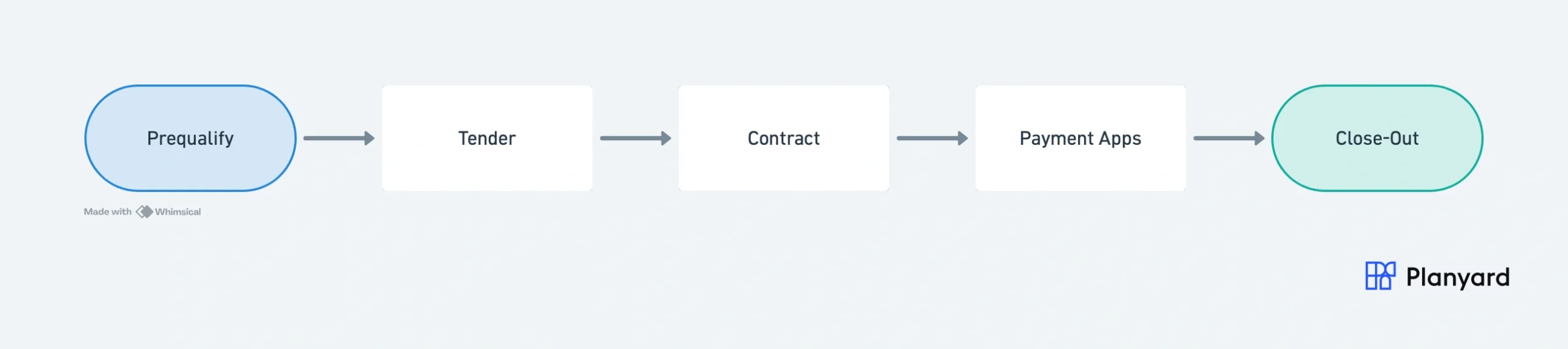
Subcontractor management software runs the commercial lifecycle between a main contractor and its subcontractors. Project management software covers programmes, drawings and site records. Subcontractor management covers the money and paperwork on each package:
- Finding and prequalifying subcontractors
- Tendering packages and comparing bids
- Issuing subcontract orders
- Recording variations against the subcontract sum
- Checking monthly applications for payment and agreeing valuations
- Holding retention and releasing it at practical completion and after the defects period
Subcontractor Management Software Compared
Prices are as published on each vendor’s site on 8 October 2026, excluding VAT.
| Tool | Best for | Starting price | Applications and valuations | Retention | Notices and CIS | Accounting |
| Planyard | SME main contractors on Xero, QuickBooks or Sage | £164 per PM per month (Ultimate) | Subcontractors submit by link against the schedule of values; overbilling blocked | Calculated on every valuation, portfolio dashboard | Notices served outside the tool; labour split set on the order, deduction and return in your accounts | Xero, QuickBooks, Sage |
| Access Coins Evo | Mid-size and large firms wanting one ERP | Quote only, per user, 3-year initial term | PayApps applications inside the ERP | Tracked | CIS verification, deductions and returns built in | Built-in accounts |
| Archdesk | Growing contractors wanting operations and compliance in one system | Quote only, per user or by annual volume | Applications reconciled against work valued on site | Tracked per subcontract to release | Pay less notice workflow; CIS not stated | Integrations, quote |
| Procore | Large contractors already on Procore | Quote only, by product and annual construction volume | Subcontractor invoices and payment applications | Retention held and released by invoice | No native CIS | ERP integrations |
| Buildern | Small residential builders | $225 per month for 2 seats, billed annually | Bills and POs; built for US-style workflows | Not stated | None stated | QuickBooks, Xero |
| Contractor Foreman | Very small firms on a tight budget | $49 per month, annual plan, 1 user | Basic; AIA-style billing for subcontractors billing a GC | Retainage on your own invoices | None | QuickBooks |
| eSUB | Specialist subcontractors managing their own work | Quote only | Progress billing from the subcontractor side | Not stated | None, US product | Quote |
How we chose: we started from the tools UK main contractors compare when they move subcontractor payments off spreadsheets, kept those still on sale with a UK route to buy or trial, and checked each one against the UK payment cycle below. Features are taken from the vendor’s own site; where a vendor does not say whether it handles retention or CIS, the table says not stated.
"Planyard can save about 15 minutes per subcontractor payment. When I'm dealing with 50 subcontractors, that's 10 to 12 hours a month. Add the CVR reporting and all of a sudden I've got two extra days free."
Read more
UK Subcontractor Payments: What the Software Has to Get Right
Most subcontractor software lists are written for the US, where subcontractors bill on AIA forms and the general contractor holds “retainage”. UK main contractors work under the Housing Grants, Construction and Regeneration Act 1996 (the Construction Act), JCT or NEC subcontracts and CIS. These are the parts of the cycle where a spreadsheet usually breaks.
Applications for payment and valuations
Each month the subcontractor applies for the value of work done to date, line by line against the subcontract schedule. The QS values the work, which is often less than the application, and the difference has to be explained. Software should show previous, current and remaining amounts per line, include approved variations, and stop a subcontractor claiming more than is left on a line. See how this works on Planyard’s subcontractor valuation software page.
Payment notices and pay less notices
Under the Construction Act, the payer must issue a payment notice within five days of the due date stating the sum it considers due. If it intends to pay less than a notified sum, it must serve a pay less notice before the final date for payment, within the period the contract sets: five days in most JCT subcontracts, seven days under the Scheme for Construction Contracts. If no payment notice is issued, the subcontractor’s application usually becomes the sum due, and without a valid pay less notice that amount has to be paid. Our guide to JCT payment terms walks through the dates.
Software helps in two ways: it produces the valued figure quickly enough to meet the five-day window, and it keeps the record of what was applied for, what was valued and why. Only some tools also issue and track the notices themselves, so check this before you buy.
Retention
Retention is usually 3% to 5% of each payment (3% is the JCT default), held until practical completion, when half is released, with the rest released at the end of the defects or rectification period, often 12 months later. On a busy firm that means hundreds of small balances across finished jobs. The software should calculate retention on every valuation, show the balance per subcontract, and flag releases that are due. Read more on how retention works in construction.
The CIS split and reverse charge VAT
Under the Construction Industry Scheme the contractor deducts 20% from the labour part of each payment to a registered subcontractor, 30% if unregistered, and nothing if the subcontractor has gross payment status. Materials and VAT are not subject to the deduction, so the labour and materials split on each application decides the amount. Retention is treated like any other payment, so CIS applies when it is released. Most supplies between subcontractor and main contractor also fall under the domestic reverse charge for VAT. In most set-ups the subcontractor tool holds the split and the certified amount, and the accounting software applies the deduction and files the monthly return. See what CIS is and how it works.
Key Features to Look For
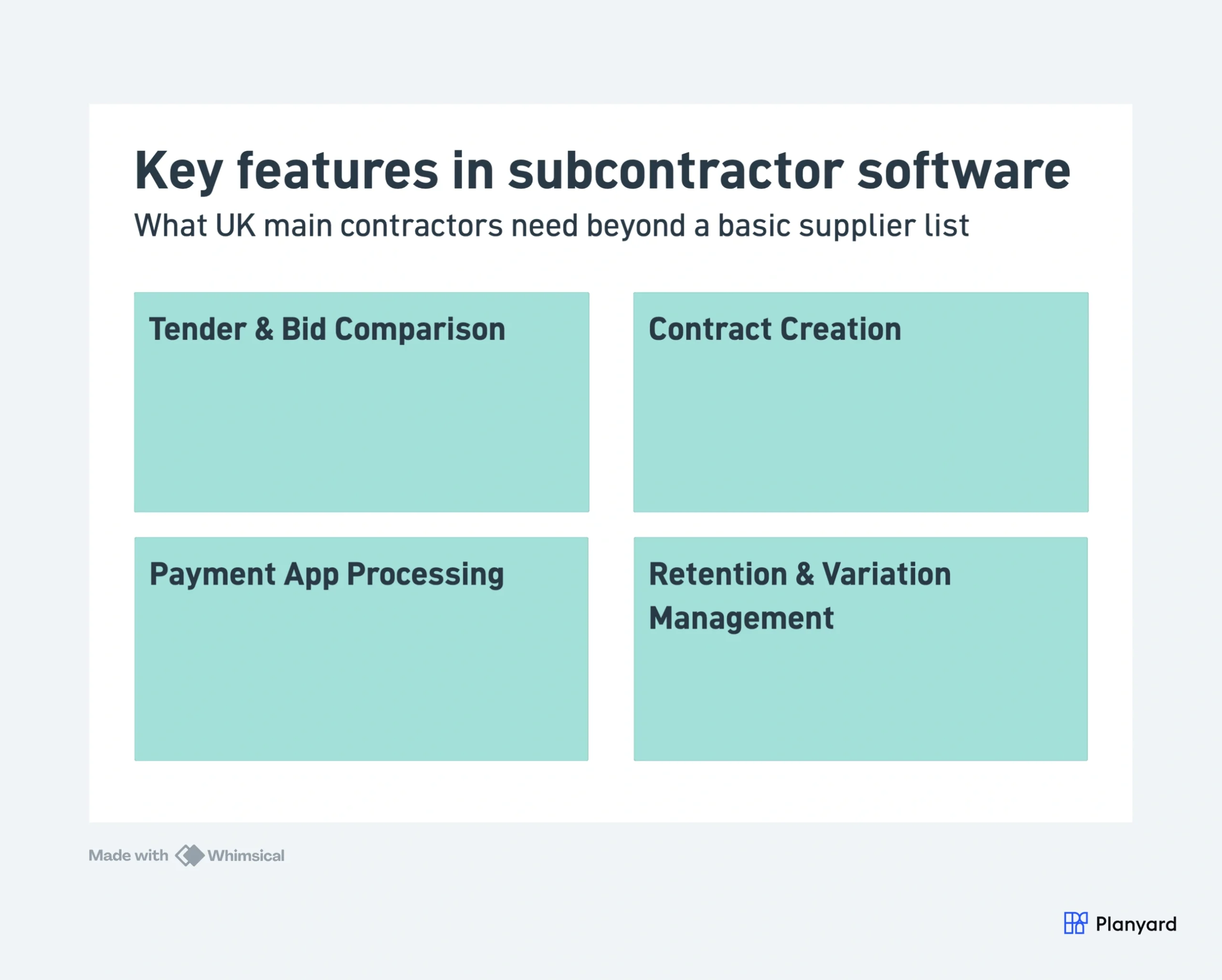
- A subcontractor database with trades, accreditations and performance history
- Tender packages sent to several subcontractors, with bids compared against the budget
- Subcontract orders with scope, rates, retention and the labour and materials split
- Applications submitted by the subcontractor against the schedule of values
- Variations that update the subcontract sum as soon as they are agreed
- Retention calculated on each valuation and tracked to release
- Approved amounts passed to Xero, QuickBooks or Sage without re-keying
The 7 Best Subcontractor Management Tools for UK Contractors
1. Planyard – Best for SME Main Contractors on Xero, QuickBooks or Sage
Planyard ties every stage of a package to one subcontract order and one budget line. You tender the package, compare bids against the budget and turn the winning bid into an order. Each month the subcontractor gets a link, submits progress by percentage, quantity or value against the contracted schedule, and uploads the invoice. No account is needed, and the system will not accept a claim above what is left on a line.
Retention and prepayments are calculated on every valuation, and a PDF payment application is produced for both sides. The labour and materials split is set once on the order. Approved bills post to Xero, QuickBooks or Sage, which apply the CIS deduction and file the return. Committed costs, variations and retention feed the forecast final cost of each subcontract, and a retention dashboard shows what is held, released and due across every project.
Best for: UK main contractors running several projects with 10 or more live subcontract packages who keep their accounts in Xero, QuickBooks or Sage.
Watch out for: Planyard does not track notice dates or issue pay less notices, so you serve those through your own contract administration. It does not file CIS returns, and it has no scheduling or drawings. Subcontractor applications, orders and tendering sit in the top plan.
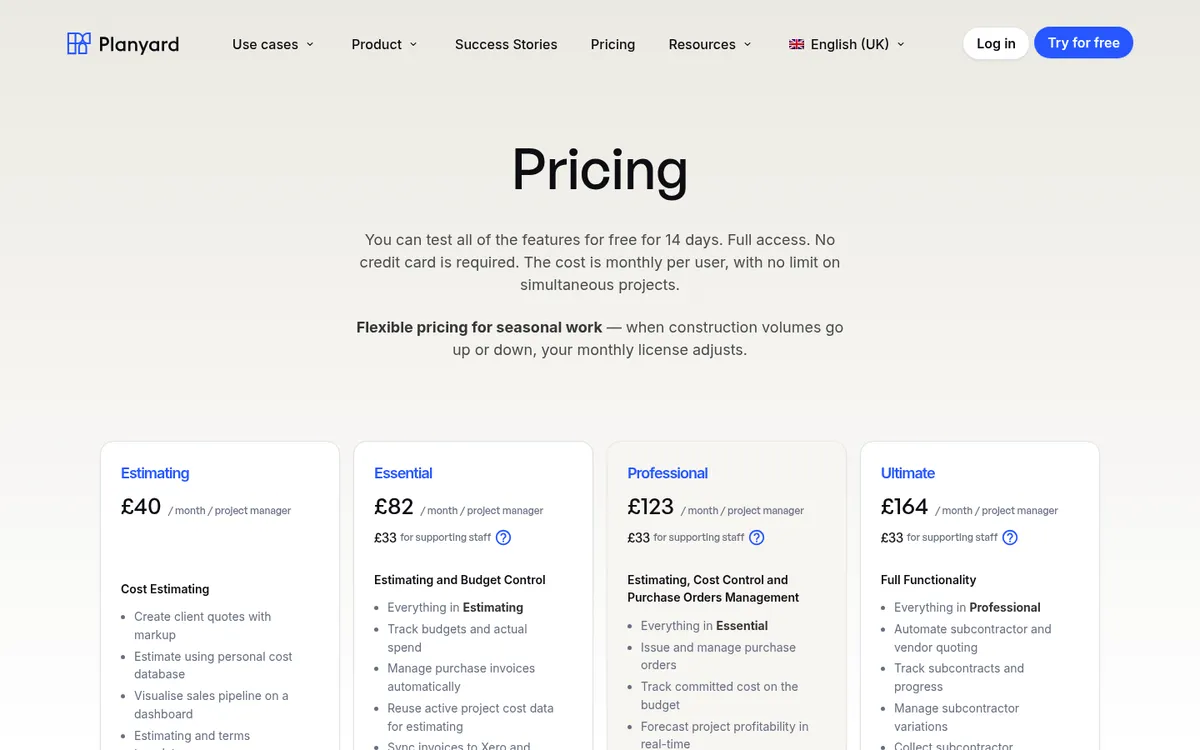
Pricing: Subcontractor management is in Ultimate at £164 per project manager per month (US $210), plus £33 per supporting staff user. Lower plans start at £40 (Estimating) and £82 (Essential). 14-day free trial, see pricing.
"A lot of the other subbies have just jumped straight onto it and clicked the link we sent them. They’ve been able to upload their valuations themselves."
Read more
2. Access Coins Evo – Best for an All-in-One UK Construction ERP

Access Coins Evo, formerly COINS and now part of The Access Group, is a construction ERP with accounts, payroll and subcontractor management in one system. Its UK main contractor edition covers PayApps applications, retentions and CIS deductions in one place, monitors subcontractors’ Constructionline status, and generates CIS returns for HMRC. Commercial project control and CVR are part of the same product.
Because the ledger, payroll and subcontractor records share one database, there is no sync to set up. The flip side is that you replace your accounting software, which makes it a finance-led project as much as a commercial one. Compare it in detail in Access Coins vs Planyard or see Access Coins alternatives.
Best for: Mid-size and large UK contractors who want accounts, payroll, CIS and subcontractor management in a single ERP.
Watch out for: It is a full ERP, so implementation takes longer and you leave Xero, QuickBooks or Sage behind. The first contract has a three-year initial term.
Pricing: Quote only. Priced per user with annual, quarterly or monthly billing; implementation is included in the first contract.
3. Archdesk – Best for Operations and Compliance in One Platform

Archdesk is a UK-based construction management platform covering CRM, estimating, cost control, scheduling and field records. Its subcontractor module tracks insurance and safety accreditations to their expiry dates, reconciles applications for payment against the work valued on site, and carries retention per subcontract through to release. Archdesk says its payment workflow issues pay less notices in line with the Construction Act and keeps a record of each application, approval and notice.
Subcontractors, clients and consultants are free external users, and performance is scored on every package so the next award decision has history behind it. See Archdesk vs Planyard.
Best for: Growing UK contractors who want subcontractor compliance, valuations and notices on the same platform as the rest of the business.
Watch out for: There is no public price list, and it is a broad platform, so you pay for and roll out more than subcontractor management. Archdesk’s site does not say how it handles CIS deductions.
Pricing: Quote only. Priced per user or on annual construction volume with unlimited users; implementation and support are included.
Valuations, retention and payment applications in one place
Subcontractors submit applications by link, retention is calculated on every valuation, and approved bills post to Xero, QuickBooks or Sage. 14-day free trial.
4. Procore – Best for Large Contractors Already on Procore

Procore is a construction management platform used on large UK projects for documents, drawings, RFIs and site quality. Its financial tools add commitments (subcontracts and purchase orders), change events, and subcontractor invoices that work as payment applications, including invoices that release retention. Compliance documents such as insurance certificates can be tracked against each company.
If your project teams already run jobs in Procore, keeping subcontract commitments in the same place saves a second system. Procore does not calculate CIS, so deductions and returns stay in your ERP or accounting software. See Procore vs Planyard and Procore alternatives.
Best for: Large main contractors with a commercial team who already use Procore for project management.
Watch out for: Pricing is an annual fee per product based on your construction volume, which suits large firms more than SMEs. UK features such as CIS sit outside Procore.
Pricing: Quote only. Annual fee by product, based on annual construction volume, with unlimited users.
5. Buildern – Best for Small Residential Builders
Buildern is a construction management platform for residential builders, covering estimates, proposals, schedules, budgets, purchase orders, bills and client selections. Subcontractors, vendors and field workers are free users, and it connects to QuickBooks or Xero.
It suits a small builder who wants one tool for the client side and basic subcontractor coordination. Its site does not mention UK valuations, retention or CIS, so check those before you rely on it for a main contracting business. See Buildern vs Planyard.
Best for: Residential builders with up to five office users who want project management and basic subcontractor handling in one tool.
Watch out for: Priced in US dollars and built around US-style workflows, with no stated support for UK applications, pay less notices or CIS.
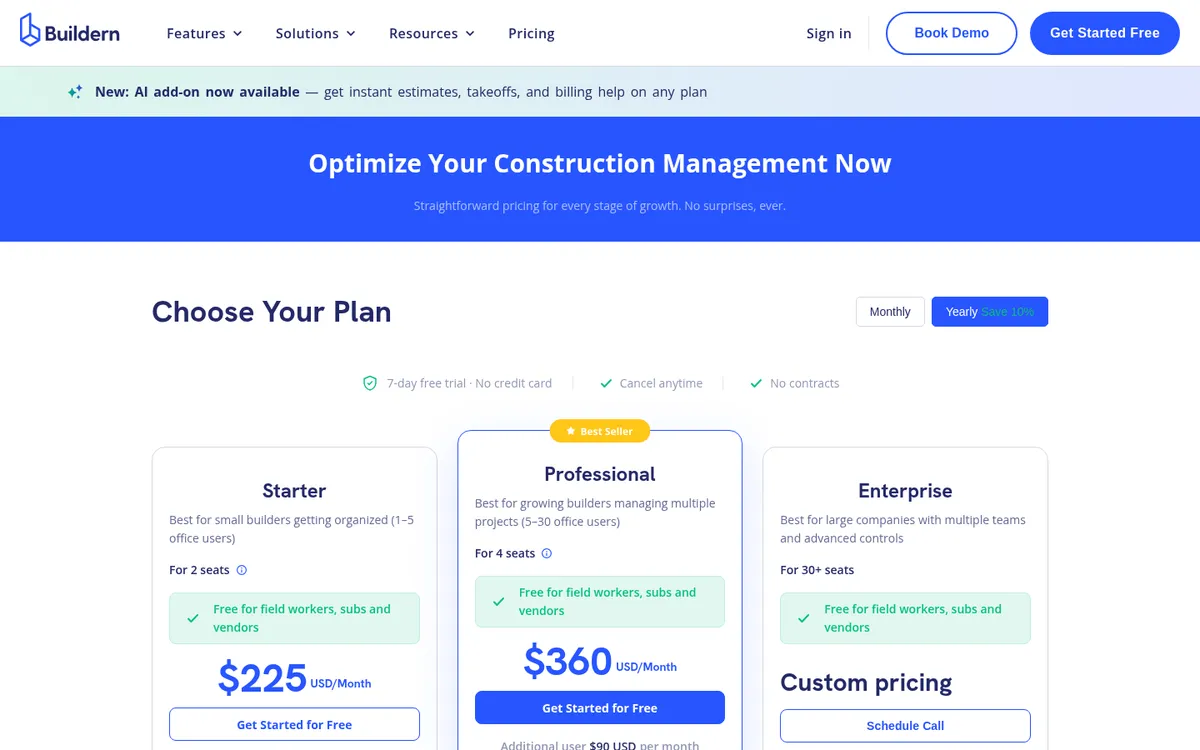
Pricing: Starter $225 per month for 2 seats, Professional $360 per month for 4 seats, both billed annually; extra users $81 and $90 per month. Enterprise is quote only. 7-day free trial.
6. Contractor Foreman – Best Budget Option
Contractor Foreman is a low-cost construction management app with scheduling, estimates, purchase orders, job costing, invoicing and a subcontractor directory. It supports AIA G702-style billing and tracks retainage held on your own invoices, which helps a subcontractor bill a US general contractor more than a UK main contractor managing its supply chain. It connects to QuickBooks; Xero is listed as coming.
For a very small firm that mainly needs to organise jobs and subcontractor contacts, it covers the basics for little money. See Contractor Foreman vs Planyard.
Best for: Very small contractors who want basic job and subcontractor organisation at the lowest price.
Watch out for: There is no portal for subcontractors to submit applications, no stated retention tracking on subcontracts you let, and nothing for UK notices or CIS.
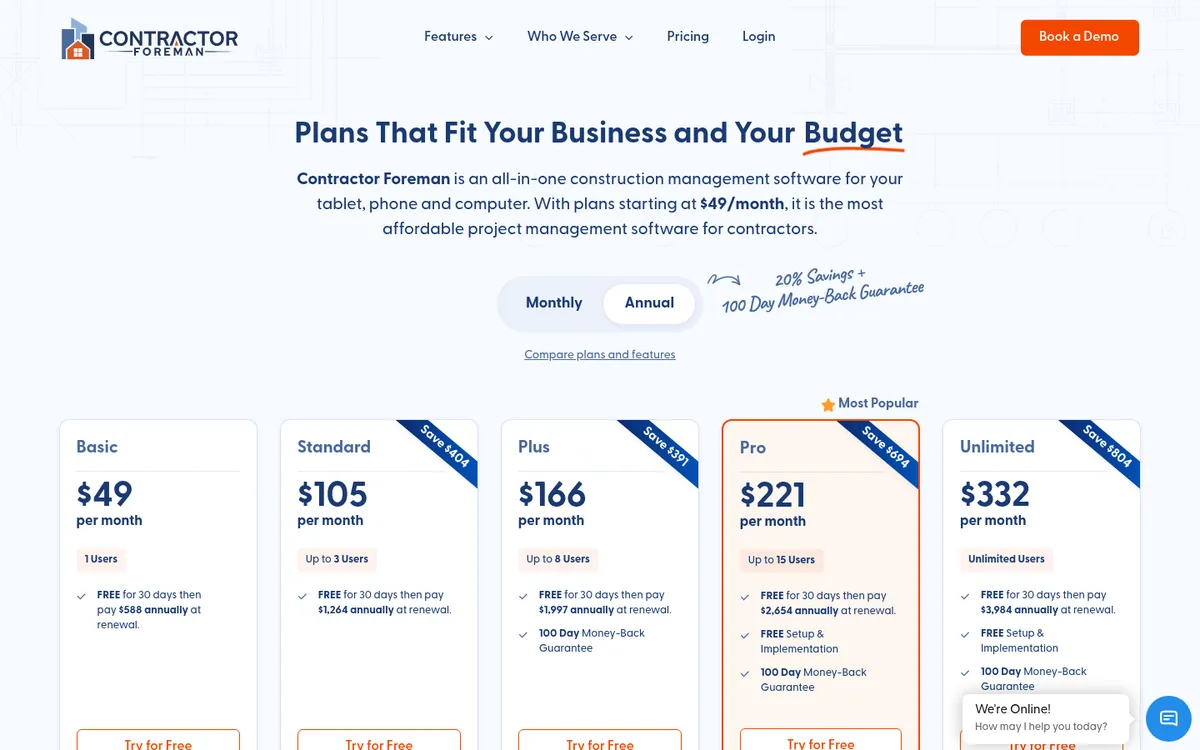
Pricing: Annual plans: Basic $49 per month (1 user), Standard $105 (3 users), Plus $166 (8 users), Pro $221 (15 users), Unlimited $332. Monthly billing starts at $139. 30-day free trial.
7. eSUB – Best for Specialist Subcontractors Managing Their Own Work

eSUB is built for specialist subcontractors such as electrical, mechanical and plumbing firms, not for the main contractor managing them. It covers daily reports, time and materials tickets, change orders, progress billing, purchase orders and job costing from the subcontractor’s side.
It is on this list because many specialist contractors search for “subcontractor software” looking for a tool to run their own jobs. If that is you, eSUB is built for it. If you manage other subcontractors, one of the tools above fits better.
Best for: US specialist subcontractors who want field reporting, change orders and progress billing in one tool.
Watch out for: It does not help a main contractor manage a supply chain, and it is a US product with no UK CIS or Construction Act features.
Pricing: Quote only. eSUB does not publish prices.
How to Choose Based on Your Setup
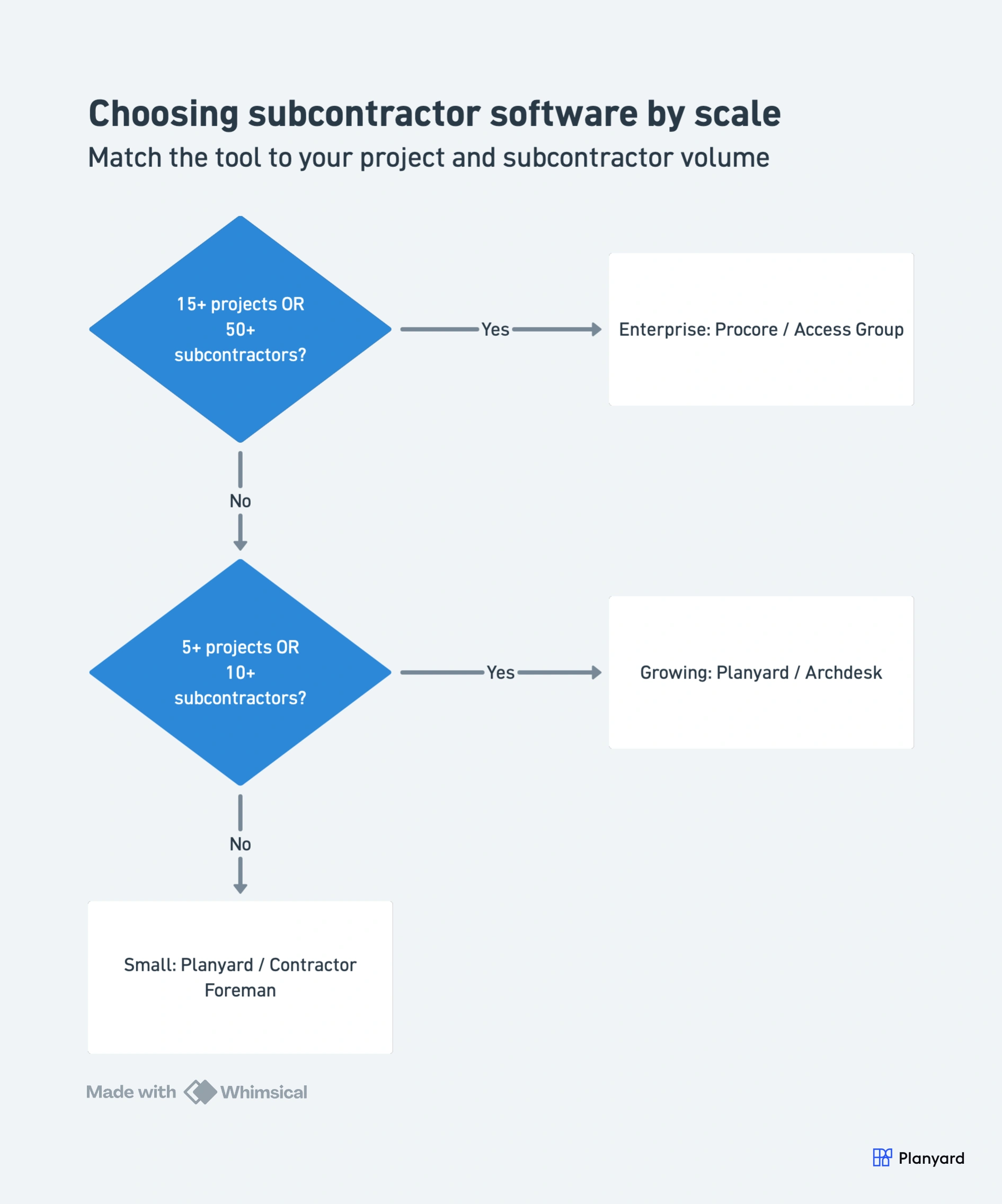
Small contractor, a few projects and under 10 subcontractors
Start with a good spreadsheet or Contractor Foreman if you mainly need contacts and jobs in one place. Once monthly applications and retention start eating your week, move to a tool that takes applications from the subcontractor directly.
Growing contractor, 5 to 15 projects and 10 to 50 subcontractors
This is where applications, retention and the CIS split cause the most rework. Planyard fits if you want to keep Xero, QuickBooks or Sage and need valuations, retention and forecast final cost per subcontract. Archdesk fits if you also want CRM, scheduling, compliance and pay less notices on one platform.
Larger contractor, 15 or more projects and a finance team
Access Coins Evo if you want accounts, payroll and CIS in the same system as subcontractor management. Procore if project teams already work in it and finance stays in your ERP. Budget for implementation time either way.
Already on Xero, QuickBooks or Sage?
You can keep it and add a tool that handles applications, retention and the labour split, then posts approved bills to your accounts so the deduction and return happen where your accountant already works. Planyard and Buildern both connect to Xero and QuickBooks; Planyard also connects to Sage and handles UK valuations and retention.
"With Planyard, there's better visibility of everything – from raising the purchase order through to paying all our suppliers and subcontractors, retention management, and sales invoices. At a glance, I can see everything. Before, it was shrouded in a veil of mystery – you had to dig deep and click on five different menus before you got anywhere."
Read more
What Changes for Your Subcontractors
Subcontractors notice the switch first. They submit applications through one link instead of emailing PDFs, see what was approved last month and what is left on each line, and get the valued figure back quickly. Fewer queries come back, because the figures they see match yours.
For you, every application, valuation, variation and retention movement sits on the subcontract with a date and a name against it. When a subcontractor disputes a deduction, you can show the history in a minute instead of searching six months of email.
"Since implementing the system, I haven't had a single complaint or support call from our subcontractors. Not one person has had trouble submitting their valuations, and no one has had to chase me for a payment outside of the system. It’s been completely seamless."
Read more
Stop chasing applications for payment by email
Send subcontractors a link, value their applications against the subcontract, and keep retention and CIS splits right before bills reach your accounts. 14-day free trial.