
Last verified: October 2026
A kitchen fitter finishes a job on Friday, types the invoice on his phone in the van, and gets an email from the main contractor on Monday: no reverse charge note, labour and materials lumped together, please reissue. The money moves a week later than it should have.
Invoicing in construction is harder than in most trades because two sets of rules sit on top of the invoice. If you work for other contractors, the Construction Industry Scheme (CIS) takes a deduction from the labour and the VAT domestic reverse charge changes who pays the VAT. If you are the main contractor, the invoice usually follows an application for payment and a valuation. This guide compares the invoicing software UK contractors use, with October 2026 prices, in two parts: apps for invoicing customers from the van, and software for main contractors who bill clients from valuations and approve subcontractor and supplier bills.
Planyard is our product. We rank it only in the second part of the list, where it fits, and we say what it does not do.
Invoicing Software for Contractors Compared
Prices are per month excluding VAT, from each vendor’s UK pricing page in October 2026, ignoring introductory discounts.
| Job | Software | Best for | From | CIS on invoices | Reverse charge VAT | Verdict |
| Invoicing customers | Xero | Contractors whose accountant uses Xero | £18 (20 invoices), £39 unlimited | Yes, on invoices and bills | Yes | The safe default |
| Invoicing customers | QuickBooks Online | Small contractors on a budget | £16, or £10 for sole traders | Yes | Yes | Cheapest full accounts package |
| Invoicing customers | FreeAgent | Sole traders and CIS subcontractors | £19 to £33, free with some banks | Yes | Yes | Best for one-person firms |
| Invoicing customers | Sage Accounting | Firms already on Sage | £43 (CIS from Standard) | Yes, from Standard | Yes, from Standard | Pick it if your accountant uses Sage |
| Invoicing customers | Powered Now | UK trades who invoice from site | £28 for one user, £32 per user | Yes, estimated per line | Yes | Best UK trade app for CIS invoices |
| Invoicing customers | Tradify | Trade teams that schedule and invoice jobs | £34 per user | Only through Xero or Sage | Only through Xero or Sage | Strong job management, CIS lives in the ledger |
| Valuations and supplier bills | Planyard | Main contractors: applications, valuations, incoming invoices | £82 per project manager | Labour split set on the order, deduction in your ledger | Handled in your ledger | For the invoices you receive and the valuations you send |
What a Contractor’s Invoice Has to Get Right
CIS
If you are a subcontractor, the contractor deducts 20% (registered) or 30% (unregistered) from the labour part of your invoice, and nothing from materials, plant hire or VAT. Show labour and materials as separate lines so the deduction can be worked out, and many subcontractors also show the expected deduction and the net amount due. The deduction appears on the monthly CIS statement the contractor sends you, and you claim it back through Self Assessment or your company’s payroll. How CIS works covers the rules in full.
Domestic reverse charge VAT
Since March 2021, when a VAT registered subcontractor supplies building services that are reported under CIS to a VAT registered contractor who is not the end user, the subcontractor does not charge VAT. HMRC requires the invoice to carry all the usual VAT invoice details, a note that the reverse charge applies (for example “Customer to pay the VAT to HMRC” or “S55A VATA 94 applies”), and the amount or rate of VAT the customer must account for. Work for homeowners, and for clients who have told you in writing that they are end users, is invoiced with VAT as normal.
Applications for payment and retention
On JCT and similar contracts, money moves through applications and valuations first. The contractor applies for the cumulative value of work done, the payer certifies an amount, retention is held back, and the VAT invoice follows for the certified sum. None of the trade invoicing apps below runs that cycle. Main contractors usually keep it in a spreadsheet or in software built for it, such as JCT payment application software.
Best for Invoicing Customers from the Van
These tools create and send your sales invoices, with the CIS deduction and the reverse charge where the work needs them. They suit subcontractors, sole traders and small firms, and the accounting packages among them are also the ledger a main contractor keeps.
1. Xero – Best All-Round Invoicing for Contractors with an Accountant
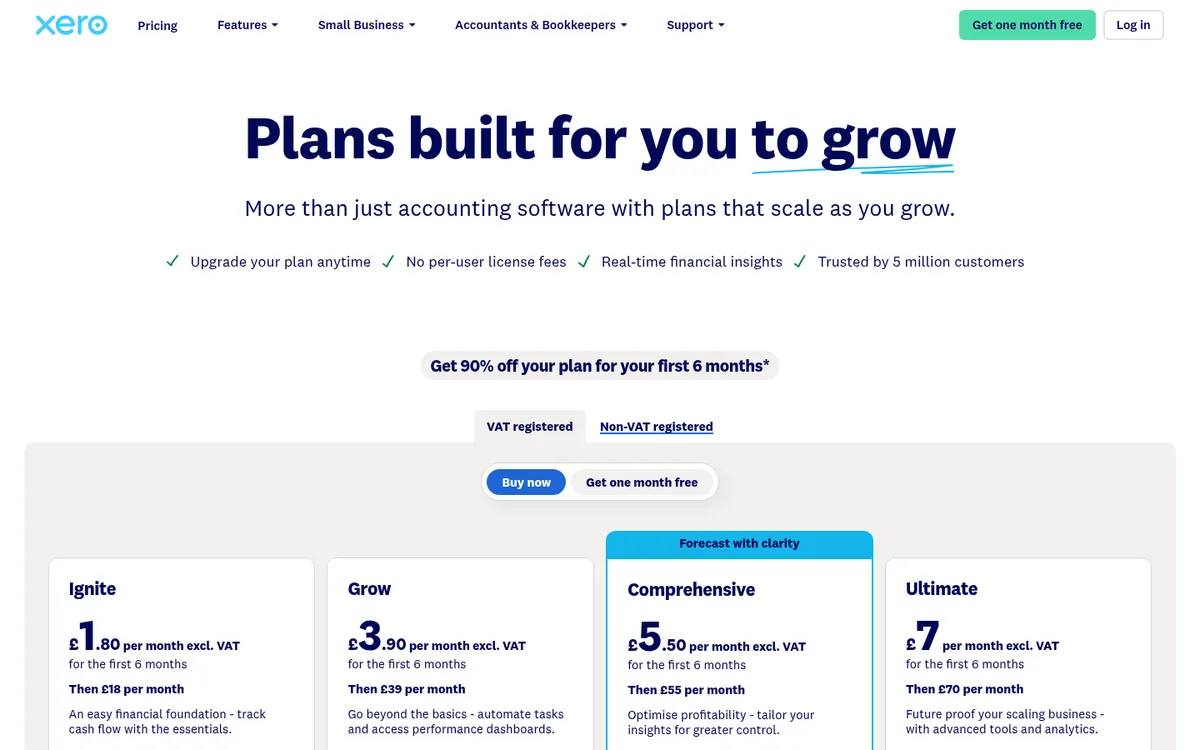
Xero is the accounts package most UK accountants work in, which makes it the default for contractors who want invoices and books in the same place. CIS is built in: tag a contact as a CIS subcontractor or contractor and invoices and bills work out the deduction from the labour lines. Reverse charge tax rates are included, invoices can be paid online, and quotes convert to invoices.
For contractors who also pay subcontractors, the “Submit contractor CIS returns” add-on (£5 a month) verifies subcontractors and files the monthly return from the same data. Our guide to CIS and VAT in Xero walks through the setup.
Xero is general accounting software, so it does not know about jobs, budgets or valuations without an add-on. Xero vs Planyard and Xero alternatives for construction cover where it stops.
Best for: Contractors and subcontractors whose accountant already works in Xero.
Watch out for: Ignite caps you at 20 invoices and 10 bills, which a busy subcontractor will hit. Grow is the realistic starting plan.
Pricing: Ignite £18, Grow £39, Comprehensive £55, Ultimate £70. Contractor CIS returns £5 extra.
2. QuickBooks Online – Best Value for Small Contractors

QuickBooks calculates CIS on invoices for subcontractors and on bills for contractors, files CIS returns to HMRC without an add-on, and has reverse charge tax rates. Estimates convert to invoices, customers can pay by card or bank transfer, and time entered against a customer or project can be added to an invoice.
Sole Trader Plus (£10) suits a CIS subcontractor who invoices a handful of contractors and needs MTD for Income Tax. Contractors who pay subcontractors need a business plan from Simple Start up. QuickBooks vs Planyard explains what it does not cover on project costs.
Best for: Small contractors who want the lowest monthly cost with CIS filing included.
Watch out for: Fewer UK accountants use it than Xero, so check that yours is happy to work in it before you move.
Pricing: Sole Trader Plus £10, Simple Start £16, Essentials £38, Plus £56, Advanced £123.
3. FreeAgent – Best for Sole Traders and CIS Subcontractors

FreeAgent was built for UK freelancers and small companies, and it shows in the invoicing: CIS deductions on sales invoices, reverse charge VAT for both subcontractors and contractors, recurring invoices, automatic reminders and online payments. Deductions suffered flow into the Self Assessment return it prepares, and it is HMRC recognised for MTD.
Contractor CIS arrived in July 2025, so a one-person firm that occasionally takes on its own subcontractors can now file the monthly return from the same account.
Best for: Sole traders and small limited companies who mostly work as CIS subcontractors.
Watch out for: It is built for micro businesses. A contractor running several projects with dozens of suppliers will outgrow it.
Pricing: Sole trader £19, partnership £24, limited company £33. Free with a NatWest, RBS, Ulster Bank or Mettle business account.
4. Sage Accounting – Best for Firms Already on Sage
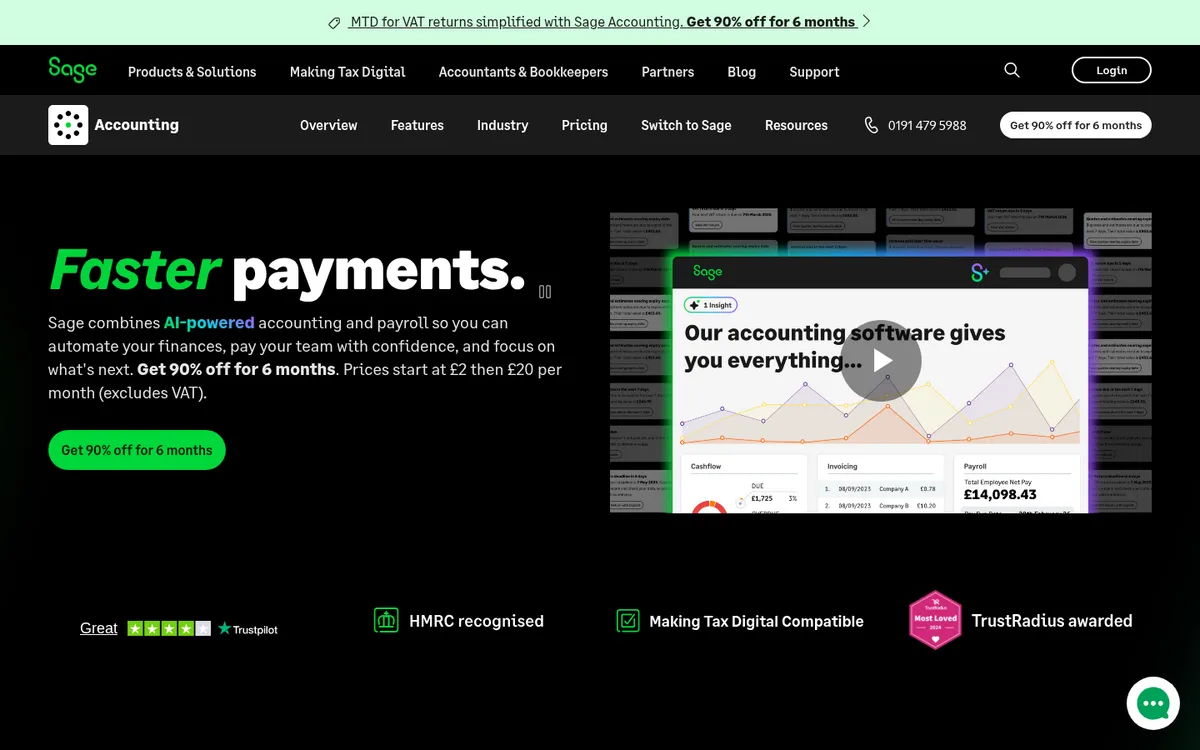
Sage Accounting, the cloud product, raises invoices and quotes, takes online payments and chases late payers with automatic reminders. CIS and reverse charge VAT are included from the Standard plan, along with MTD VAT filing.
Firms with an in-house accounts team often run Sage 50 on the desktop instead, where CIS is a paid module. Sage Accounting vs Planyard compares it with a construction tool.
Best for: Contractors whose accountant or bookkeeper already works in Sage.
Watch out for: Start (£20) does not include CIS, so the real price for a contractor is £43.
Pricing: Start £20, Standard £43. Sage 50 Standard £115 or Professional £234, plus £11 for the CIS module.
5. Powered Now – Best Invoice App for UK Tradespeople

Powered Now is a UK job management app for trades: quotes, scheduling, job sheets, certificates and invoices from a phone or tablet. It handles both construction rules on the sales side. Each invoice line gets a category that decides whether it is subject to CIS, the app puts the estimated deduction on the invoice, and you can amend it before sending. For reverse charge work you choose the reverse charge tax rate on each line.
It also supports deposits and part payments, payment links, and automatic chasing on the Premium plan. It is HMRC recognised for MTD, and the Professional plan files VAT returns and connects to Xero and QuickBooks.
Best for: Sole traders and small trade teams who quote and invoice from site and want CIS and reverse charge handled on the invoice.
Watch out for: Business is a single-user plan, and Xero or QuickBooks integration starts at Professional, priced per user.
Pricing: Business £28 (one user), Professional £32 per user, Premium £40 per user. Two months free on annual billing. 14-day free trial.
6. Tradify – Best for Trade Teams That Schedule and Invoice Jobs

Tradify is job management software for trades, sold in the UK with GBP pricing. Quotes turn into jobs, jobs into invoices, and staff log time and costs against the job from the app. Higher plans add progress invoicing with deposits and retentions, purchase orders and bulk invoicing. It syncs with Xero, QuickBooks Online and Sage.
Tradify’s own help centre says it cannot create CIS or reverse charge VAT invoices on its own. Connected to Xero or Sage, those invoices work without restriction; with QuickBooks Online you send the invoice across and edit it there.
Best for: Trade businesses with a few staff who want scheduling, job costing and invoicing in one app, and already use Xero or Sage.
Watch out for: No CIS or reverse charge invoicing without an accounting connection, and it is priced per user from the first one.
Pricing: From £34 per user per month on Tradify’s UK pricing page. Pro and Plus are reported at £37 and £44 per user by third-party comparisons. Month to month, 14-day free trial.
Best for Valuations and Subcontractor Bills
A main contractor with several live projects spends most of its invoicing time before any invoice goes out: applications from subcontractors, supplier bills checked against orders, and the monthly valuation to the client. Xero, QuickBooks and Sage still hold the bills and file the contractor CIS return; Planyard runs that cycle and posts the approved bills to them.
1. Planyard – Best for Main Contractors Handling Applications and Supplier Invoices
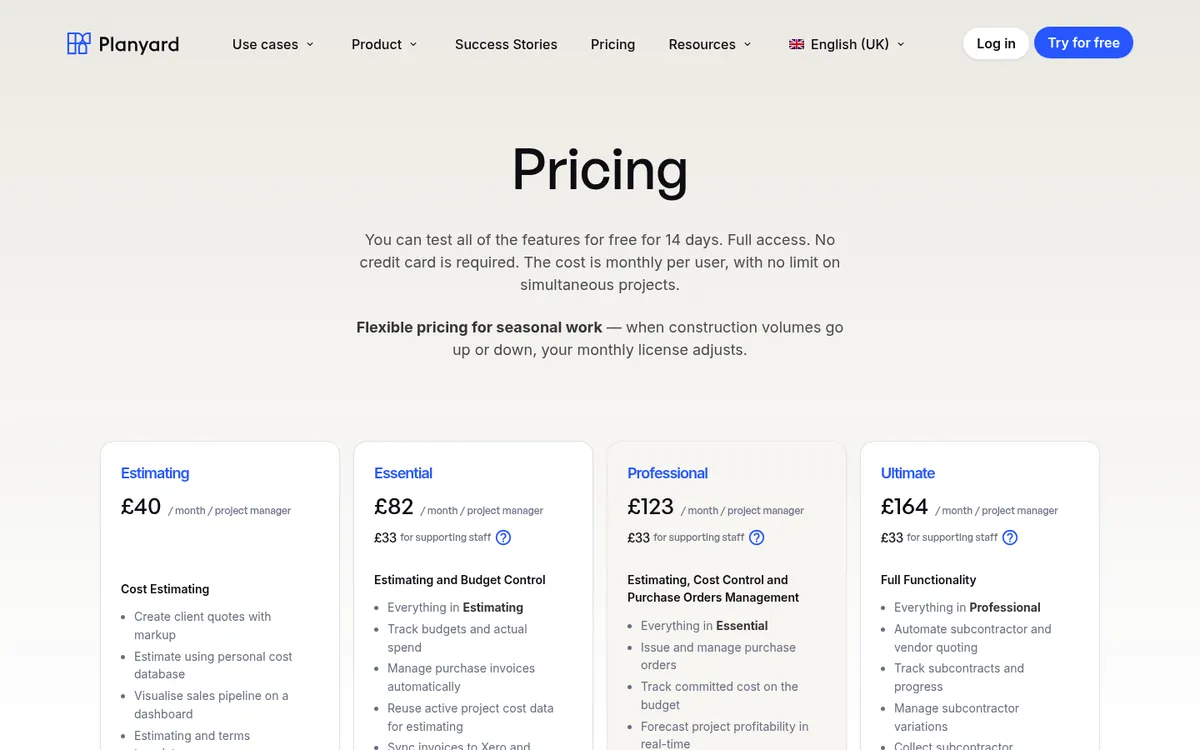
Planyard sits in front of your accounting software and covers the invoicing a main contractor actually spends time on: the money going out to subcontractors and suppliers, and the valuations going to the client, with the sales invoice raised from each one. Subcontractors submit applications through a web link without an account, the commercial team certifies, and the subcontractor is told exactly what to invoice for. The CIS labour and materials split is set once on the subcontract order, and Xero, QuickBooks or Sage applies the deduction and files the return.
Supplier invoices arrive by email, the Outlook or Gmail add-in, or a bulk upload. Planyard reads them, matches them to the order and project, routes them for approval and posts the approved bill to the ledger. See invoice management for the incoming side and construction billing for valuations to the client, retention and variations. If approvals are your main problem, our invoice approval software comparison looks at that alone.
Best for: Main contractors and specialist contractors with several live projects, subcontract packages and a client valuation each month.
Pair it with: Xero, QuickBooks or Sage for the ledger and the CIS return, which Planyard does not file. If you only need to invoice customers from the van, you do not need it; pick a tool from the first part of this list.
Pricing: Essential £82 per project manager per month (invoice import, Xero, QuickBooks and Sage sync). Professional £123 adds invoice OCR, approval workflows, client valuations, variations and retention. Ultimate £164 adds subcontractor payment applications. Supporting staff £33. 14-day free trial.
"When everything is set up, it’s just a few clicks and the process is complete. It automatically sends the document and tells the subcontractor exactly what amount to invoice for, making the entire valuation process incredibly easy."
Read more
"We had to get our accountant on board and interface it with Xero, so invoices hit the right job number. Now an invoice gets uploaded in Planyard, I sign it off, and it drops into my Xero payment schedule in three or four weeks – it’s perfect."
Read more
Get supplier invoices and valuations right before they reach Xero
Collect subcontractor applications, certify valuations and post approved bills to Xero, QuickBooks or Sage. 14-day free trial, no credit card.
How We Chose
We started from what UK contractors search for and ask on forums, including the r/ukelectricians thread on invoicing apps for CIS subcontractors. For each tool we read the UK pricing page and help documentation in October 2026 and checked four things: whether it can put a CIS deduction on a sales invoice, whether it handles the domestic reverse charge, whether it is MTD ready, and how it connects to the accounts. Prices are the regular monthly price excluding VAT, ignoring introductory discounts. Tools that only make a PDF invoice without CIS or reverse charge support were left out.
How to Choose
Sole trader working as a CIS subcontractor: FreeAgent if your bank makes it free, otherwise QuickBooks Sole Trader Plus. Both put CIS and the reverse charge on your invoices and cover MTD for Income Tax.
Trade business that quotes and invoices from site: Powered Now if you want CIS and the reverse charge on the invoice without extra setup. Tradify if scheduling a team matters more and you already use Xero or Sage.
Small contractor paying a few subcontractors: Xero with the CIS returns add-on, or QuickBooks if price comes first. Sage if your accountant is a Sage practice.
Main contractor with several live projects: keep the sales ledger in Xero, QuickBooks or Sage. Use Planyard for subcontractor applications, the supplier invoices coming in, and client valuations with the sales invoices raised from them. Our construction accounting software guide and CIS software comparison cover the ledger side in more depth.
"The best part is that I only have to do things once instead of twice; it’s great to have everything in a single, efficient system."
Read more
Next Step
If you invoice customers from site, pick the app that puts CIS and the reverse charge on the invoice and connects to the accounts your bookkeeper already uses. If most of your invoicing time goes on applications, valuations and checking the invoices that come in, that is the part Planyard handles, alongside Xero, QuickBooks or Sage.
Applications, valuations and supplier invoices in one place
Planyard collects subcontractor applications, builds client valuations and posts approved invoices to Xero, QuickBooks or Sage. 14-day free trial.