
Last verified: October 2026
Microsoft Project is good at one thing: building and tracking a programme. Ask it what a job will make once every purchase order, subcontract and supplier invoice is counted, and it has no answer, because those numbers live in your accounting software and a spreadsheet somewhere.
The product has also changed under its users. Microsoft retired Project Online on 30 September 2026 and now sells Planner plans plus the Project desktop app. If you have to move anyway, it is a good moment to ask whether your next tool should handle the money as well as the dates.
This guide compares six Microsoft Project alternatives for construction financial management, with the prices each vendor publishes today. Some replace the programme, some sit next to it and handle the costs.
Microsoft Project Alternatives: Quick Comparison
Prices are per month as published by each vendor in October 2026, excluding VAT. Planyard is priced per project manager; supporting staff are £33 each.
| Tool | Best for | Scheduling | Cost control | Accounting link | From | Verdict |
| Planyard | Cost control next to your programme | No | Budgets, POs, subcontracts, invoices, forecasts | Xero, QuickBooks, Sage (two-way) | £82 per PM (£40 Estimating) | Strongest on the money; keep a scheduler for the programme |
| Buildertrend | US residential builders | Yes | Budgets, job costing, change orders | Xero, QuickBooks | $499 (USD) | All-in-one for homebuilders; priced in dollars |
| Buildxact | Small builders who estimate and schedule | Yes, from Pro | Estimates, POs, cost tracking | Xero, QuickBooks, MYOB | £119 (unlimited users) | Good value for small residential firms |
| Procore | Large contractors | Yes | Budgets, commitments, change events | Sage, Xero via connectors | Quote only | Powerful, heavy for an SME |
| Jonas Construction | North American specialty contractors | Yes | Full ERP with job costing | Own accounting and payroll | Quote only | An ERP, not a Project swap |
| eSUB | US commercial subcontractors | Field and project tools | Job costing, POs, change orders | Not confirmed | Quote only | Built for trade subcontractors |
| Microsoft Planner | Programmes only | Yes | No | None | £7.70 per user | Cheap for schedules, no cost control |
What Microsoft Project Looks Like Now
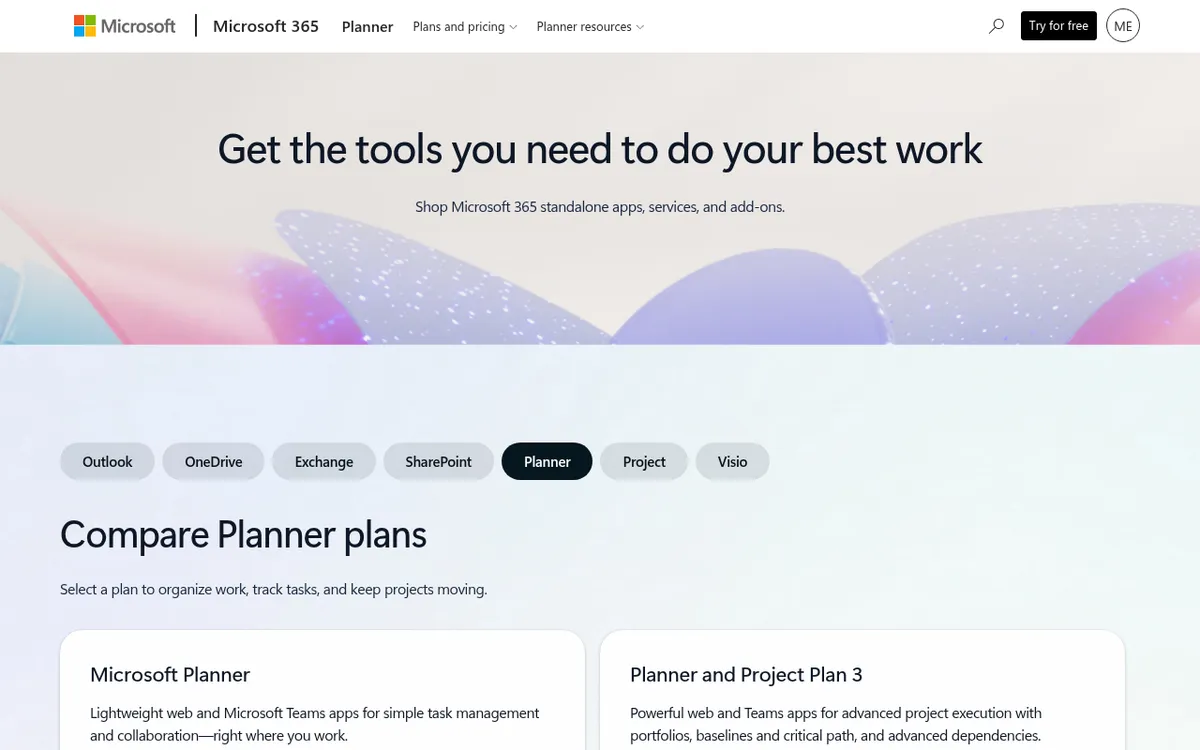
Microsoft no longer sells Project as a single product. On its UK site today you can buy:
- Planner Plan 1 at £7.70 per user per month, paid yearly: timeline (Gantt) views, task dependencies, sprints and goals in the web app and Teams.
- Planner and Project Plan 3 at £23.10 per user per month, paid yearly: everything in Plan 1 plus baselines, critical path, advanced dependencies and the Project desktop app.
- Project Standard 2024 at £679.99 and Project Professional 2024 at £1,149.99, one-off purchases licensed for one user.
Project Online stopped working on 30 September 2026. Microsoft sends those customers to Planner, Project desktop, Project Server Subscription Edition or Dynamics 365 Project Operations.
None of these options knows about purchase orders, subcontract valuations, retention or supplier invoices. Project can attach cost rates to resources and compare cost against a baseline, but the actual costs have to be typed in. That is why contractors searching for a Microsoft Project alternative usually want two things: a programme and a live view of the job’s finances. Our Microsoft Project vs Planyard comparison goes through that split in more detail.
The 6 Best Microsoft Project Alternatives for Construction Finance
1. Planyard – Best for Cost Control Next to Your Programme
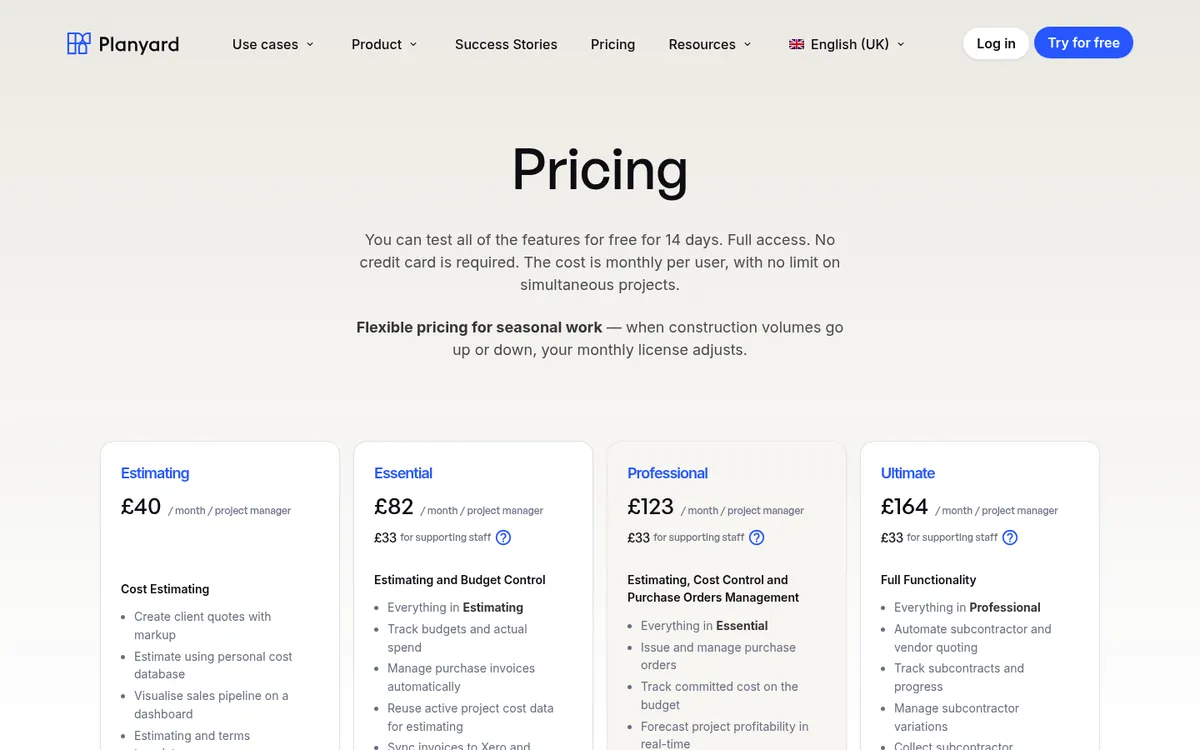

Planyard is construction cost control software for small and mid-sized contractors and developers. Each project has a live budget broken down by cost code, and every purchase order, subcontract and supplier invoice is booked against it. Committed and actual costs update as documents arrive, so the forecast final cost is up to date at any point in the month.
Bills and sales invoices sync with Xero, QuickBooks or Sage, so the accounts team stops re-keying them. From the Professional tier you get client valuations, variations and retention; Ultimate adds subcontractor payment applications, tenders and CVR version history. Cash flow forecasts build from invoice and payment dates from the Essential tier.
Planyard does not draw a Gantt chart. If your programme lives in Microsoft Project or Planner, keep it there and use Planyard for the money.
Best for: Contractors with several live jobs who run their accounts in Xero, QuickBooks or Sage and need job profit without spreadsheets.
Watch out for: No scheduling, no takeoff. Purchase orders and invoice approval workflows start at the Professional tier.
Pricing: Estimating £40, Essential £82, Professional £123, Ultimate £164 per project manager per month; supporting staff £33; Enterprise by quote. 14-day free trial. See pricing.
"Timewise, on a single project, I'd probably save 6 to 8 hours—essentially a full day every month. When it comes to processing monthly payments, it saves me a solid day, perhaps even a day and a half, just in sorting through the invoices. Saving a day and a half of my time means the system pays for itself time and time again."
Read more
Keep the programme, fix the cost report
Run budgets, purchase orders and invoices in Planyard and sync them with Xero, QuickBooks or Sage.
2. Buildertrend – Best for US Residential Builders Who Want One System

Buildertrend is an all-in-one platform for homebuilders and remodellers: schedules, client portal, proposals, estimates, budgets, job costing and change orders. It integrates with Xero, QuickBooks and Gusto. CoConstruct, which earlier versions of this article listed separately, is now fully part of Buildertrend and no longer a separate product.
It covers the programme and the budget in one place, which Microsoft Project cannot. The trade-off is price and focus: it is built for US residential work and priced in dollars.
Best for: Residential builders and remodellers who want scheduling, client communication and job budgets in one tool.
Watch out for: Priced in USD and aimed at the US market. Less suited to UK commercial work with valuations and retention. See Buildertrend vs Planyard and Buildertrend alternatives.
Pricing: Starting at $499 per month, with 10% off when you pay annually upfront.
3. Buildxact – Best for Small Builders Who Estimate and Schedule
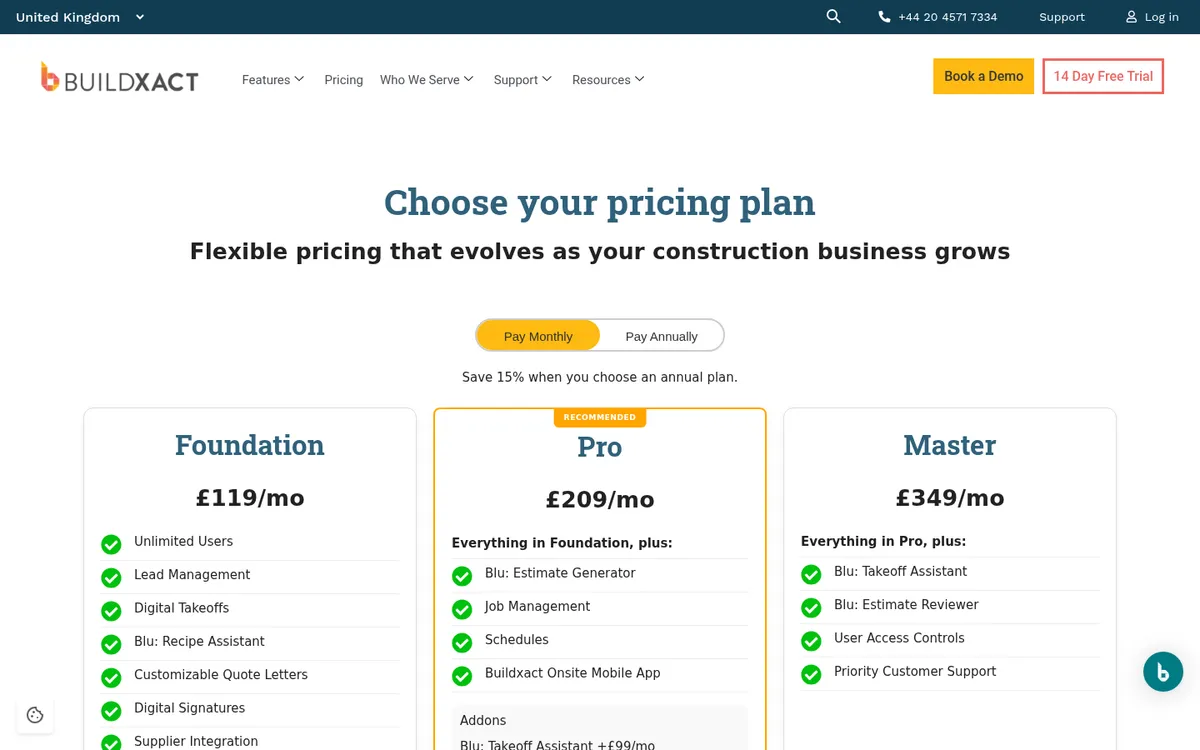
Buildxact combines takeoff, estimating and quoting with job management. Schedules and job management come with the Pro plan, purchase orders are on every plan, and all plans include unlimited users. It syncs invoices and purchase orders with Xero, QuickBooks or MYOB.
For a small builder moving off Microsoft Project, Buildxact Pro replaces the programme and adds estimating and cost tracking in the same tool.
Best for: Small residential builders and renovators who price jobs from drawings and want a simple schedule.
Watch out for: Schedules need Pro or above. Cost reporting is lighter than a dedicated cost control tool once you run several subcontract packages. See Buildxact vs Planyard.
Pricing: Foundation £119, Pro £209, Master £349 per month on monthly billing; annual plans are 15% cheaper. Unlimited users. VAT extra.
4. Procore – Best for Large Contractors Running Procore on Site

Procore is a full construction management platform with project management, quality and safety, and a financials suite covering budgets, commitments and change events. Every contract includes unlimited users.
It replaces Microsoft Project and much more, which is why it suits contractors with project teams large enough to use it fully.
Best for: Main contractors with large project teams who want site, document and financial workflows in one system.
Watch out for: Annual contract priced on the products you buy and your annual construction volume, so it is a big commitment for a small firm. See Procore vs Planyard and Procore alternatives.
Pricing: Quote only. Procore charges an upfront annual fee by product, based on annual construction volume.
5. Jonas Construction Software – Best for North American Specialty Contractors Needing an ERP

Jonas Construction is a construction ERP covering accounting, payroll, job costing, purchase orders, service management and project management, including scheduling, change orders, RFIs and daily logs. It is aimed at mechanical, electrical, plumbing and other specialty contractors.
Jonas replaces your accounting system as well as Microsoft Project. That is a bigger project than most firms looking for a Project alternative intend.
Best for: Established specialty and service contractors in North America who want accounting, payroll and job costing in one system.
Watch out for: Support is North America based, and it replaces your accounts rather than connecting to Xero, QuickBooks or Sage.
Pricing: Quote only; Jonas publishes no prices.
6. eSUB – Best for US Commercial Subcontractors

eSUB is cloud project management software for commercial trade subcontractors (electrical, HVAC, mechanical, plumbing, concrete and others). It covers daily reports, time tracking, document control, RFIs, submittals, change orders, purchase orders, progress billing and job costing.
It replaces the field and project side of Microsoft Project for subcontractors, with job costing that tracks labour against budget.
Best for: US commercial subcontractors who need field reporting and job costing together.
Watch out for: Built for the US subcontractor market. No published pricing.
Pricing: Quote only.
How We Chose
We looked for tools that cover the gap Microsoft Project leaves: job budgets, committed costs, invoices and a link to accounting software. Each one had to be a current product, sold today, and every price was checked on the vendor’s own pricing page in October 2026. Where a vendor publishes no price, we say so. CoConstruct was removed because it is now part of Buildertrend. Planyard is our own product; we have described what it does not do as plainly as the others.
Which Microsoft Project Alternative Should You Choose?
- You only need a programme: Planner Plan 1 at £7.70 per user is the cheapest way to stay in Microsoft 365.
- You need the programme and job costs in one tool, residential: Buildxact (UK pricing) or Buildertrend (US pricing).
- You run large projects with big site teams: Procore.
- You want accounting, payroll and job costing in one ERP and work in North America: Jonas.
- Your programme is fine but you cannot see job profit until month end: keep Project or Planner and add Planyard on top of Xero, QuickBooks or Sage.
"I have saved a lot of time! It’s so much easier now that I am less reliant on Excel. When we’ve been awarded a project and we’ve uploaded the project on Planyard, I don’t need to look at spreadsheets anymore. I can just ignore Excel after that point…"
Read more
Conclusion
Microsoft Project is still a capable scheduler, and with Project Online gone the choice is now between Planner, Project desktop or something else. If the real problem is that nobody can say what a job will make, a new scheduler will not fix it. Put the budget, purchase orders, subcontracts and invoices in one place that talks to your accounts. Brown & Bancroft did that and now run live CVRs instead of rebuilding spreadsheets each month.
See every job's margin without a spreadsheet
Try Planyard free for 14 days, or book a demo and bring one of your live jobs.