
Last verified: October 2026
Xero Projects lets you track time and costs against a job and invoice from them, inside the accounting software many contractors already use. For a joiner billing day rates, that can be enough. For a contractor with subcontract packages, purchase orders and monthly valuations, it usually is not.
This guide covers what Xero Projects costs in the UK today, what it does well, where it falls short for construction, and five alternatives that connect to Xero while handling the project side properly.
"Xero does have a purchase order system, but it wasn't geared towards a construction business or the way we actually operate."
Read more
Xero Projects and Alternatives: Quick Comparison
Prices are per month as published by each vendor in October 2026, excluding VAT, on monthly billing.
| Tool | Best for | Purchase orders | Subcontracts and retention | Accounting link | From | Verdict |
| Xero Projects | Small trades billing time and materials | Not against the job | No | Built into Xero | £70 (Ultimate plan, 10 Projects users) | Fine for simple jobs, thin for contractors |
| Planyard | Contractors with subcontract packages | Yes, from Professional | Yes, from Professional | Xero, QuickBooks, Sage (two-way) | £82 per PM (£40 Estimating) | Best for cost control on top of Xero |
| Buildxact | Small residential builders | Yes | Not a focus | Xero, QuickBooks, MYOB | £119 (unlimited users) | Strong on estimating and quotes |
| Buildertrend | US residential builders | Yes | Not a focus | Xero, QuickBooks | $499 (USD) | All-in-one for homebuilders |
| Tradify | Trades running many small jobs | Not listed | Not a focus | Xero, QuickBooks, Sage | £34 per user | Simple job management |
| Fergus | Trades with office and field staff | Yes | Not a focus | Xero, QuickBooks, MYOB | £39 | Job management with good reporting |
What Xero Projects Does
Xero Projects is a module inside Xero for tracking project profitability. You set an estimate for each project, record time and costs against it, and invoice the client from what you have tracked. Everything sits in the same Xero file as your bank feeds and VAT.
- Time tracking: start and stop timers or manual entries in the Xero Projects app, charged at the rates you set.
- Expenses and costs: bills and expenses assigned to a project and compared against the estimate.
- Invoicing: invoices raised from tracked time, costs and fixed-price tasks.
- Reporting: project profitability reports from the same data as your accounts.
Xero Projects Pricing in the UK
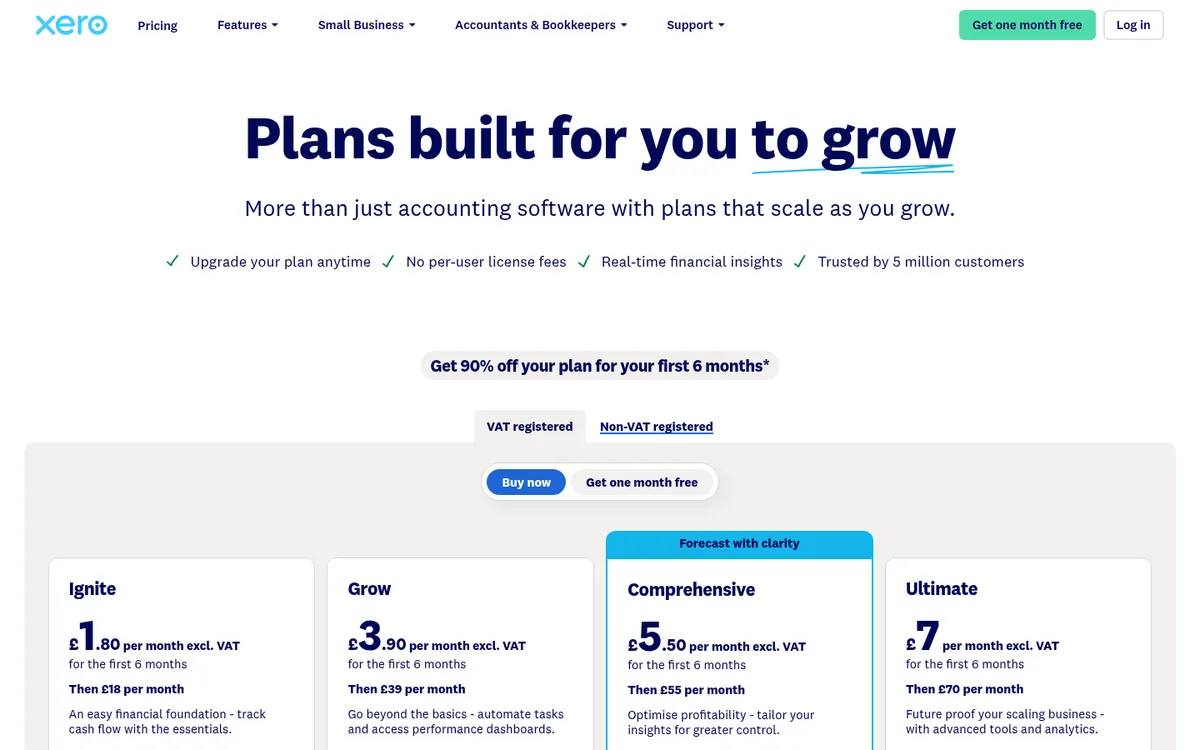
In the UK, Projects comes only with Xero Ultimate, at £70 a month excluding VAT, and cannot be added to a cheaper plan. Ultimate includes Projects for 10 users, and each additional Projects user costs £5 a month. The other plans are Ignite at £18, Grow at £39 and Comprehensive at £55, none of which include Projects. Filing contractor CIS returns is a £5 a month add-on on any plan.
Xero’s pricing page often shows an introductory discount for new customers. The figures above are the regular prices that apply afterwards.
Where Xero Projects Falls Short for Contractors
- Purchase orders and subcontracts: you cannot raise a purchase order or subcontract against a project budget and see committed cost, so what is ordered but not yet invoiced is invisible until the bill arrives.
- Cost codes: a project has an estimate, not a cost-coded budget with packages, so you cannot see which trade or element is overrunning.
- Valuations and retention: there is no client valuation or subcontractor payment application workflow, and retention is tracked outside Xero.
- Permissions: users report that controlling which staff can see project financials is awkward, which matters once site teams log time.
- Forecasting: you see profit to date, not a forecast final cost for the job.
Many contractors work around these gaps with tracking categories and spreadsheets. Our guide to job costing in Xero explains how far that gets you. The other route is a construction tool that keeps Xero as the ledger.
The 5 Best Xero Projects Alternatives That Integrate With Xero
1. Planyard – Best for Cost Control on Top of Xero
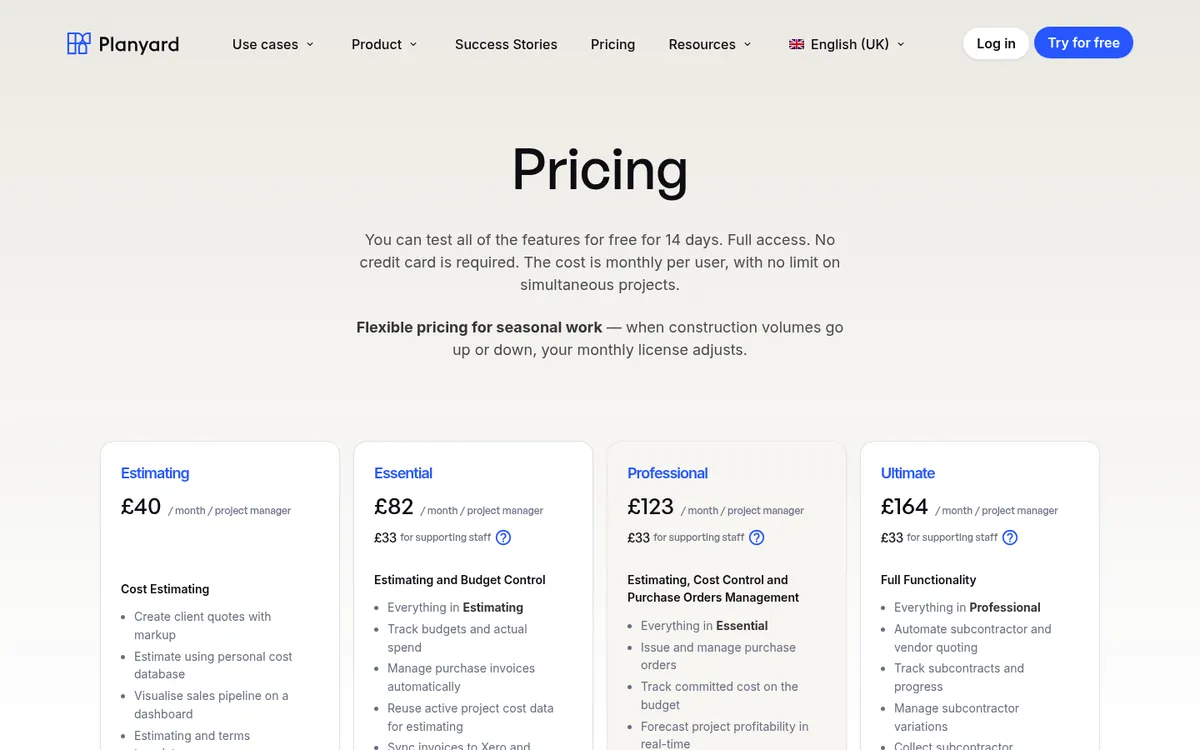

Planyard is construction cost control software for small and mid-sized contractors. Each project has a budget by cost code. Purchase orders, subcontracts and supplier invoices are booked against it, so committed cost, actual cost and forecast final cost stay current.
Invoices can arrive straight from your accounts payable inbox, OCR reads them, and they are matched to the project, supplier and budget line before an approver signs them off. Approved bills sync to Xero with the right tracking, and sales invoices come back the other way. From the Professional tier you get client valuations, variations and retention; Ultimate adds subcontractor payment applications, tenders, CVR version history and limited roles for site teams.
Planyard does not file CIS returns: it sets the labour and materials split on the subcontract order, and Xero applies the deduction and files. See Xero Projects vs Planyard for a side-by-side.
Best for: Contractors on Xero with several live jobs, subcontract packages and a need for job margins without spreadsheets.
Watch out for: No takeoff or Gantt scheduling. Purchase orders, OCR and approval workflows start at the Professional tier.
Pricing: Estimating £40, Essential £82, Professional £123, Ultimate £164 per project manager per month; supporting staff £33; Enterprise by quote. 14-day free trial. See pricing.
"We had to get our accountant on board and interface it with Xero, so invoices hit the right job number. Now an invoice gets uploaded in Planyard, I sign it off, and it drops into my Xero payment schedule in three or four weeks – it’s perfect."
Read more
Keep Xero. Add the project side it is missing.
Budgets, purchase orders, subcontracts and invoices in Planyard, synced both ways with Xero.
2. Buildxact – Best for Small Residential Builders
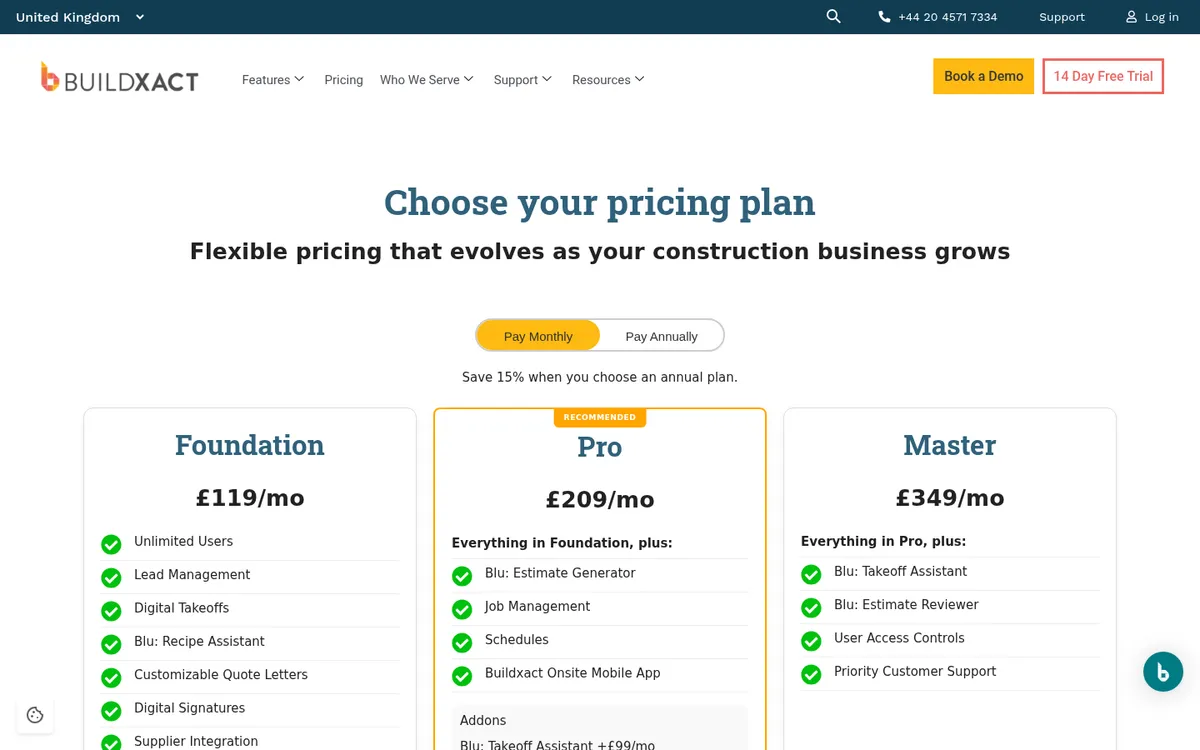
Buildxact combines takeoff, estimating and quoting with job management. Purchase orders are on every plan, schedules and job management come with Pro, and every plan includes unlimited users. Invoices and purchase orders sync with Xero, QuickBooks or MYOB.
For a builder who wins work on the strength of fast, accurate quotes, it covers more of the job than Xero Projects does.
Best for: Small residential builders and renovators who price from drawings.
Watch out for: Cost reporting is lighter than a dedicated cost control tool; no subcontract valuation workflow listed. See Buildxact vs Planyard.
Pricing: Foundation £119, Pro £209, Master £349 per month on monthly billing; annual plans are 15% cheaper. VAT extra.
3. Buildertrend – Best for US Residential Builders

Buildertrend covers schedules, client portal, proposals, estimates, budgets, job costing and change orders, and integrates with Xero, QuickBooks and Gusto. CoConstruct, which this article used to list separately, is now fully part of Buildertrend.
It suits homebuilders who want one system from sale to handover.
Best for: Residential builders and remodellers, mainly in the US.
Watch out for: Priced in USD and built around US residential work; heavy for a UK commercial contractor. See Buildertrend vs Planyard and Buildertrend alternatives.
Pricing: Starting at $499 per month, with 10% off when you pay annually upfront.
4. Tradify – Best for Trades Running Many Small Jobs

Tradify is job management for trade businesses: quoting, scheduling, job tracking, timesheets, and invoicing, including progress invoicing. It syncs two ways with Xero and Sage, and with QuickBooks Online.
It is closer to Xero Projects in spirit than the other tools here, with better scheduling and mobile apps for the field.
Best for: Electricians, plumbers and other trades with lots of short jobs.
Watch out for: Per-user pricing adds up as the team grows, and it is not built for subcontract packages or valuations.
Pricing: From £34 per user per month, month to month with no contract.
5. Fergus – Best for Trades With Office and Field Staff

Fergus is job management software for trade businesses with quoting, job cards, scheduling, timesheets, purchase orders, supplier integrations, invoicing and reporting. It connects to Xero, QuickBooks and MYOB.
Its reports cover quotes, customer invoices, supplier documents, staff time and business financials, which suits trades that have outgrown Xero Projects but do not need construction cost control.
Best for: Trade contractors with a small office team and field staff.
Watch out for: Built for service and trade work, not main contracting. Contractor and timesheet users are charged on top.
Pricing: Essentials £39 and Professional £45 per month; timesheet users from £12 a month; Enterprise for 10+ staff by quote. Check the pricing page for introductory offers.
How We Chose
Every tool here had to connect to Xero, so you can keep Xero as your ledger. We checked each price and plan name on the vendor’s own pricing page in October 2026. We removed CoConstruct, which is now part of Buildertrend, and Houzz Pro, whose pricing page lists a QuickBooks Online integration but no Xero integration. Planyard is our own product, and we have listed what it does not do.
Xero Projects or an Alternative?
- You bill time and materials on small jobs and already pay for Xero Ultimate: Xero Projects is included, so start there.
- You run lots of short trade jobs: Tradify or Fergus.
- You build homes and win work on quotes: Buildxact in the UK, Buildertrend in the US.
- You manage subcontract packages, purchase orders and monthly valuations: Planyard on top of Xero. See also our Xero alternatives for construction.
"All in all, between the two of us on the finance side, we are saving 10 to 12 hours every single day. The administrative time savings have been immense."
Read more
Conclusion
Xero Projects is a reasonable way to track time and costs on simple jobs, and it is included if you already pay for Ultimate. Once a job has subcontract packages, purchase orders and valuations, it cannot show what is committed or what the job will finish at. Keeping Xero as the ledger and adding a construction tool on top is usually cheaper and less disruptive than replacing it. E&N Group in London did exactly that: read how they set up Planyard with Xero.
See committed costs on every job, synced with Xero
Try Planyard free for 14 days, or book a demo with one of your live projects.