
A project QS opens their budget spreadsheet on Monday. Three orders went out last week. Two variations came in. An invoice batch hit on Friday. None of it is in the budget yet. The numbers on screen are already wrong – and everyone making decisions from them doesn’t know it.
That gap is what budget monitoring exists to close. This guide walks through the full project lifecycle – from tender breakdown to final account.
What this guide covers:
- Budget setup – cost code structure, client vs internal budgets, contingency
- Procurement & commitments – how orders and subcontracts feed the budget
- Variations & change – tracking adjustments before they become surprises
- Forecasting EAC – estimate at completion from commitments + actuals
- Month-end CVR – turning budget data into a live position, not a report
Setting Up the Project Budget
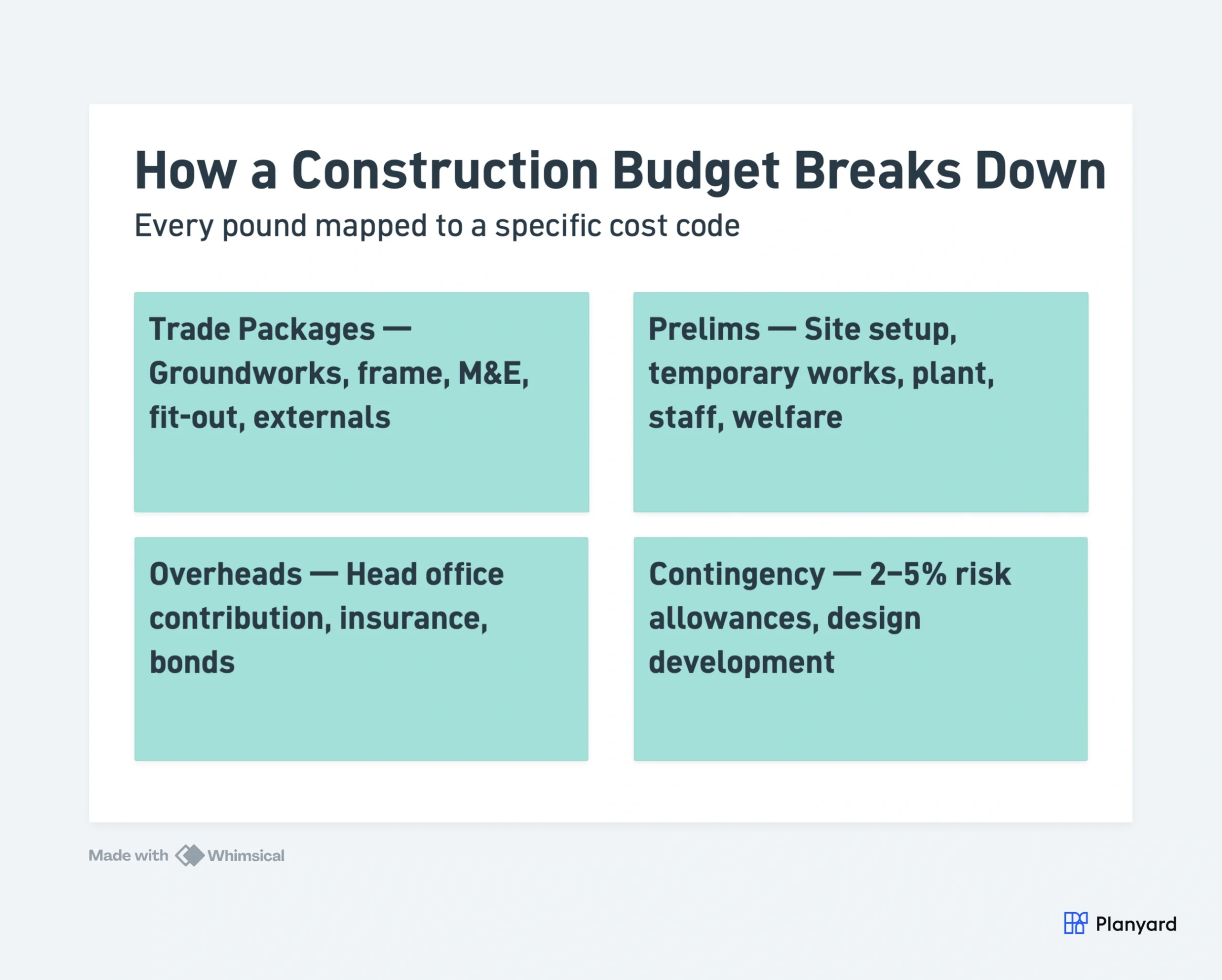
Every budget starts with the tender. The winning bid gets broken into cost codes – typically by trade package plus prelims, overheads, and design fees. This baseline is what everything else measures against.
Two budgets exist from day one:
- Client budget – what the contractor expects to receive through valuations
- Internal budget – what the contractor expects to spend (the gap = target margin)
Getting the structure right here determines whether tracking is useful or painful for the rest of the project.
The commercial manager or senior QS owns the structure. Too broad and you can’t see where money leaks – too granular and admin kills the benefit.
Contingency and Risk Allowances
Every budget should carry contingency – typically 2-5% depending on complexity. The key: make risk allowances explicit rather than buried in package rates. Visible contingency lets the team track how it’s consumed as risks materialise or close out.
"Planyard takes your project budget and puts it very clearly on screen, allowing you to account for all your costs, invoices, and receipts as you process them before they even reach the accounting department. This gives you a live, real-time picture of exactly where your project budget stands at any given point."
Read more
Procurement and Commitments
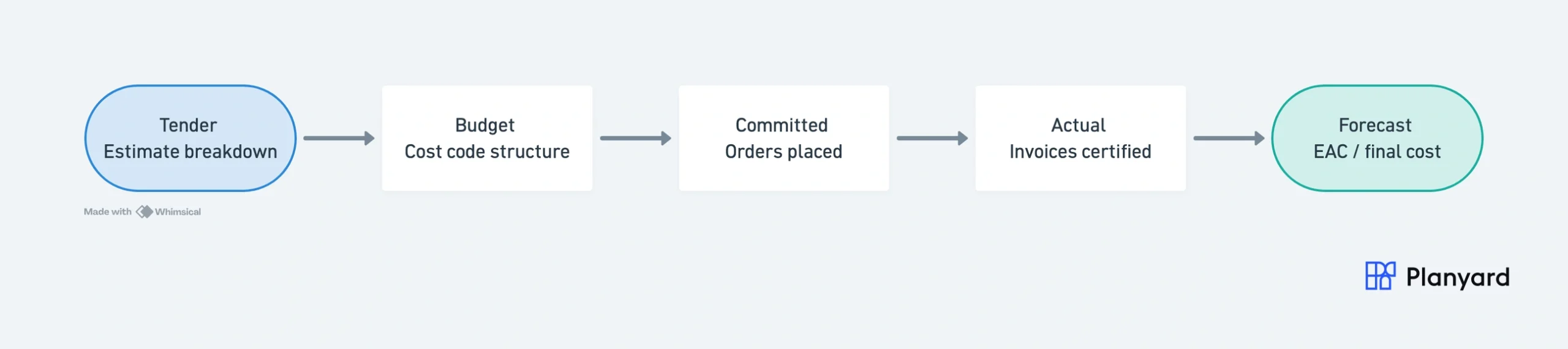
Once the budget is set, procurement converts budget lines into real commitments. This is where the budget becomes a live financial instrument – and where many teams lose visibility.
From Budget to Orders
Each budget line becomes one or more procurement packages. The team tenders, evaluates, negotiates, and places orders. The moment an order is issued, that budget line has a committed value – even though no invoice has arrived.
A budget line with £200k allowance and a £180k committed order has a £20k saving – but only if you track committed costs separately from actuals. Without commitment tracking, that saving only surfaces when the final invoice arrives months later.
The Four Budget States
Professional budget tracking distinguishes four cost states for every line:
- Budget: The original allowance from the tender/estimate
- Committed: Orders and contracts issued (what you owe regardless of invoicing)
- Actual: Invoiced and certified amounts (what you have paid or will pay)
- Forecast: Where you expect the final cost to land (committed + anticipated future costs)
Budget vs committed = procurement performance. Committed vs actual = invoicing progress. Budget vs forecast = predicted margin – the number directors care about most.
"With Planyard, there's better visibility of everything – from raising the purchase order through to paying all our suppliers and subcontractors, retention management, and sales invoices. At a glance, I can see everything. Before, it was shrouded in a veil of mystery – you had to dig deep and click on five different menus before you got anywhere."
Read more
Monthly Monitoring: Actuals vs Forecast
The monthly cycle is where budget tracking produces real value. Each month, the QS collects actuals, updates the forecast, and reports the financial position.
Sources of Actual Cost Data
Actuals come from several sources: subcontractor valuations (monthly applications certified against each package), supplier invoices (materials, plant hire, consumables), and daywork/labour records (direct costs, agency staff, signed daywork sheets).
Prelim actuals – site running costs, plant fuel, temporary works – often get overlooked but erode margin quickly. Overhead allocations complete the picture.
Key Metrics
The numbers that matter:
- EAC – Estimate at Completion (forecast total cost at project end)
- Variance – gap between budget and forecast (positive = saving, negative = overrun)
- Margin – client value minus forecast cost
- Cost to complete – anticipated remaining spend from today to completion
These feed directly into the CVR – the commercial team’s primary health check. Budget tells you where you planned to be. Forecast tells you where you’re heading. The gap = what commercial management exists to manage. For a full explanation, see how CVRs work in construction.
The Monthly Cycle
A typical monthly budget review follows this pattern:
- Collect all cost data (invoices, valuations, daywork, accruals)
- Update committed costs with any new orders or variations
- Review cost to complete on each package
- Calculate EAC and variance for every budget line
- Prepare CVR report comparing cost against value
- Report exceptions to directors (overruns, risk items, opportunities)
In a spreadsheet-based workflow, steps 1-4 alone can consume two to three days of QS time per project. In a connected system, most of it happens automatically as data flows through.
"CVRs are so much easier to manage because the information is there and it’s live. It’s reduced mistakes as well because we have the information there at our fingertips and it never gets forgotten about. So it’s saved time and money, really."
Read more
Managing Change: Variations and Scope Creep
No construction project finishes exactly as tendered. Changes happen constantly – client instructions, design development, unforeseen conditions, subcontractor claims. How these changes flow through the budget determines whether you lose margin or capture it.
Client Variations (Adding Value)
When the client instructs a change, it should add to both the cost budget and the value (client contract sum). Under JCT contracts, these are formal variations. Under NEC contracts, they are compensation events. Either way, the commercial team must price the change, agree it with the client, and reflect both the additional cost and value in the budget.
Subcontractor Variations (Increasing Cost)
When a subcontractor claims for additional work, it increases cost without necessarily adding value. The QS must assess whether the claim is valid, whether it’s recoverable from the client, and how it affects the forecast. Untracked subcontractor variations are one of the biggest causes of margin erosion.
The Danger of “Sort It at Final Account”
The worst outcome is changes that happen on site but never make it into the budget system until final account. By then, memory has faded, records are incomplete, and entitlement that should have been captured is lost. Good budget tracking means changes hit the forecast the same week they happen – not six months later.
Track budgets and commitments in real time
Orders, variations, and invoices update your project budget automatically. No more month-end assembly. No credit card required.
Common Budget Tracking Methods
How you track budgets depends on your scale, team size, and growth trajectory. Here’s how the common approaches compare:
| Method | Pros | Cons | Best for |
|---|---|---|---|
| Excel/Sheets | Flexible, free, familiar | Version issues, manual, no audit trail | 1-3 projects |
| Accounting software (Xero/Sage) | Good for actuals | No commitments, no forecast | Finance view only |
| ERP (COINS, Sage Intacct) | Comprehensive | Expensive, slow to implement, rigid | Enterprise (50+ projects) |
| Commercial platform (Planyard) | Purpose-built, fast setup, integrated | Focused on commercial (not site ops) | Growing contractors (5-50 projects) |
The inflection point typically comes at 3-5 live projects. Below that, a well-structured spreadsheet can work if the QS is disciplined. Above that, the version control issues, lack of commitment tracking, and reporting lag make spreadsheets a liability rather than a tool.
For a detailed comparison of purpose-built tools, see our guide to construction budgeting software.
What Good Budget Tracking Looks Like
Regardless of tool, effective budget tracking in construction shares these characteristics:
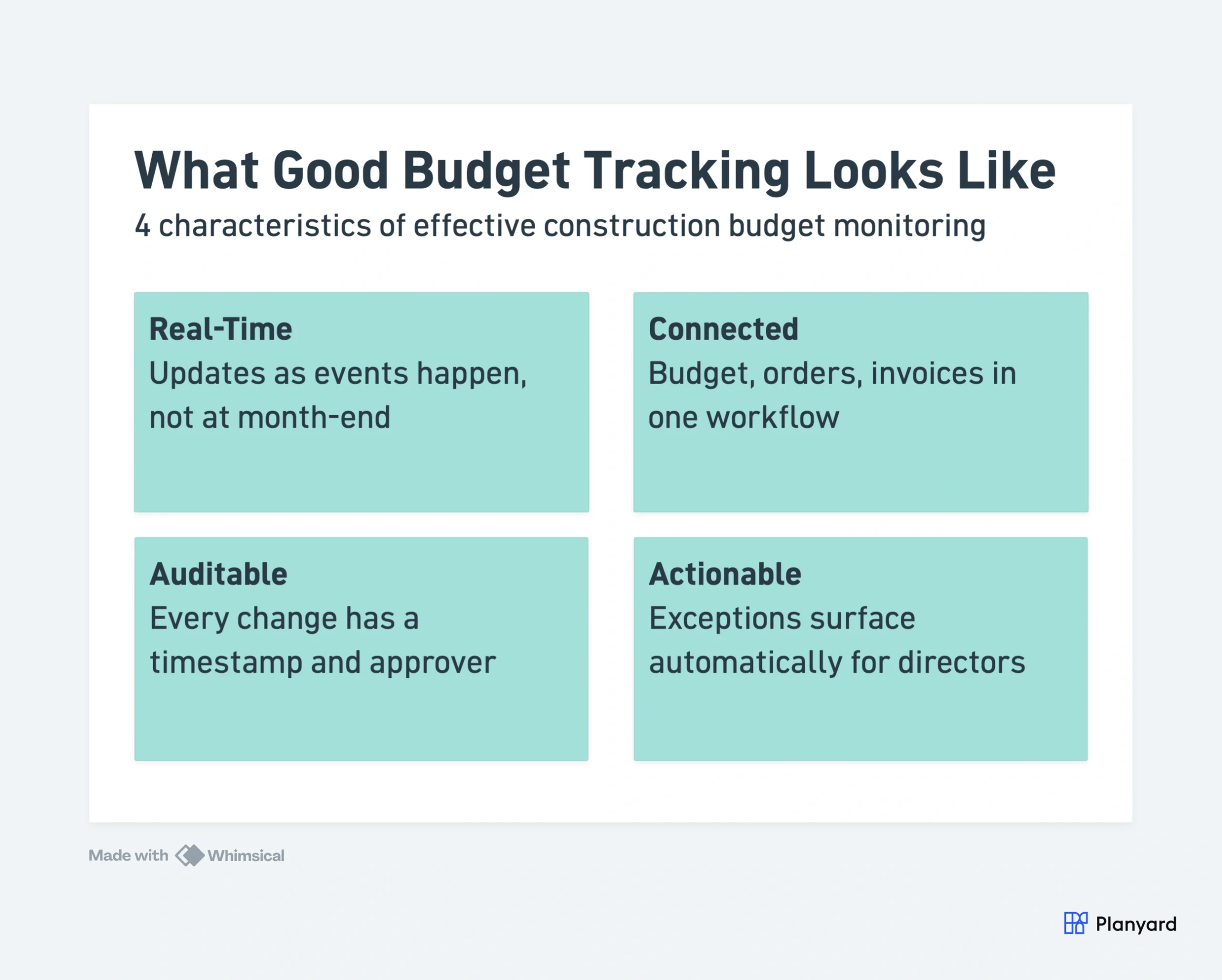
Real-Time
The budget updates as events happen – when an order is placed, when an invoice is approved, when a variation is instructed. Not at month-end when a QS manually enters everything. Real-time means the numbers are always current, and decisions are made on today’s data.
Connected
Budget, orders, invoices, and ledger live in one workflow. A purchase order raised against a budget line automatically updates committed cost. An approved invoice moves the number from committed to actual. No re-keying, no reconciliation, no “I’ll update the spreadsheet on Friday.”
Auditable
Every change has a timestamp, a reason, and an approver. When the budget shifts, you can trace exactly what changed, when, and who authorised it. This matters for internal governance and for final account negotiations where you need to demonstrate the history of cost movement.
Actionable
Directors see exceptions without asking for reports. If a package is trending 10% over budget, that surfaces automatically – not buried in a spreadsheet that nobody looks at until the monthly board meeting. The system highlights problems early enough to act on them.
Forecastable
Tracking where you are is necessary but not sufficient. Good budget tracking also tells you where you’re heading – the forecast. This means maintaining cost-to-complete estimates on every package and rolling them up into an EAC that directors can rely on for business decisions.
"We wanted to know before a project finished whether we were going to make a profit or not. Planyard has allowed us to do that. We can see exactly which jobs are profitable and which ones are not and can make changes on the go."
Read more
Getting Started: Moving from Spreadsheets
If your team is ready to move beyond spreadsheets, the transition doesn’t need to be painful. Most successful implementations follow this pattern:
- Pilot on one project: Pick a project that’s early in its lifecycle (ideally pre-procurement). Set up the budget structure, raise orders, and run it in parallel with your existing process for one month.
- Migrate data: Upload your existing budget breakdown. Most platforms accept CSV exports from Excel. The key data is cost codes, budget values, and any existing commitments.
- Connect your accounting: Link to Xero, QuickBooks, or Sage so approved costs flow through without double entry.
- Roll out gradually: Once the pilot project is running cleanly, bring the next 2-3 projects online. Don’t try to migrate everything at once.
The goal isn’t to change how your commercial team thinks about budgets – it’s to give them a tool that matches their existing workflow while eliminating the manual assembly and version control problems that spreadsheets create.
For more context on the challenges that drive teams to make this switch, see 5 biggest challenges for construction commercial teams. For a free starting point, grab our construction budget template.
Further Reading
- What is Commercial Management in Construction?
- 5 Biggest Challenges for Construction Commercial Teams
- Construction Cost Value Reconciliation (CVRs) Explained
- Free CVR Template for Excel
- Best Construction Budgeting Software
- Construction Budget Template
- Commercial Construction Management Software
See how commercial teams track budgets in real time
Planyard connects your budget, orders, and invoices in one workflow – live visibility from day one, not month-end. No credit card required.