
You have got 12 subcontractors across 3 projects.
Bids come in via email, contracts live in shared drives, payment applications arrive as PDFs, and you are cross-referencing everything in spreadsheets. When a sub disputes a valuation, you are digging through email threads from six months ago.
This guide compares 7 subcontractor management tools for UK main contractors – covering tender management, contract admin, payment tracking, and integration with your accounting software.
What Is Subcontractor Management Software?
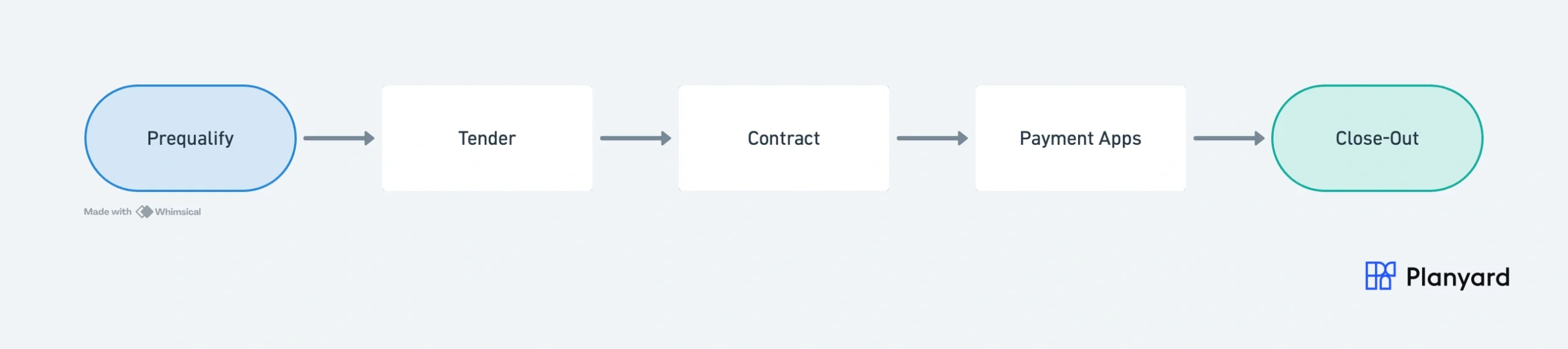
Subcontractor management software handles the full commercial lifecycle between a main contractor and their subcontractors. It is not project management software (which covers scheduling, documents, and coordination). It is specifically focused on:
- Finding and prequalifying subcontractors
- Running tenders and comparing bids
- Issuing subcontracts
- Processing monthly payment applications
- Managing retention and variations
- Closing out and releasing retention at practical completion
The distinction matters. Many “construction software” tools focus on scheduling and document management but leave the commercial side to spreadsheets. If your biggest pain is tracking payments, contracts, and valuations across multiple subs – you need a tool built for that specifically.
Key Features to Look For
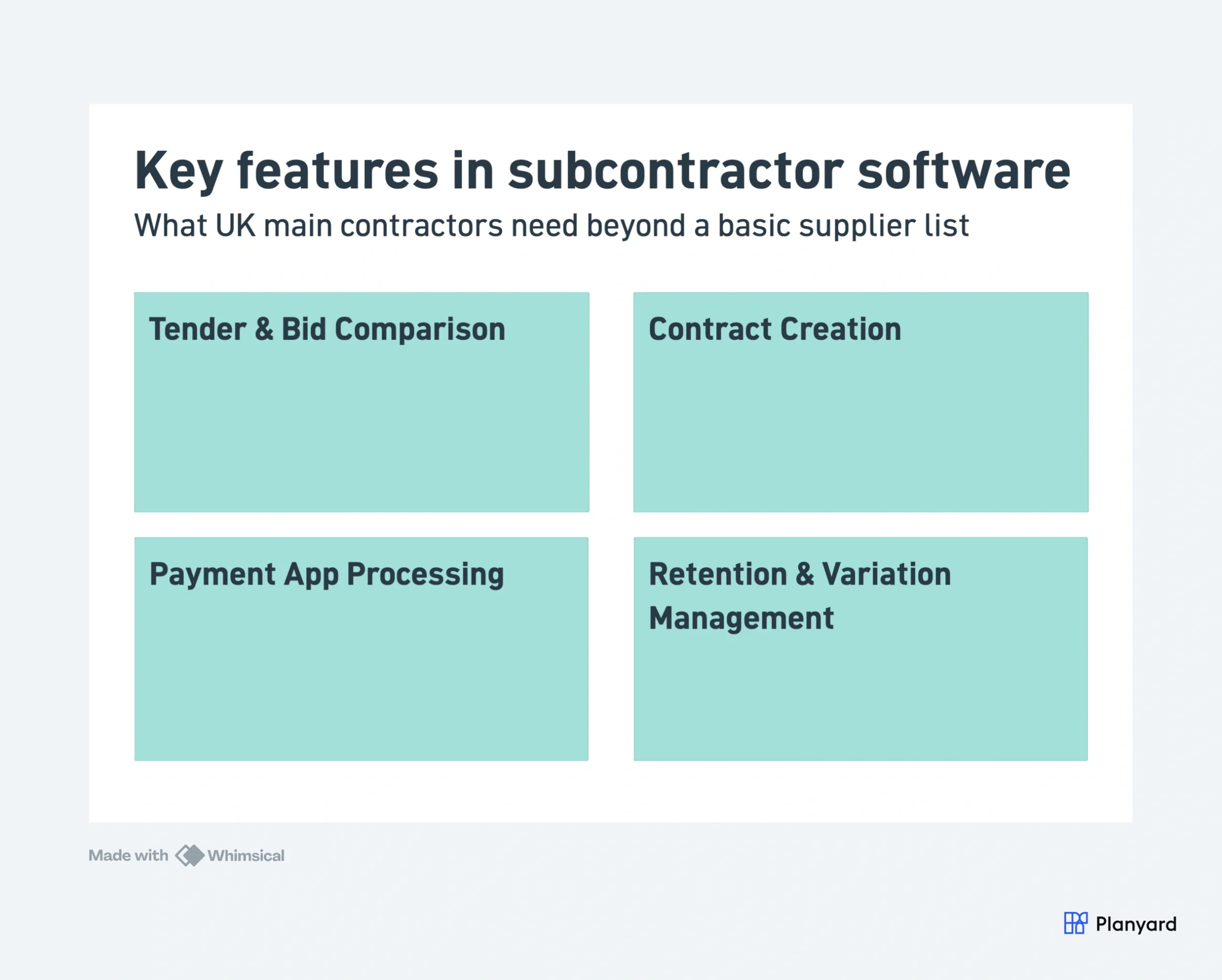
Not all subcontractor management tools cover the same ground. Here are the features that matter most for UK main contractors:
- Subcontractor database – a CRM for your supply chain with trade categories, certifications, and performance history
- Tender and bid comparison – issue RFQs to multiple subs and compare returns side-by-side
- Contract creation and signing – generate subcontracts from templates, send for e-signature
- Payment application processing – subcontractors submit valuations through a portal, you review and approve
- Retention tracking – automatic retention hold and release at agreed milestones
- Change order and variation management – track variations against the original subcontract value
- Accounting integration – sync approved payments to Xero, Sage, or QuickBooks with CIS deductions applied
The 7 Best Subcontractor Management Tools (2026)
1. Planyard – Best for SME Main Contractors
Planyard covers the full subcontractor lifecycle from tender to final payment. Subcontractors get their own portal to submit payment applications, which are then matched against purchase orders and contracts. Approved payments sync directly to Xero or QuickBooks with CIS deductions applied.
Where Planyard stands out for UK SME contractors is the combination of depth and simplicity. You get proper tender management, contract administration, and payment processing without the 6-month implementation project that comes with enterprise platforms.
Best for: UK main contractors (5-50 staff) managing 5-30 subcontractors per project who want a single system from tender to payment.
Key sub-management features:
- Issue RFQs and compare bids side-by-side
- Subcontractor orders with scope, rates, and retention terms
- Subcontractor portal for payment application submission
- 3-way matching (contract, application, invoice)
- Retention tracking with automatic hold and release
- Two-way Xero and QuickBooks sync
Pricing: From 79 GBP per month. 14-day free trial.
Pros: Full lifecycle in one tool, fast setup, subcontractor portal reduces admin, native Xero sync.
Cons: Not a full project management platform (no scheduling, drawings, or RFIs). Best suited for the commercial side.
"A lot of the other subbies have just jumped straight onto it and clicked the link we sent them. They’ve been able to upload their valuations themselves."
Read more
2. Procore – Best for Large Main Contractors
Procore is a comprehensive construction management platform that includes subcontractor management as part of its broader offering. It handles commitments (subcontracts), payment applications, change events, and compliance documentation within the same ecosystem as your project documents and schedules.
For large UK contractors already using Procore for project management, adding the financial tools keeps everything in one platform. The trade-off is cost and complexity – Procore is built for organisations with dedicated commercial teams and project budgets above 5 million GBP.
Best for: Large main contractors (50+ staff) already on Procore who want subcontractor management integrated with their existing project management platform.
Key sub-management features:
- Commitments tracking (subcontracts and POs)
- Payment application workflows with approval chains
- Change event management with cost impact tracking
- Compliance and insurance certificate tracking
- Subcontractor prequalification questionnaires
- Integration with Sage and other ERPs
Pricing: Custom pricing. Typically 1,000+ GBP per month with annual contracts.
Pros: Full platform (PM + commercial), strong compliance tracking, widely used on large UK projects, good API.
Cons: Expensive, complex implementation, overkill for SME contractors, financial tools are add-on modules.
3. The Access Group – Best for Mid-to-Large UK Contractors
The Access Group (formerly COINS) offers a construction ERP with dedicated subcontractor management modules. It handles the full subcontract lifecycle including prequalification, order creation, monthly valuations, retention, and CIS – all within a UK-specific platform.
Access Construction is designed for organisations that need everything in one system with no third-party integrations. If you are a 50+ person contractor and want accounting, project management, and subcontractor management in a single ERP, Access is one of the few UK-specific options.
Best for: Mid-to-large UK main contractors (20-500 staff) who want a single ERP covering subcontractor management, accounting, and project administration.
Key sub-management features:
- Subcontractor prequalification and approved lists
- Subcontract creation with JCT/NEC templates
- Monthly valuation processing with withholding notices
- Native CIS deductions and HMRC returns
- Retention tracking across all contracts
- Integrated accounting (no external sync needed)
Pricing: Custom pricing, provided by quote. Typically enterprise-level. 3-6 month implementation.
Pros: Built for UK construction, native CIS, full ERP (no separate tools needed), strong compliance.
Cons: Expensive, long implementation, dated interface, requires dedicated admin, overkill for smaller contractors.
4. Buildern – Best for Residential Builders
Buildern is a construction project management platform with built-in subcontractor management features. It handles bids, contracts, work orders, and basic payment tracking. The platform is designed for residential and light commercial builders who want PM and sub management in one tool.
Buildern is particularly strong for builders who need client-facing features (proposals, selections, client portal) alongside subcontractor coordination. The sub management features are lighter than dedicated tools but sufficient for small builders managing 3-10 subs per project.
Best for: Residential builders and small contractors (1-15 staff) who want project management and basic sub management combined.
Key sub-management features:
- Bid requests and comparison
- Subcontract creation from templates
- Work order management
- Basic payment tracking
- Subcontractor scheduling integration
Pricing: From 99 USD per month (approximately 80 GBP).
Pros: Combines PM and sub management, client-facing portal, estimating tools included.
Cons: Limited payment application depth, no native CIS or UK valuation workflows, US-oriented (limited UK localisation).
5. Archdesk – Best for Growing Contractors
Archdesk is a UK-based construction management platform that covers project management, CRM, and subcontractor coordination. It is designed for growing contractors who are outgrowing spreadsheets but are not ready for enterprise ERP systems.
Archdesk handles subcontractor scheduling, work orders, and basic payment processing. It is strongest for contractors who need to manage their supply chain alongside project delivery and sales pipeline. The sub management features are not as deep as Planyard or Access Group but are integrated with broader operational tools.
Best for: Growing UK contractors (10-50 staff) who want operational management (CRM, scheduling, finance) alongside basic sub management.
Key sub-management features:
- Subcontractor database with categorisation
- Work order creation and tracking
- Basic payment management
- Scheduling with resource allocation
- Integrated CRM for supply chain relationships
Pricing: By quote, from around 690 GBP per month for small teams.
Pros: UK-based, combines operations and sub management, CRM included, good for growing businesses.
Cons: Sub management lighter than dedicated tools, no subcontractor portal for self-service, limited payment application workflow.
Manage subcontractors from tender to final payment
Planyard handles RFQs, contracts, payment applications, and retention – with a portal your subs actually use. 14-day free trial.
6. Contractor Foreman – Best Budget Option
Contractor Foreman is an affordable construction management platform that includes basic subcontractor management features. It handles subcontractor databases, work orders, and scheduling at a price point accessible to very small contractors.
The sub management features are basic compared to dedicated tools – no payment application portal, limited tender management, and no retention tracking. But for sole traders or very small builders who need a cheap way to organise their subcontractor relationships, it covers the fundamentals.
Best for: Very small contractors (1-5 staff) on a tight budget who need basic subcontractor organisation alongside simple project management.
Key sub-management features:
- Subcontractor contact database
- Work order creation
- Scheduling with sub assignment
- Document sharing
- Basic invoicing
Pricing: From 49 USD per month (approximately 40 GBP).
Pros: Very affordable, easy to start, covers basics, includes other PM features at the price.
Cons: No payment application portal, no retention tracking, no tender management, limited UK localisation, basic overall.
7. eSUB – Best for Specialty Subcontractors
eSUB is designed specifically for subcontractors to manage their own work – daily reports, change orders, time tracking, and project documentation. It flips the perspective from “managing subs” to “helping subs manage themselves.”
Including eSUB here because if you are a specialist subcontractor reading this guide looking for tools to manage your own operations (rather than a main contractor managing others), eSUB is purpose-built for that. It does not help main contractors manage their supply chain.
Best for: Specialist subcontractors (M&E, groundworks, roofing) who want to manage their own projects, daily logs, and change orders.
Key features (for subs):
- Daily reporting and time tracking
- Change order tracking and documentation
- T&M ticket management
- Project photo documentation
- Integration with main contractor platforms
Pricing: Custom pricing. Typically from 49 USD per user per month.
Pros: Purpose-built for subcontractors, excellent daily reporting, strong change order documentation.
Cons: Not for main contractors managing subs, US-focused, limited UK presence, niche use case.
Comparison Table
| Feature | Planyard | Procore | Access Group | Buildern | Archdesk | Contractor Foreman | eSUB |
| Tender management | Yes | Yes | Yes | Basic | No | No | No |
| Contract creation | Yes | Yes | Yes | Yes | Basic | No | No |
| Payment app portal | Yes | Yes | Yes | No | No | No | No |
| Retention tracking | Yes | Yes | Yes | No | No | No | No |
| Change orders | Yes | Yes | Yes | Basic | Basic | No | Yes (sub side) |
| Xero/Sage sync | Xero + QBO | Via connector | Built-in accounting | No | Basic | No | No |
| CIS support | Via Xero | Limited | Native | No | No | No | No |
| Pricing (GBP/mo) | From 79 | 1,000+ | 500+ | ~80 | ~200 | ~40 | Custom |
| Best company size | 5-50 staff | 50+ | 20-500+ | 1-15 | 10-50 | 1-5 | Subcontractors |
How to Choose Based on Your Setup
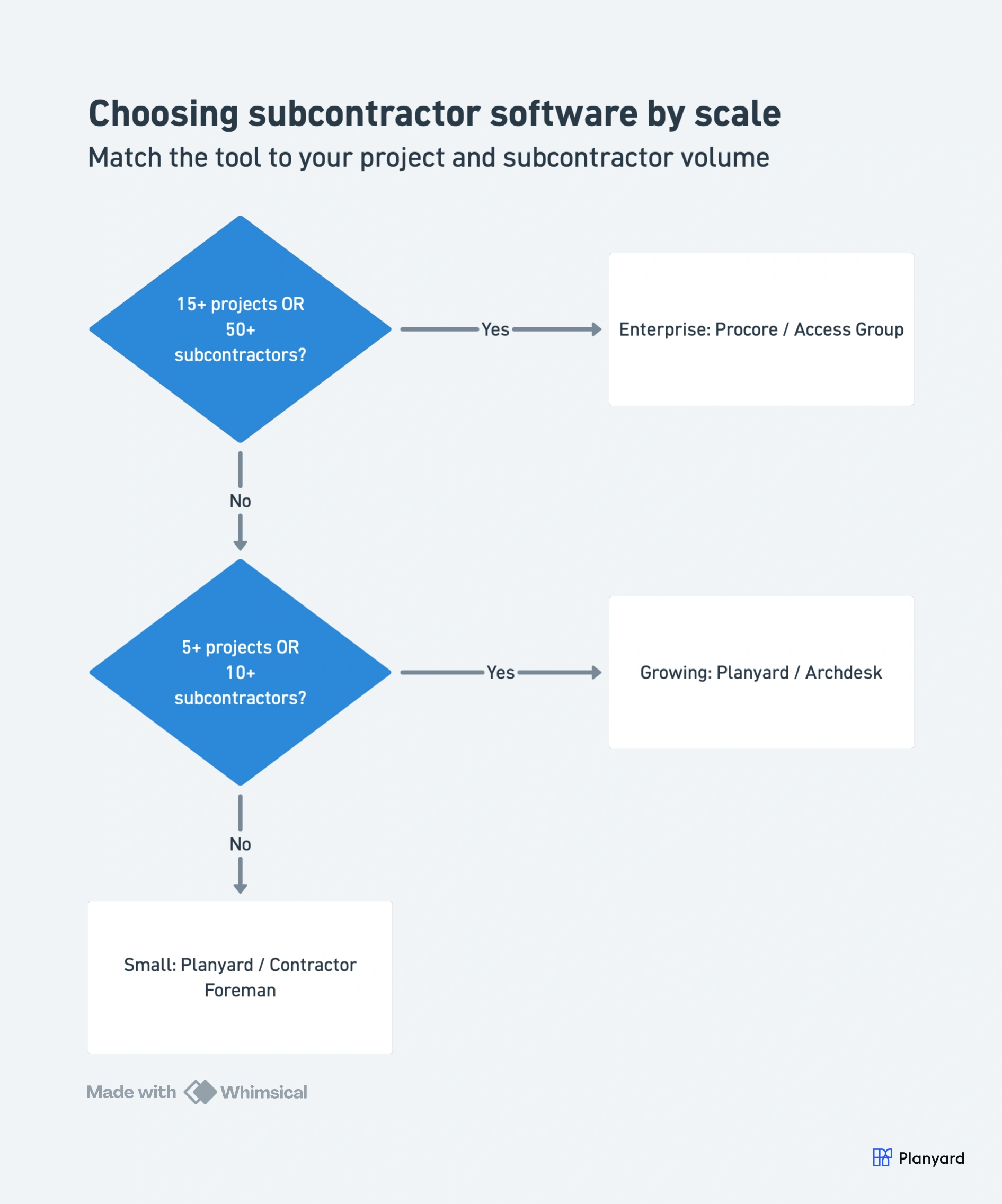
Small contractor (less than 5 projects, under 10 subs)
Start with Planyard or Contractor Foreman. You need basic contract tracking and payment management without the overhead of an enterprise system. Planyard gives you deeper sub management features; Contractor Foreman is cheaper but more basic.
Growing contractor (5-15 projects, 10-50 subs)
Planyard or Archdesk. At this scale, you need proper payment application workflows, retention tracking, and accounting integration. If your priority is commercial management, choose Planyard. If you also need CRM and scheduling in the same tool, consider Archdesk.
Enterprise (15+ projects, 50+ subs)
Procore or The Access Group. At enterprise scale, you need compliance tracking, prequalification workflows, and integration with existing ERP systems. Budget for implementation time and dedicated training.
Already on Xero?
Choose Planyard. It is the only tool on this list with native two-way Xero sync for subcontractor payments. Approved payment applications drop straight into your Xero payment schedule with CIS deductions already applied.
"It looks more professional. The subbies are happier because nothing gets lost in translation. It's very easy for them. So, it's just very easy for everyone."
Read more
How Subcontractor Management Software Improves Collaboration
The biggest gain from dedicated subcontractor management software is not efficiency – it is relationship quality. When payments are transparent, disputes drop. When processes are consistent, subs prioritise your jobs.
Here is what changes when you move from email and spreadsheets to a proper system:
- Subs submit their own payment applications through a portal instead of emailing PDFs. No more chasing, no more lost attachments.
- Real-time contract visibility – both parties can see the current contract value, approved variations, and payment history at any time.
- Automated reminders for monthly valuation deadlines. Subs submit on time because the system prompts them.
- Document sharing without email chains – subcontracts, variation orders, and certificates all live in one place with version control.
- Audit trail for disputes – when a sub queries a deduction, you can pull up the exact approval history in seconds rather than searching through emails.
"I have heard quite a bit of positive feedback regarding collecting the subcontractors' monthly applications for payment (also known as progress reports). It's easy and provides a good overview for the subcontractors."
Read more
"I can not imagine, that I still had to manually track the invoices and enter them one by one on Excel to see my committed costs. That feels like stone-age."
Read more
Stop chasing payment applications by email
Give your subs a portal. Get payment apps on time. Sync to Xero automatically. 14-day free trial, no credit card.