
Most contractors do not replace Xero when construction budgeting gets harder. They keep Xero for bookkeeping and finance. Then add spreadsheets, manual workarounds, or a dedicated construction budgeting layer to manage project budgets, committed costs, invoice approvals, and margin visibility. This page shows how that happens in real life – with real quotes from contractors who have been through it.
These are not theoretical examples. Every story below comes from a contractor who uses Xero today and had to figure out how to handle the construction budgeting piece that Xero does not cover.
Most contractors start in the same place
The starting point is usually simple. Xero is already in place, the finance team likes it, and nobody wants to rip it out.
The problem is that as projects grow, Xero alone does not give project teams enough budget detail, committed-cost visibility, or live margin control.
- Use Xero for bookkeeping and accounts
- Add spreadsheets to fill the budgeting gaps
- Outgrow the workaround as projects and teams get more complex
“We use Xero for bookkeeping, but not for managing projects”
Some contractors are happy with Xero as their finance system. The issue is not bookkeeping. The issue is that once they need more detailed project financial control, they realise Xero does not give them enough construction-specific visibility.
They can manage the books in Xero, but still struggle to manage the live project budget, package-level costs, and detailed budget tracking needed to run jobs properly.
"We use Xero to manage the company’s bookkeeping and finances, but it doesn't provide the detailed project information we need to manage our projects effectively."
Read more
Instead of trying to force detailed project control into accounting software, they added a construction-specific layer on top.
Takeaway: Xero often stays as the accounting system. The budgeting layer is what gets added – not a replacement for Xero, but something that fills the gap it was never designed to cover.
“We kept exporting Xero data into Excel just to see where the budget stood”
Many contractors do not move to a better workflow immediately. First, they try to make Xero work by adding spreadsheets around it.
Estimates live in one spreadsheet, the budget lives in another, actual costs come out of Xero, and someone has to manually stitch it all together to understand whether the project is on track.
"It was a combination of manual steps that slowed us down. We were doing estimates in one spreadsheet, creating another to manage the budget, and then trying to extract data from Xero to bring back into Excel. From there, we had to somehow match everything up just to understand how the budget was tracking against our actual expenditure. It was a disjointed process that made financial clarity difficult to achieve."
Read more
Instead of exporting and matching data every month, they moved toward a workflow where the budget and cost control live in one place – connected to the same orders and invoices that feed the accounting system.
Takeaway: When contractors say they use Xero for construction budgeting, they often mean Xero plus spreadsheets plus manual reconciliation. That combination works until it doesn’t – and it usually stops working as project count or team size grows.
“We needed the missing construction costing layer”
At some point, the issue stops being “how do we use Xero better?” and becomes “we need something on top of Xero that is actually built for construction costing.”
Cloud accounting tools help with finance, and project tools help with tasks – but many contractors find neither gives them the right level of construction budget control, committed-cost tracking, and margin visibility.
"When I have been working on cloud accounting like Xero and Quickbooks they don’t have a specific construction-based costing tool. You have project management costing tools but they are not aimed at the level of what construction companies need so I came across Planyard and I was like finally there is something that solves the problem."

They stopped looking for a better accounting tool and started looking for a better construction workflow on top of the accounting tool they already had.
Takeaway: The missing piece is not accounting software. It is a construction-specific budgeting and costing layer that connects budget lines, purchase orders, invoices, and margin in a way that makes sense for how contractors actually run jobs.
Already using Xero? See the construction budgeting layer that sits on top
Keep Xero for the books. Add Planyard for live budget control, committed costs, and margin visibility.
“We kept Xero for approvals and payments, but moved margin control elsewhere”
Some contractors do not want to change how finance works at all. They want Xero to remain the place for accounts and payment approval.
The finance process may be fine, but project teams still need a better way to manage live budgets, invoice sign-off, and job margins before everything lands in accounting.
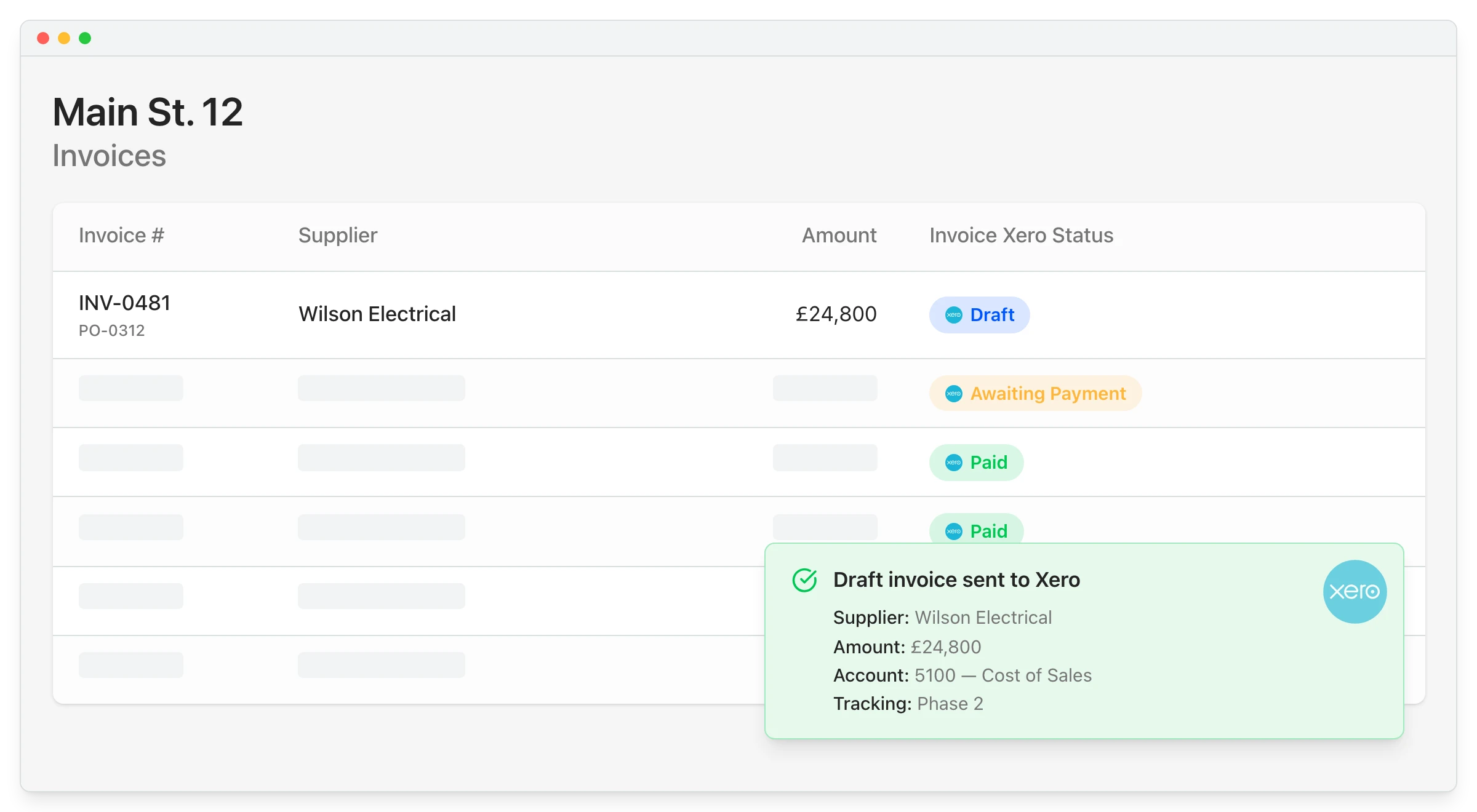
"We had to get our accountant on board and interface it with Xero, so invoices hit the right job number. Now an invoice gets uploaded in Planyard, I sign it off, and it drops into my Xero payment schedule in three or four weeks – it’s perfect."
Read more
"At the very beginning my wife did all that finance stuff – she doesn’t need to do it anymore. All I do is approve payments on Xero and check the margins on Planyard."
Read more
The job split became clearer. Xero stayed the place for payments and accounting, while Planyard became the place for project budget control and margin visibility.
Takeaway: The best setup is often not Xero or Planyard. It is Xero for finance and Planyard for live project commercial control – each doing what it was designed to do.
“Xero purchase orders were not enough for how we actually work”
Contractors often start by trying to use the tools already inside Xero.
That usually works up to a point, but when teams need committed-cost visibility, supplier-package tracking, part-invoicing logic, or clearer budget links, generic PO workflows no longer match the reality of construction buying and subcontracting.
"Xero does have a purchase order system, but it wasn't geared towards a construction business or the way we actually operate."
Read more
They moved from generic purchase tracking to a construction budgeting workflow that connected commitments, invoices, and project margin properly.
Takeaway: Construction teams need more than a general PO function. They need budget logic, committed-cost logic, and project-commercial logic – things that a generic accounting tool was never built to handle.
What these Xero use cases have in common
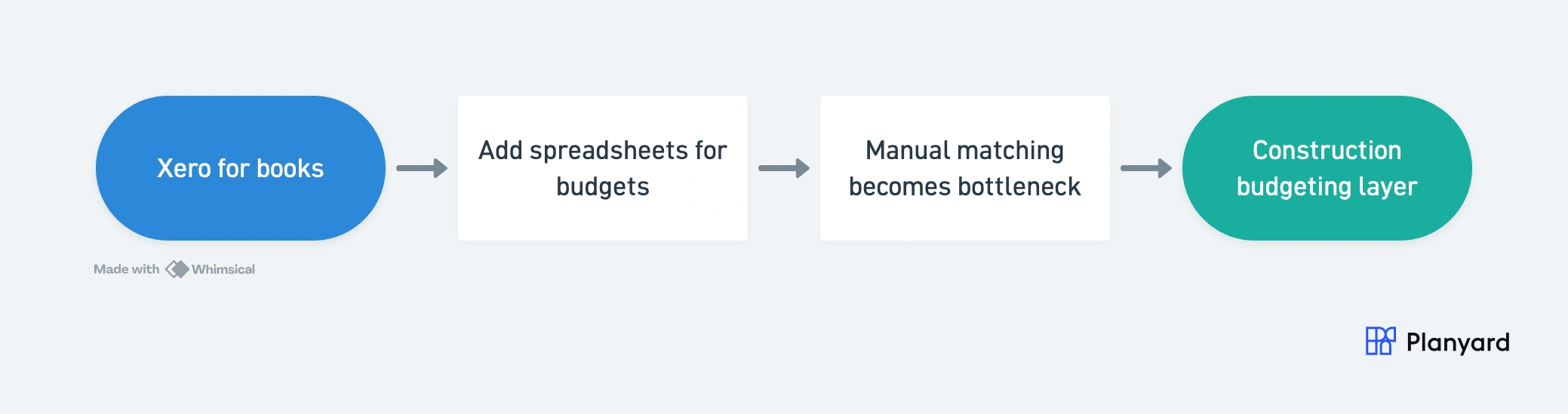
The pattern is remarkably consistent. Contractors start with Xero, add spreadsheets to fill the budgeting gap, then hit a point where manual reconciliation becomes too slow, too messy, or too risky.
That is when they start looking for a construction-specific layer that works on top of Xero instead of replacing it. The trigger is different for each team – some hit it at 3 projects, some at 10 – but the progression is the same.
- Xero stays for accounting – nobody wants to rip out what finance already trusts
- Spreadsheets fill the budget gap at first – because they are familiar and free
- Manual matching becomes the bottleneck – exports, reconciliation, version control
- A construction-specific budgeting layer becomes the next step – purpose-built for the workflow
Where Planyard fits in the workflow
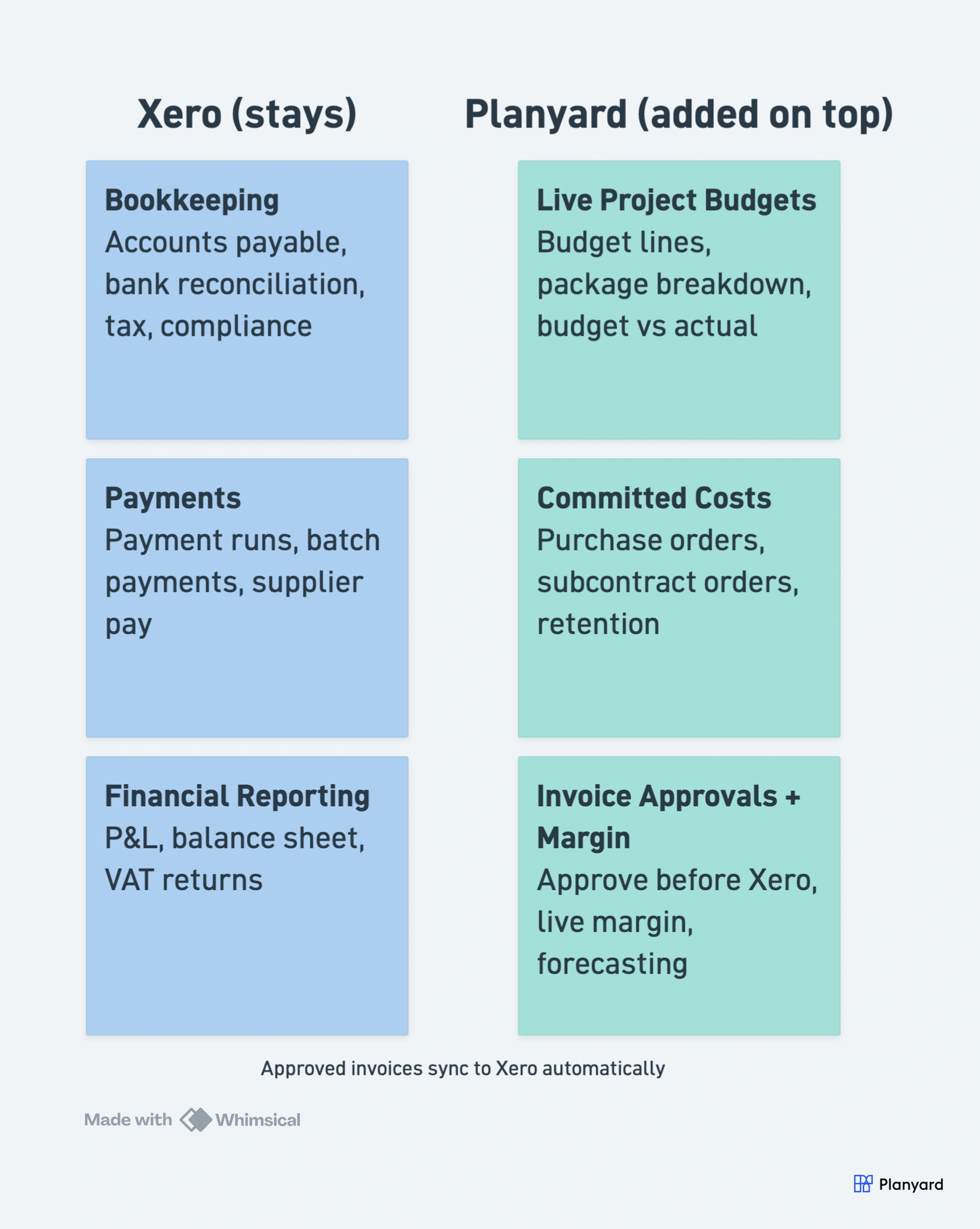
Planyard is for contractors who already use Xero and do not want another accounting system. It adds the missing construction budgeting layer for Xero – live budgets, committed costs, invoice approvals, forecasting, and margin visibility – while letting Xero remain the finance system underneath.
The setup is straightforward:
- Keep Xero for bookkeeping, accounting, and payments – nothing changes for the finance team
- Use Planyard for budgets, commitments, invoice approvals, and project cost control – the commercial layer that project teams actually need
- Give project teams and finance one cleaner, more reliable workflow – approved data flows into Xero automatically
Read more about how Xero handles job costing and whether Xero is enough for construction accounting.
Already using Xero? Add the layer contractors use to control project budgets properly.
Keep Xero for the books. Use Planyard for the live construction budgeting workflow around it.