In the construction industry, money moves quickly and often in large sums. Dozens — sometimes hundreds — of suppliers, subcontractors, and vendors can be involved in a single project, each sending invoices with different payment deadlines. Keeping these payments timely and accurate is what “construction accounts payable” is all about. When handled well, accounts payable (AP) ensures healthy project cash flow, stable vendor relationships, and fewer financial headaches overall.
Below, we’ll explore why effective AP matters so much in construction, common obstacles, best practices, and how software solutions — like Planyard — can transform your payment workflows.
What Is Construction Accounts Payable?
In simple terms, construction accounts payable is the money your company owes to vendors, suppliers, subcontractors, or any service providers. It includes expenses across the board—from raw materials like bricks or concrete to subcontracted labor and overhead costs such as utilities or insurance.
Unlike regular business AP, construction accounts payable must deal with the complexities of a project-based environment. Each project has unique cost codes, schedules, progress payments, and contract terms. For instance, a large commercial build will have significantly different timelines and vendor relationships compared to a small residential remodel. Tracking every invoice and payment accurately ensures you’re always aware of project costs, can forecast future spend, and keep your finances under control.
Why Construction Accounts Payable Is Critical
Cash Flow Management
Maintaining positive cash flow is the backbone of any construction company’s survival. Construction projects are often long, with significant expenses hitting early and revenue trickling in later. If you’re late in paying subcontractors or suppliers, they might halt deliveries or refuse to continue work, stalling the entire project. Having a structured accounts payable process guarantees that crucial bills are settled on time, keeping your projects (and reputation) intact.
Compliance and Audit Readiness
Construction projects sometimes involve public funds or operate under strict regulations, making precise record-keeping essential. Accurate AP tracking ensures compliance with contract terms, helps you avoid costly penalties, and makes it easier to pass audits with flying colors.
Vendor Relationships
Vendors and subcontractors are more likely to partner with you on favorable terms when they know you pay reliably. Timely payments and transparent communication strengthen those relationships, giving you better bargaining power—such as negotiated discounts or quicker service in emergencies.
Project Profitability
Every untracked or overdue invoice introduces risk to your bottom line. Managing accounts payable properly allows you to maintain a clear perspective on your direct and indirect costs. This insight means you can detect if a project is veering off budget early and make the right financial decisions to stay profitable.
Key Challenges in Construction Accounts Payable
Despite its importance, managing accounts payable in the construction industry can feel daunting because of:
- Multiple Invoices and Complex Terms
Construction companies may juggle hundreds of invoices at once. Each supplier or subcontractor might have different payment terms, complicating your pay cycle even further. - Tracking Retainage
Construction projects often retain a percentage of payments until the project’s final stages. This “retainage” must be tracked separately, since it doesn’t follow the same schedule as normal payables. - Paperwork Overload
Paper or email-based invoices can get lost, delayed, or duplicated if managed manually. It’s easy for confusion to arise, especially when multiple stakeholders, project managers, and accountants are involved. - Data Entry Errors
Manual data entry is prone to mistakes—like duplicating invoices or entering the wrong amount. Errors can lead to overspending and time wasted trying to correct financial records. - Slow Approval Processes
A single invoice may pass through several layers of approval, especially on large projects. Without a streamlined workflow, payment bottlenecks can cause frustrations for everyone involved.
How to Set Up a Construction Accounts Payable Process
You do not need an ERP to get accounts payable under control. The steps below work with email and a spreadsheet to begin with, and each one still applies once you move to software. Start with the first two; the rest can be added as the team grows.
- Create one accounts payable inbox and make it the only way in
Invoices that land in project managers’ inboxes or at info@ get lost, and the same invoice often arrives in two places. Set up a dedicated address such as ap@yourcompany.com and write into every subcontract agreement and purchase order that invoices sent anywhere else will not be processed. - Give the inbox an owner
It does not need to be a full-time job, but one person has to own it: an office manager, an accountant or one of the managers. They log every invoice, route it to the right project manager or quantity surveyor for approval, and check that approved invoices are scheduled for payment on time. - Enter invoices the day they arrive
Log each invoice into your system before it goes anywhere for approval. You then have a record of the liability even if the approval takes a week, and nothing turns up as a surprise at month end. Scan or save the file in a shared cloud folder rather than a drawer, so anyone can find it later for an audit. - Log receipts the same day
When someone buys materials, the receipt should not ride around in their van for three weeks. Make it policy that receipts are photographed on a phone and sent to the AP inbox immediately, so the project manager can allocate them to the right budget line while the purchase is still fresh. - Match every invoice to its purchase order or subcontract before approval
Overbilling and duplicate invoices are caught here or not at all. The approver should see the order the invoice bills against, what has already been invoiced on it, and the live budget and margin for that line, then approve or query it in one step. - Track retainage separately
Retainage, or retention, is the share of each payment held back until the project is signed off. Keep it in its own account or category so you can see what is owed now and what falls due at closeout, instead of mixing the two in one payables figure. - Negotiate terms so client money arrives before vendor money leaves
Cash flow is usually tighter than profitability. Ask vendors for 20 to 30 day terms and bill clients on 10 day terms where you can. Client payments then arrive before you have to pay subcontractors and suppliers, and projects stay cash positive. - Pay on a fixed schedule
Pick a predictable cycle, for example every Wednesday or the 1st and 15th, and stick to it. Vendors learn when to expect payment, and you stop paying ad hoc whenever someone chases. - Run an AP report every week or two
A short report of what is due in the next two weeks, per project, is enough to plan cash outflow when several jobs need funding at the same time. - Write down special payment conditions
Some costs are paid by joint check or need an extra sign-off. Note the condition on the invoice or in the system so whoever cuts the checks does not have to ask.
How Planyard Simplifies Construction Accounts Payable
Accounting tools like Xero or QuickBooks can run the basic flow above: invoices come into an inbox, a manager approves them, payments go out. What they cannot do is update the project budget when an invoice is approved, so someone still keys the figures into a spreadsheet. Planyard closes that gap.
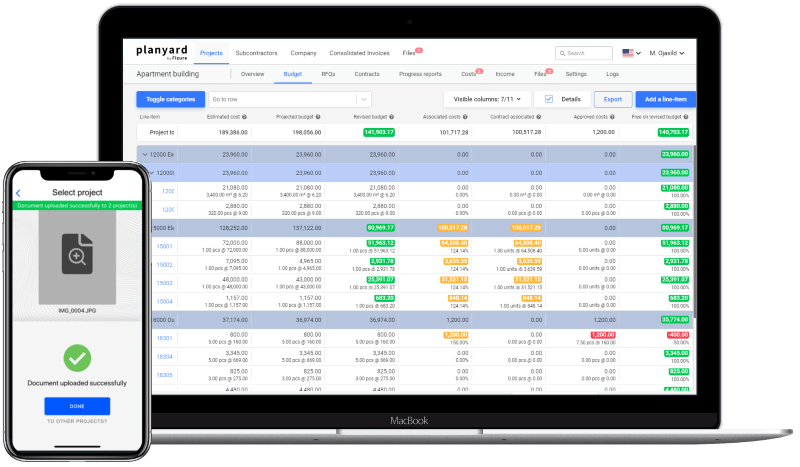
- Invoices are captured from the AP inbox automatically. Point your accounts payable address at Planyard and every invoice is imported as it arrives. If an invoice reaches a project manager directly, the Outlook and Gmail add-ons send it to the right project from inside the email.
- Approval takes one click. OCR reads the invoice number, date, supplier and amounts. The project manager sees all pending invoices in one list, picks the budget line and the purchase order or subcontract the invoice bills against, and approves it. See how it works.
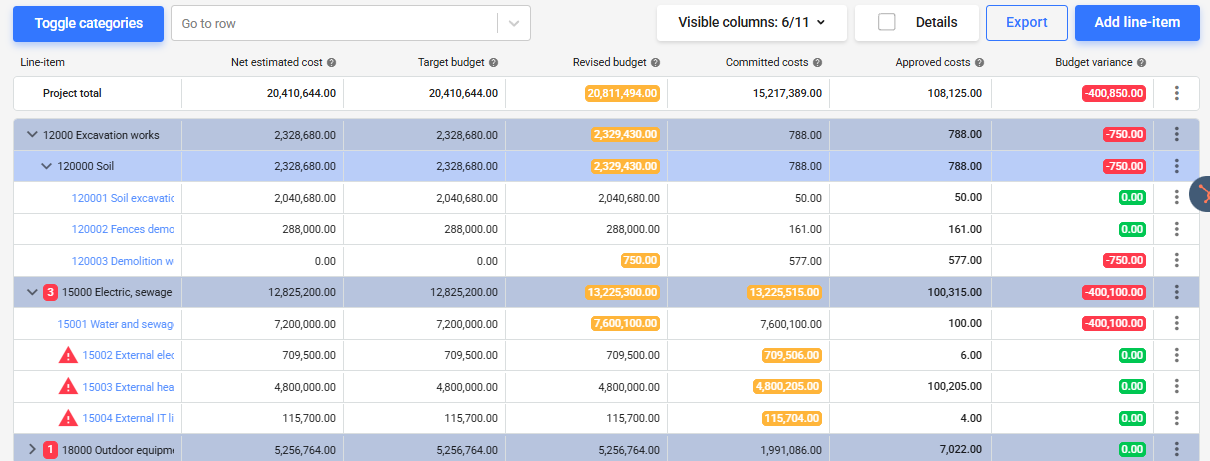
- The budget updates at approval. Actual cost against forecast is current for every line the moment an invoice is approved, so finance does not wait for month end to find out a project is over.
- Accountants get a pre-filled draft bill, not an email. Approved invoices go to Xero, QuickBooks, MYOB or Sage with the chart of accounts code, project reference, tracking categories and the original invoice file attached. No retyping and no duplicate entries. This short video shows the accountant’s side.
- Retainage, partial payments and due dates are tracked per invoice. Reports show what is due, what is pending approval and the total AP liability per project, and every record carries its documents for an audit.
Ready to simplify your construction accounts payable?
Try Planyard today for a more efficient, transparent, and profitable AP process. Book a demo now and see how quickly it can transform the way you manage costs and keep projects on track.