
The project looks fine on paper.
Then the subcontractor invoices land, a materials price increase you half-remembered gets confirmed, and the margin you thought you had is already gone.
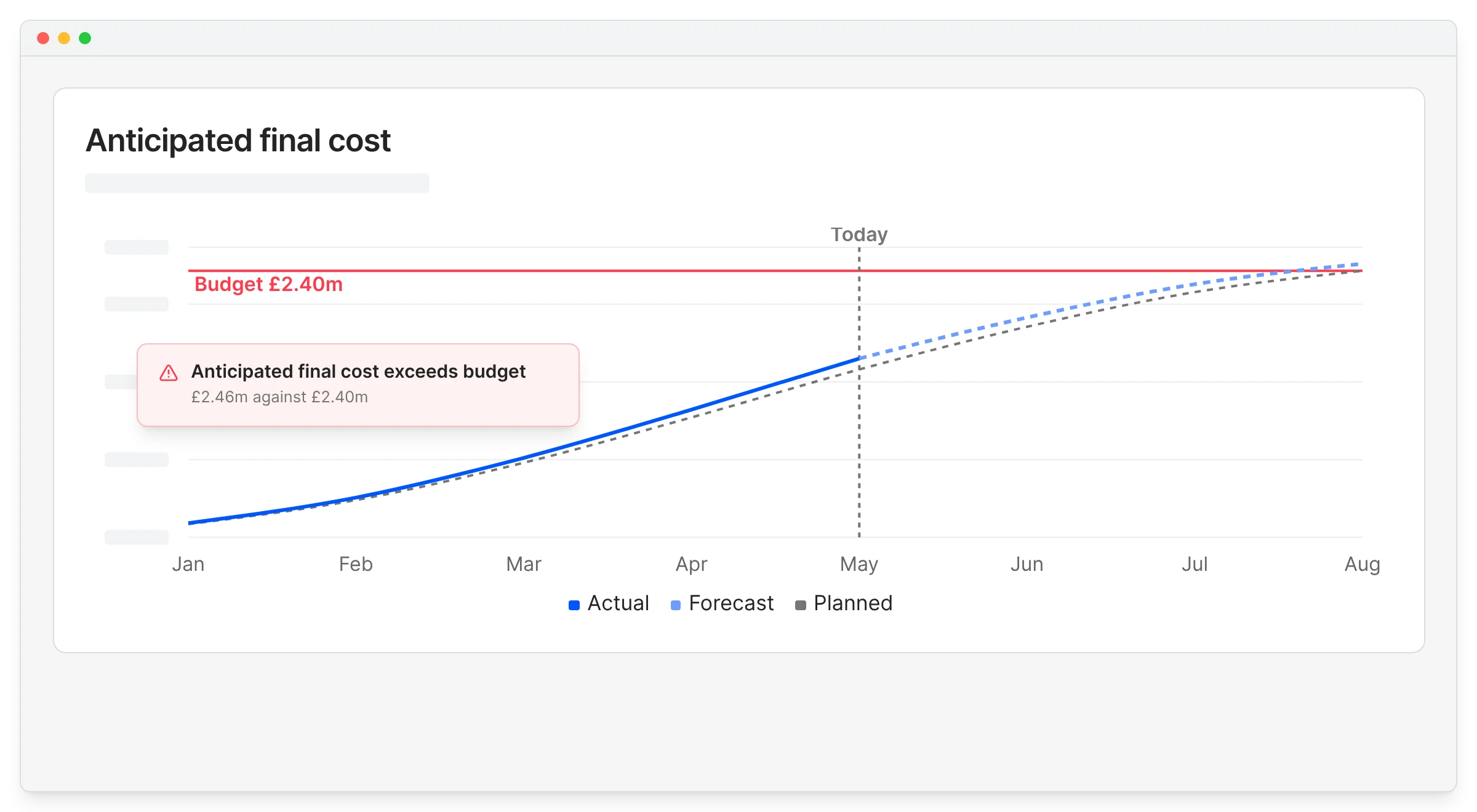
The problem is almost never that nobody was tracking costs. It is that the tracking only caught up with reality at month-end.
This guide covers how to close that gap: what to track, why committed costs are the number most teams miss, and how to get the whole picture updating on its own. If you want the fundamentals first, start with our guide on what construction cost control is.
The challenge of construction cost control
Most contractors run cost control across a stack of tools that were never designed to talk to each other. The estimate lives in one spreadsheet, the budget in another, purchase orders in a folder, invoices in an inbox, and the real financial position in someone’s head until they find time to rebuild it.
That setup works until it does not. Add a third live project, or a fourth person touching the numbers, and the time it takes to produce a trustworthy cost report grows faster than the business does.
What is cost control in construction?
Construction cost control means monitoring and managing a project’s budget while the work is still happening, so expenses stay close to plan and you can act on problems early. In practice it comes down to four things.
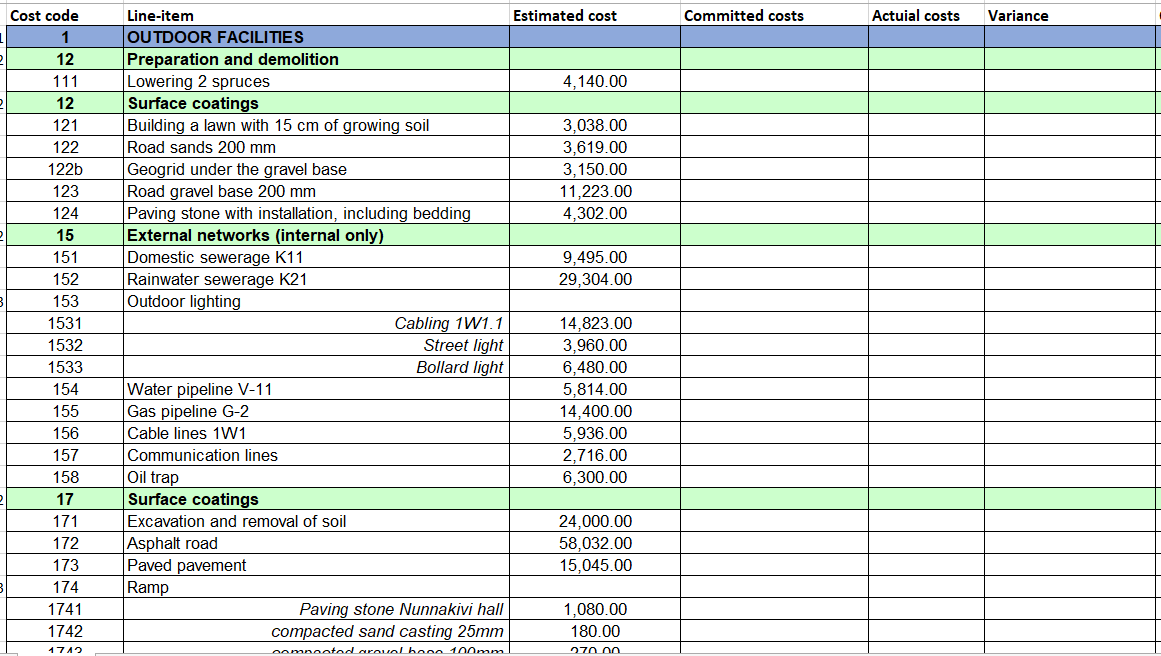
- Budget tracking: a live record of estimated against actual cost, per cost code.
- Commitment tracking: knowing what you have already agreed to spend through purchase orders and subcontracts, before the invoice arrives.
- Forecasting: projecting where the job finishes if current spending continues.
- Early warning: surfacing the cost codes heading for an overrun while there is still room to respond.
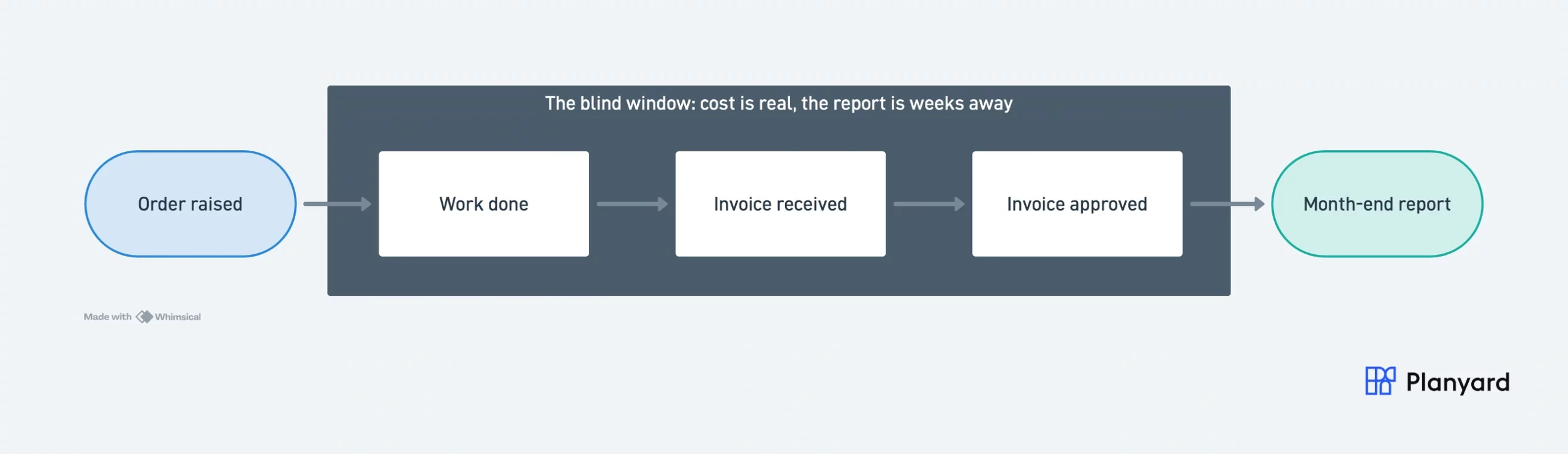
The middle one is where most teams have a blind spot. If you only look at approved invoices, you are reading history. The commercial risk started earlier, when the order was placed.
Why is cost control so difficult in construction?
Spreadsheets break quietly
A spreadsheet will not tell you when it is wrong. A formula that was not dragged down far enough, a link to a file someone renamed, a version that two people edited in parallel – none of these announce themselves.
They surface later, usually in front of a client or a director, which is the expensive moment to find out.
Duplicate data entry eats QS and PM time
The same invoice gets keyed into the cost tracker, then the budget sheet, then the accounting system. Every extra entry is another chance for the three to disagree, and reconciling them is work that produces nothing.
Cost reporting arrives after the fact
If the cost report is built once a month, the picture it shows is already weeks old by the time anyone reads it. Overruns get discovered, not prevented.
Forecasts have nothing solid to stand on
Without committed costs in the picture, a forecast is an estimate built on an estimate. Variations and change orders then move the target faster than the forecast can be updated by hand.
How to control cost overruns in construction projects
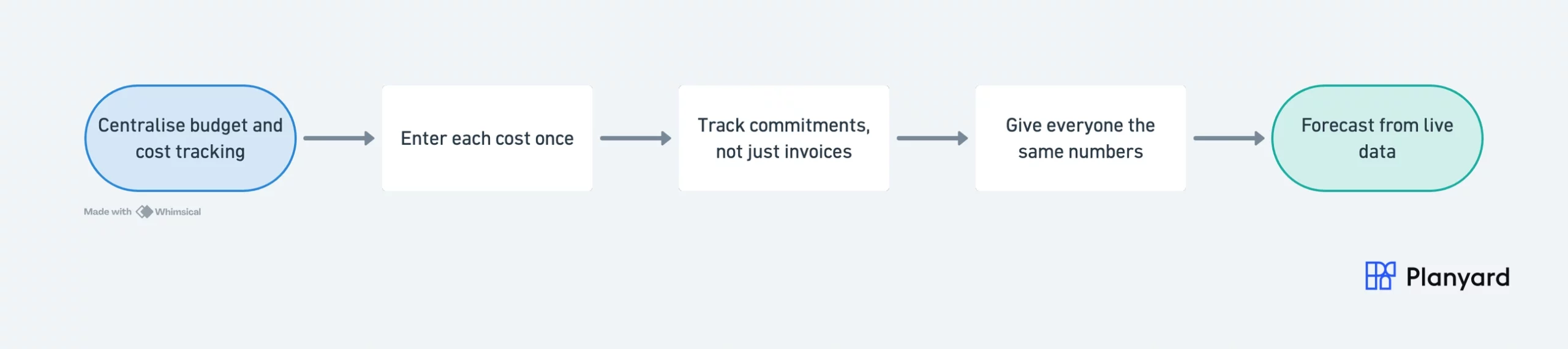
1. Centralise budget and cost tracking
Put the budget, orders, invoices, and variations in one place, structured against the same cost codes. The point is not tidiness. It is that the cost position can then update itself as work is processed, instead of waiting for someone to rebuild it.
"The implementation process is remarkably quick, allowing you to gain a firm handle on your project budgeting and financial management almost immediately. Having that level of control is absolutely critical for any project; that’s what I’d say."
Read more
2. Enter each cost once
When an invoice is processed, the budget, the commitment, and the accounting entry should all move from that single action. This is the single biggest source of reclaimed time for most commercial teams, and it removes the reconciliation work entirely.
3. Track commitments, not just invoices
The moment a purchase order or subcontract is raised, that money is effectively spent. Recording it as a committed cost right then is what turns cost control from reporting into early warning.
It is also what lets you answer “are we still making money on this job?” on a Tuesday, rather than three weeks after month-end.
4. Give everyone the same numbers
Project managers, quantity surveyors, and finance usually work from separate versions of the truth, which turns every commercial review into a reconciliation meeting. One shared live view, with role-based permissions so people see what is relevant to them, removes that argument before it starts.
5. Forecast from live data
Once budgets, commitments, and actuals are connected, the expected final cost and expected final profit follow from the data rather than from a manual exercise. You can watch performance per cost heading and see which ones are drifting.
Stop rebuilding the cost report. Start reading it.
See budgets, committed costs, and invoices update as your team works. Set up your first project in under an hour.
How Planyard makes construction cost control easy
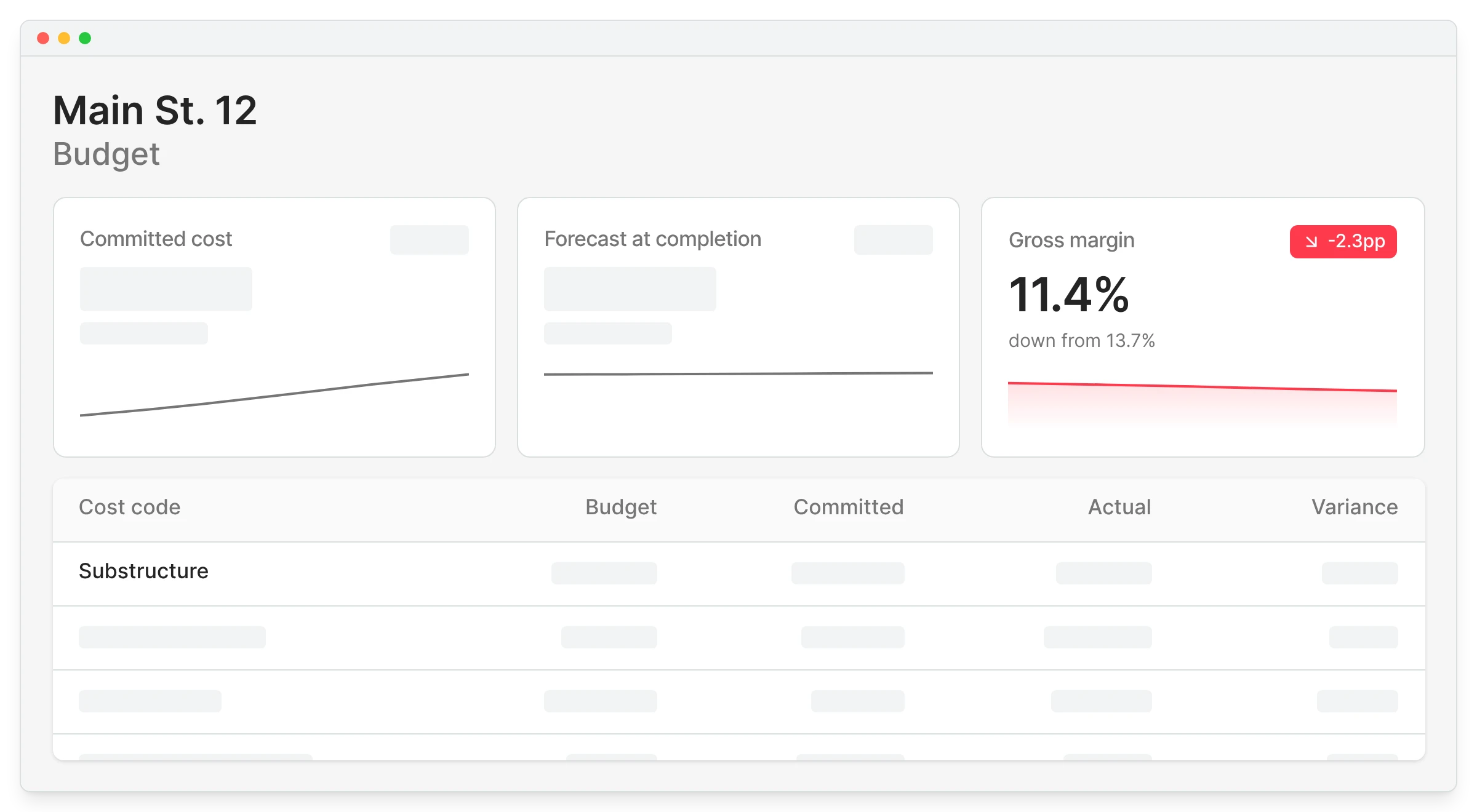
Unlike spreadsheets and general accounting software, Planyard is built specifically for construction cost control. Budgets, purchase orders, subcontracts, variations, and invoices sit in one workflow, so processing a cost updates the project position at the same time.
- Live budgets: the cost position updates as orders and invoices are handled, not at month-end.
- Connected cost management: purchase orders, invoices, and contracts link to budget lines without manual matching.
- Live cost value reconciliation: the CVR is a view you open, not a report you build.
- Invoice approvals in the flow: approvals happen against the budget, then push through to accounting.
The Keane Group, an Australian contractor, is a good example of what changes. Their setup time and their reporting cycle both collapsed.
"In the past, it would take me an entire week just to set up a spreadsheet for a single project. Now with Planyard, that same setup takes maybe an hour. There’s no reason to spend a week building a manual system from scratch when you can get everything ready to go in a fraction of the time."
Read more
The reporting side moved just as far. Before Planyard, financial tracking happened once a month and took a couple of days to pull together for a single project, by which point the numbers were already out of date.
"Timewise, on a single project, I'd probably save 6 to 8 hours—essentially a full day every month. When it comes to processing monthly payments, it saves me a solid day, perhaps even a day and a half, just in sorting through the invoices. Saving a day and a half of my time means the system pays for itself time and time again."
Read more
Still weighing your options? Compare the two approaches in our guide to a construction spreadsheet alternative for cost control, see the full construction cost management software, or if you run your books in Xero, look at cost control on top of Xero.
Why contractors are switching to Planyard
The pattern is consistent: teams do not switch because they want new software. They switch because the spreadsheet process stopped scaling and the month-end cycle got too slow to be useful.
- Cost tracking stops being a separate manual job.
- Overruns show up as commitments, while there is still time to act.
- Duplicate data entry between the cost tracker, the budget, and accounting goes away.
- Forecasts come from live data instead of a monthly rebuild.
Planyard connects to QuickBooks, Xero, and other accounting software, so approved costs flow through without being re-entered and your accounts stay in step with the project.
Making construction cost control easy, in practice
Cost control gets easy when the numbers maintain themselves. Connect the budget to the orders and invoices that move it, record commitments the moment they are made, and give the whole team one view to work from.
Do that and the month-end scramble turns into a review of numbers that were already right.
See where your projects really stand
No spreadsheets, no duplicate data entry, no waiting for month-end. Free 14-day trial, no credit card required.