Keep labor, equipment, and rented workforce costs under control — with work orders and job sheets that post straight to your budget and update your forecasts in real time.
Website-based capture (no apps or logins) your crews actually use
Hours tie directly to budget line items — no duplicate entry
Live cost-to-complete forecasting so you catch overruns early
Growing contractors who want simple, accurate work orders and time sheets linked to job costing: construction businesses, service/technician teams, rented labor & equipment, and infrastructure projects.
How Planyard Work Orders Work (and why they outperform spreadsheets)
Create work orders → Log hours & evidence → Approve hours → Forecast project end cost & bill the customer — all in one flow.
Create & assign work orders
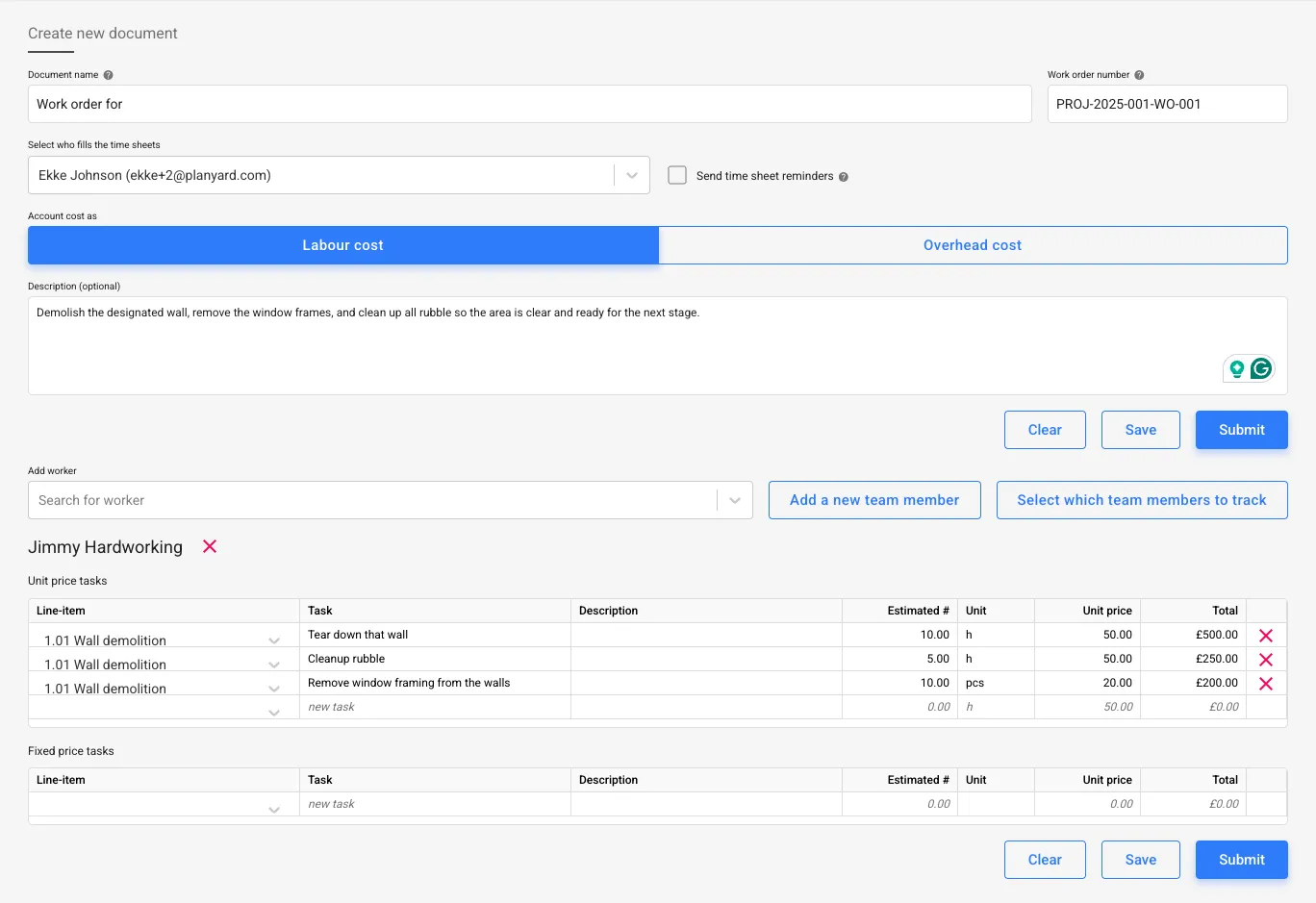
Project managers or QSs quickly create work orders, link them to budget/cost codes, set rates/dates, and assign workers, subs, or equipment.
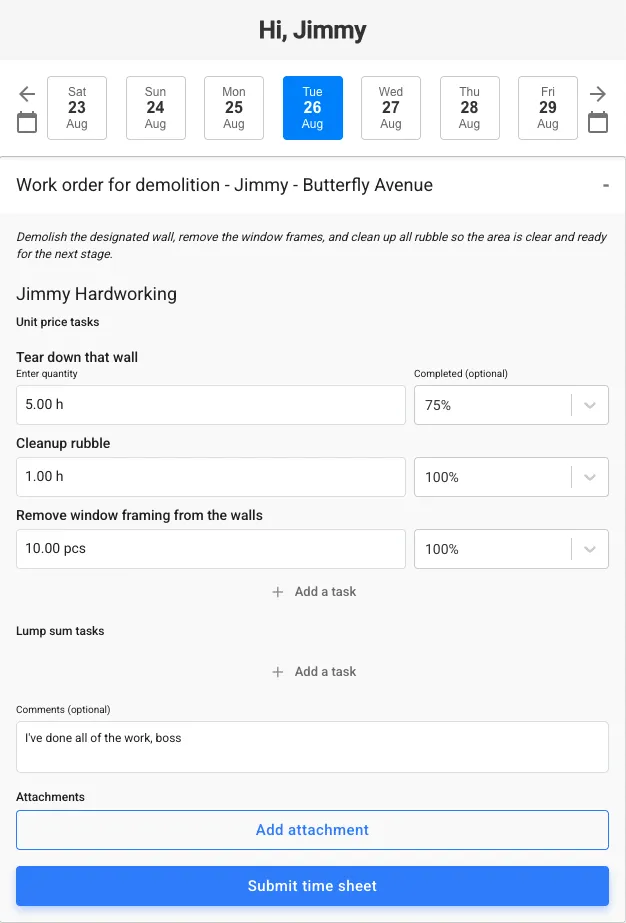
Each work order is delivered via a simple website — no apps or logins — so crews log hours, add photos/notes, and % complete.
Central worker rates
Standardize common tasks and worker rates across projects
Multi-assignee jobs
Assign multiple workers/equipment to a single work order
Budget linkage
Every task is tied to a budget item from the start
Email delivery
Workers receive job sheets and reminders by email — no app needed
Fast time capture (no app, no logins)
Workers submit hours per task, optionally add % complete, images of the done work, and their notes.
Adoption is frictionless because it arrives where they already are — their inbox or via SMS/WhatsApp.
Per-task hours
Track hours against tasks for precise job costing
% complete
Workers update progress to improve forecast accuracy
Notes & photos
Attach daily summaries and images as evidence
Automatic reminders
Daily/weekly nudges keep submissions on time
Upload your project budget and follow the financial progress in real-time
No credit card required. No sales or IT support needed.
Keep an auditable trail that your commercial team and clients can trust. For smaller maintenance jobs, compose client documents directly from the images attached to the time sheets.
Photos & site notes
Capture conditions and work done for dispute-proofing
Daily summaries
Summarize crews, tasks and progress in one place
Supplier hours
Track and validate rented labor & equipment hours before paying invoices
Exportable records
Keep clean backup for payroll and billing
Review, approve & control costs
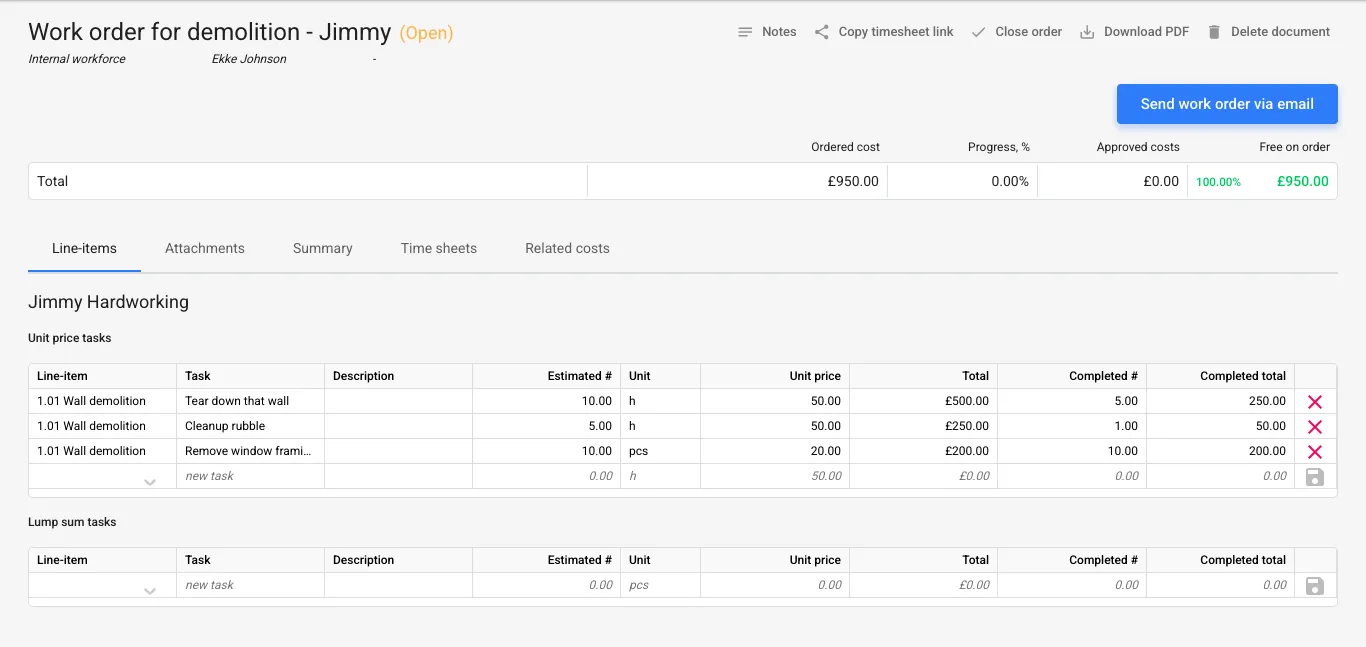
Project managers and quantity surveyors validate work before they hit the budget.
Payroll and supplier reconciliation dashboards speed up month-end reconciliation for the accountant.
Pre-budget validation
Stop invalid hours before it affects end costs
Payroll summary
See hours/days per person for salary runs
Supplier reconciliation
Match rented labor/equipment hours to invoices
Approval history
Keep an audit trail on each job sheet
Upload your project budget and follow the financial progress in real-time
No credit card required. No sales or IT support needed.
As hours roll in, Planyard updates cost-to-complete so you spot overruns early and protect margin daily.
When jobs are projected to take more hours than initially planned, it is reflected directly in your committed costs.
Real-time forecasts
Link % complete to budget to project outcomes
Budget vs. actuals
See impact of labor alongside materials in real time
Historical productivity
Reuse actuals to price future tenders accurately
Client billing
Generate pay apps with confident backup
Why contractors replace spreadsheets with Planyard
Spreadsheets are manual, error-prone and disconnected from forecasts — tiny mistakes get expensive, and overruns surface too late. Planyard gives a single, structured workflow that saves 4–6 days/month per PM/QS and prevents late-stage financial surprises.
Designed for field realities
Crews on multiple sites? Staggered shifts? You need mobile-friendly capture, per-site/job tracking, clean exports for payroll/accounting, and simple onboarding — exactly what buyers ask for when they ditch spreadsheets.
Competitors vs Planyard
Capability / Outcome
Excel & generic time apps
Heavy ERPs / Procore
Planyard
Purpose-built workflow out of the box (fast rollout)
DIY setup; templates break and ownership drifts.
Feature-rich, but long implementations and heavy change management.
Ready on day 1; no consultants; minimal training.
Email-based job sheets (no apps or logins)
Files/spreadsheets passed around; versions get lost.
App/logins required; site adoption often low.
Job sheets arrive by email; crews reply in seconds.
Task-level job costing (hours to budget lines)
Easy to misallocate; formulas fragile.
Available, but complex to configure per project.
Hours post directly to the right budget items.
Approvals & audit trail
No true approvals; comment history is scattered.
Robust but heavy, with multi-step workflows.
Simple approvals with full timestamped history.
Real-time cost-to-complete forecasting
Manual updates; forecasts lag by weeks.
Possible via modules, but slow and specialist-dependent.
Updates automatically as job sheets are approved.
Evidence on every job sheet (photos, notes)
Attachments live in inboxes/folders; hard to find later.
Supported in mobile apps; adoption varies on site.
Photos/notes captured in-flow and stored with the record.
Accounting sync (Xero/QuickBooks) — no double entry
CSV exports and retyping introduce errors.
Integrations exist; require admin upkeep.
Native sync; data flows one-time from field → budget → accounts.
Payroll & supplier reconciliation
Manual collation; mismatches discovered late.
Available, but requires custom setups.
Payroll summaries and supplier hours validation out of the box.
Crew adoption & on-time submissions
Inconsistent; reminders are manual.
App fatigue; low compliance in the field.
Email reminders; no logins; high on-time submission rate.
Month-end speed & accuracy
Slow close; back-and-forth to fix errors.
Accurate but time-consuming; depends on specialists.
Pre-validated data shortens close and reduces rework.
Ready to stop guessing labor costs?
Get a live demo and see how work orders post to your budget and forecasts in real time — without spreadsheets or duplicate entry.
Perfect for support roles or stakeholders—gain access to essential project features and view key financial data without full platform permissions, enabling users to stay informed and contribute without hands-on tasks.
Usually selected for: site engineers, clients, estimators or auditors.
Perfect for support roles or stakeholders—gain access to essential project features and view key financial data without full platform permissions, enabling users to stay informed and contribute without hands-on tasks.
Usually selected for: site engineers, clients, estimators or auditors.
Estimating, cost control and purchase orders management
Perfect for support roles or stakeholders—gain access to essential project features and view key financial data without full platform permissions, enabling users to stay informed and contribute without hands-on tasks.
Usually selected for: site engineers, clients, estimators or auditors.
See how Planyard helps businesses like yours succeed - read their stories in our blog.
"Planyard's integration with Xero has streamlined our project financials, providing clear insights and saving us valuable time. It's easy to use and keeps all commitments organized for seamless financial tracking."
"Planyard is basically a live CVR and saves time by making Excel unnecessary. Once a project’s set up, I can rely on Planyard to stay organized without spreadsheets."
Claire HillQuantity Surveyor
· Brown & Bancroft Interiors
· Bolton, United Kingdom
"If there’s some problem with the budget, it just tells you what you need to fix and you’ll be fine. It really just kind of thinks a step ahead for you."
Jordan CohenProject Director & Partner
· TITN Development
· Florida, United States
"Planyard saves us 3-4 days per project by simplifying financial tracking and cutting out double data entry. It’s user-friendly and lets us focus on our main tasks."
Jason EscobarProject Manager
· The Keane Group
· Queensland, Australia
"Planyard is exactly what I’m after as a business owner: a good-value system that keeps everything in one place, saves me money and makes sure I’m not losing any money on projects. As a businessman, that’s a no-brainer."
Lee CovingtonOwner
· E&N Group Ltd
· London, United Kingdom
"I’m confident that we can manage multiple projects effectively. We’re currently running three fairly large ones, and the system makes it very clear and easy to manage all of them at once."
Graham EastwoodOffice Manager
· Karringtons Ltd
· Kent, United Kingdom
"I chose Planyard because it stood out as the most straightforward and intuitive option on the market. I really wanted a tool that would simplify our existing processes and make everything more efficient, rather than switching to a system that was far too complicated for us to use on a daily basis."
Grant CollinsQuantity Surveyor
· Skyler Contracting
· Kent, United Kingdom
"Planyard has completely replaced my CVR process. Cost Value Reconciliation is essentially about tracking your budget against your actual spend to see exactly what remains, and that functionality is the absolute essence of the central core of Planyard."
Ian HolfordManaging Director
· Higgihaus Developments
· Bristol, United Kingdom
"For me Planyard is essentially the go to software for SMBs. There are other software packages out there that are a large investment upfront with a significant monthly cost. These are all potential solutions once you get to a very large business but they are not a solution for SMBs."
Paul HowarthExperienced FD/Consultant
· Live Management Accounts
"Timewise, on a single project, I'd probably save 6 to 8 hours—essentially a full day every month. When it comes to processing monthly payments, it saves me a solid day, perhaps even a day and a half, just in sorting through the invoices. Saving a day and a half of my time means the system pays for itself time and time again."
Paul TreweekQuantity Surveyor & Estimator
· DPTQS Ltd
· Cornwall, United Kingdom
Frequently asked questions
We've got your questions covered. If you can't find the answer below, then feel free to contact us via the chat.
A system for assigning tasks and capturing hours/evidence per job so you can bill accurately and control costs. With Planyard, job sheets are tied to budget lines and forecasts.
Hours are submitted per task, validated by QS/accountant, and update cost-to-complete instantly — not just a timesheet silo.
No. They receive job sheets by email or SMS/WhatsApp and submit in seconds, which drives adoption on site.
Yes — consolidate hours per supplier and validate against invoices before payment.
Payroll gets summarized hours/days per worker, and commercial teams can generate client pay apps with evidence.
Upload your project budget and follow the financial progress in real-time
No credit card required. No sales or IT support needed.