
Live dashboards, not month-end reports
See your true margin every day, not just at month-end. Planyard calculates your project position continuously as costs and valuations flow in – so the numbers in front of you are always current.
A cost value reconciliation (CVR) is a monthly financial health check that compares actual costs against the value of work completed to track project profitability. Teams use CVRs to catch budget overruns early and forecast final margins with accuracy.
Without a CVR, you are flying blind – often discovering losses only after a project ends, when it is too late to recover.
Our free CVR template gives you a solid starting point. Below, we break down what is inside the template, how to use it, and when you might need something more powerful.
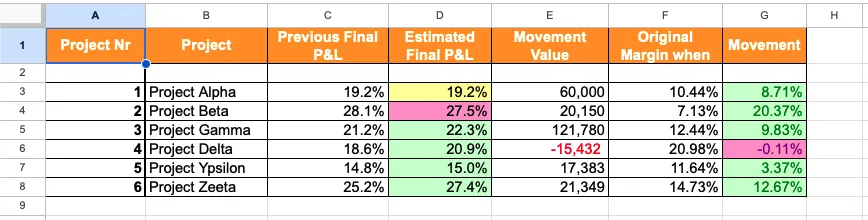
A useful CVR template needs to capture the full picture – from the original contract value through to your forecast final margin. Here is what each section of our template covers and why it matters.
Every CVR starts with context: project name, client, contract type, reporting period, and the responsible QS or commercial manager. This header ties the numbers to a specific job and period so reports do not get mixed up across your portfolio.
This section tracks the original contract sum, approved variations, pending variations, and the revised contract value. It defines the total value baseline you are measuring performance against – and makes sure nothing slips through between agreed scope changes.
Costs are split into labour, materials, plant and equipment, subcontractors, preliminaries, and other direct costs. For each category, the template captures budgeted cost, actual cost to date, and the variance. Breaking costs down this way lets you spot exactly where pressure is building – whether that is a materials price spike or a subcontractor running over.
This is the income side: the monetary value of work physically completed on site. The template records measured work, percentage complete per trade or package, and the claimed value. Comparing earned value against costs tells you whether the project is generating value faster than it is spending money.
The cost to complete is your best estimate of what remains to be spent. Add it to your actual costs to date and you get the total forecast cost – the projected final spend for the job. This is the number that directors care about most, because it shows where the margin is heading, not just where it has been.
The bottom line: earned value minus total forecast cost equals your projected margin. The template expresses this in both monetary and percentage terms, so you can track movement between reporting periods and flag any deterioration early.
"When we used to do our month-end CVRs it could usually take 3-4 days to put them together. It now takes me 10-15 minutes to just quickly go through the jobs and check that I haven’t missed anything."
Read more
You do not need to be a senior QS to get started. Follow these four steps each month to keep your project finances under control.
Download the template and enter your project details - contract value, client name, reporting period, and your cost code structure. Set up one sheet per project.
At month-end, enter your actual costs by category (labour, materials, plant, subcontractors, prelims). Pull figures from your invoices, purchase orders, and accounting software.
Record the value of work completed - measured works, percentage complete per trade, and the amount you have claimed or certified. This is your earned value.
Review the margin calculation and forecast columns. Compare against last month. If costs are outpacing value, investigate the variance before the next reporting period.
A template is a great starting point, but manual CVRs have real limitations that grow with your business.
Most QS teams spend 1-2 days per month just cleaning data in Excel. By the time the report is finished, the data is already two weeks old – and the decisions you need to make have moved on.
One broken cell reference or a missed row in a VLOOKUP can hide a significant cost overrun until it is too late to fix. The more complex the spreadsheet, the harder these errors are to spot.
When the PM has one version and the QS has another, you lose the single source of truth. Nobody knows which numbers are current, and meetings turn into debates about data instead of decisions about the project.
Spreadsheets are good at tracking what you have spent, but poor at showing what you have promised to spend. Purchase orders and pending subcontract commitments are where overruns hide – and they are nearly impossible to capture accurately in a manual template.
"Without a proper system, you are essentially flying blind. You wouldn't know if there was a problem until it was too late, and you wouldn't truly know if you had made a profit until the project was already finished."
Read more
Instead of compiling a CVR once a month, imagine if your CVR updated itself every time a PO was raised or an invoice was approved.
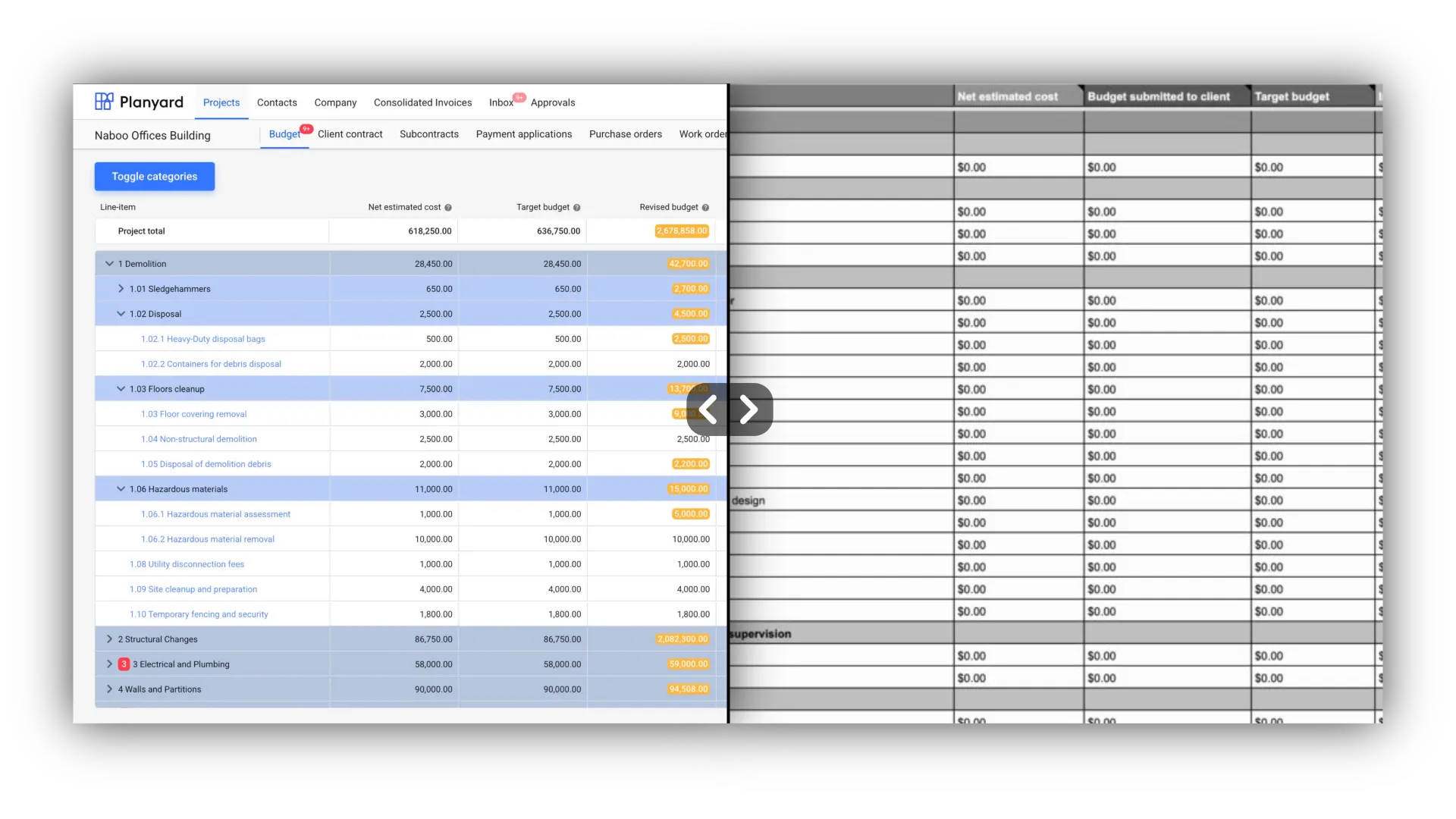
See your true margin every day, not just at month-end. Planyard calculates your project position continuously as costs and valuations flow in – so the numbers in front of you are always current.
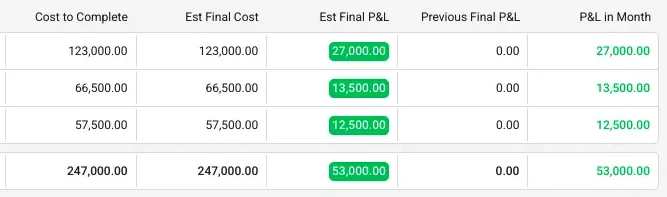
Invoices match to purchase orders automatically. Subcontractor valuations update committed costs the moment they are approved. No more double entry, no more chasing numbers across tabs.
See how Planyard helps businesses like yours succeed - read their stories in our blog.
"Planyard is basically a live CVR and saves time by making Excel unnecessary. Once a project’s set up, I can rely on Planyard to stay organized without spreadsheets."
Read more
"Planyard has completely replaced my CVR process. Cost Value Reconciliation is essentially about tracking your budget against your actual spend to see exactly what remains, and that functionality is the absolute essence of the central core of Planyard."
Read more
"When we used to do our month-end CVRs it could usually take 3-4 days to put them together. It now takes me 10-15 minutes to just quickly go through the jobs and check that I haven’t missed anything."
Read more
"Without a proper system, you are essentially flying blind. You wouldn't know if there was a problem until it was too late, and you wouldn't truly know if you had made a profit until the project was already finished."
Read more
"The spreadsheet process was prone to errors. If you didn't drag a formula down to include every row, you could suddenly drop £20,000 out of your price without realizing it."
Read more
"With Planyard, the financial data is live, meaning you have a real-time view of where the project stands at any moment. When I was relying on Excel, I could only manage that kind of insight once a month. The transition from monthly snapshots to a live dashboard has completely changed how we monitor our project health."
Read more
"Updating spreadsheets is a dull task where a simple mistake could easily be very expensive."

"Everything has a PO linked to a job number. No one does a job without a purchase order, so when I look at margin I know it’s the true margin."
Read more
"Before, we were doing everything in Excel, which was a pretty 'dumb' solution because there was no real intelligence or data behind the individual cells. Now, it's a very smart but simple solution—you can just click on a cell and instantly see every contractor who provided a quote. This makes it incredibly easy to present different scenarios to a client so they can make an informed choice."
Read more
"I see Planyard as replacing [Cost Value Reconciliation (CVR)] in businesses."




See how Planyard turns a 4-day manual process into a 15-minute review.
We've got your questions covered. If you can't find the answer below, then feel free to contact us via the chat.
A cost value reconciliation (CVR) is a reporting process that compares actual project costs against the value of work completed. It tells you whether a project is making or losing money at any given point, and helps forecast the final margin.
A good CVR template includes project details, the contract value summary (original sum plus variations), a cost breakdown by category, earned value of work done, cost to complete, forecast final cost, and the gross margin calculation.
Monthly is the industry standard – typically after valuations are agreed and costs are captured for the period. Some teams using software like Planyard maintain a live CVR that updates continuously as costs and valuations flow in.
The quantity surveyor (QS) or commercial manager typically owns the CVR process. They prepare the report, reconcile costs against value, and present findings to project management and directors.
Yes – duplicate the template sheet for each project. The limitation is that you will not get a portfolio-level view across all projects without manually combining the data, which is where dedicated CVR software helps.
A template is a blank spreadsheet you fill in manually each month. CVR software like Planyard populates the data automatically from your purchase orders, invoices, and valuations – giving you a live, always-current view instead of a monthly snapshot.
 Go to site for