
At Planyard, the focus hasn’t changed: help construction teams control costs, understand profitability, and get out of spreadsheet chaos. If that’s something you’re looking to do, just upload the budget of a project that’s starting and track your financials in real time.
The updates below build on that same idea. They make it easier to see what changed in your budgets, keep track of labour and work orders, understand portfolio-level performance, and automate repetitive admin like invoice entry and approvals.
Work orders and time sheets (limited rollout)
We’ve introduced a new set of features around work orders and time sheets, which is currently being rolled out to selected customers.
What’s new
- Revamped work order creation and detail views, with clearer structure and better links to the budget.
- The ability to quickly add tasks and workers to work orders, including external labour resources.
- Time sheets connected to work orders:
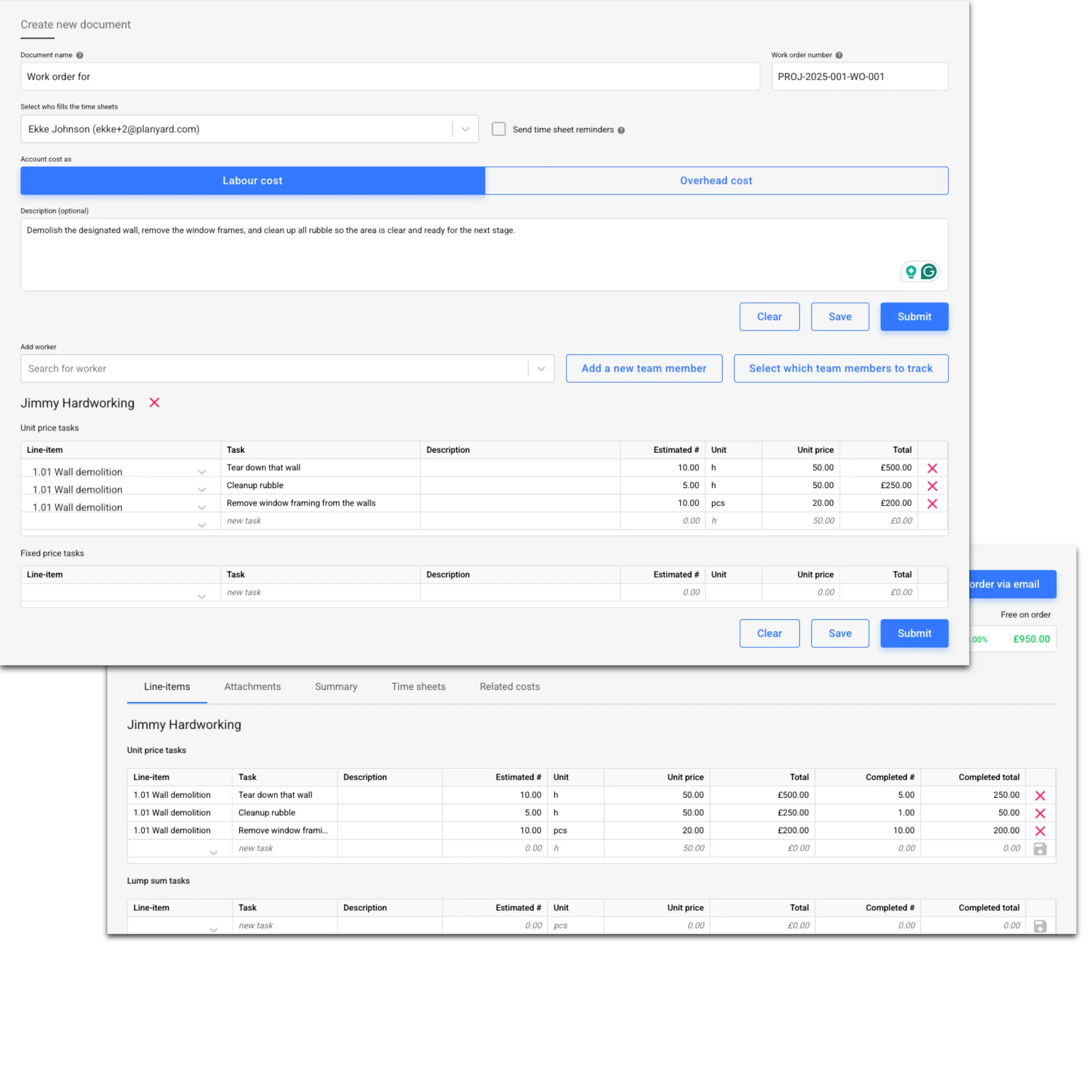
- Workers (or supervisors) can submit time sheets via a simple UI, with comments and attachments.
- Submitted time sheets can be reviewed, adjusted, and linked to tasks and costs.
- Time sheet data is automatically synced back to the budget under associated costs, so labour usage isn’t floating in a separate system.
- A new “resource manager” role to coordinate workforce usage and approvals across projects.
- External workforce invoices can now be approved and linked to the budget.
Why it matters
Most contractors still track workforce time in spreadsheets, WhatsApp messages, or separate time-tracking tools that never really talk to the project budget. That makes it hard to answer very basic questions, like:
- “Are we burning more labour than we allowed in the budget?”
- “Which tasks are driving overtime?”
- “Can we forecast labour needs for the next month with any confidence?”
- When you receive labour invoices from external companies, they can now also be linked all the way from the estimate to the end of the project.
By linking work orders, tasks, workers, and time sheets together—and then syncing those back to the budget—you get one connected picture of labour usage and cost.
This module is currently live for a selected group of customers. If you’re looking to improve workforce time tracking and labour forecasting, reach out to us, and we can discuss enabling it for your account.
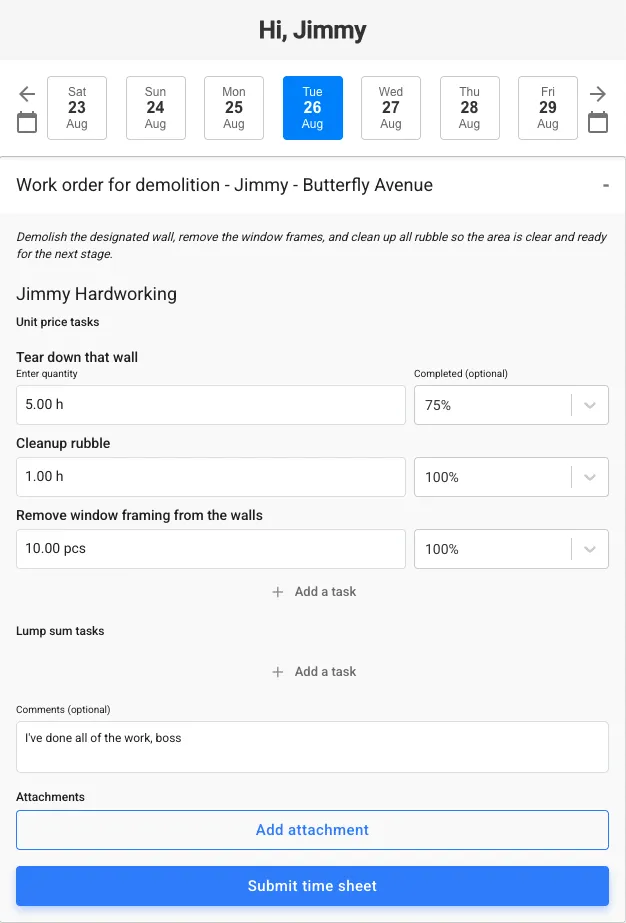
The view the workforce sees via mobile to submit the timesheet and tasks on which they worked today. They can also submit notes and photos from the site. No apps or logins required.
Budget timelines: understand what changed this month
Budget Timelines (Advanced CVRs) were introduced to show how each budget line changes over time. The latest improvements make them more practical during cost control meetings and more powerful for enterprise users.
What’s new
- When you are in a monthly cost control meeting, you can:
- Quickly see which line items’ forecasts increased this month.
- See which purchase orders or subcontracts were raised or revised.
- Drill into specific changes without exporting data to Excel.
- Budget Timelines are now available for all customers on the Enterprise package.
- The current month now shows live data, so you’re not looking at a static snapshot like before.
- Profitability change is surfaced alongside value changes, helping you see where margin is improving or eroding.
Why it matters
A lot of project reviews still start with “What changed since last month?” and then turn into a long hunt through emails, spreadsheets, and accounting exports.
Budget Timelines let you answer that question in a few clicks:
- You see which lines moved, by how much, and why.
- You can tie changes back to real events—new POs, variations, or updated forecasts.
- You can focus the meeting on decisions and risk management instead of detective work.
For commercial managers, quantity surveyors, and CFOs, this turns CVR meetings from a forensic exercise into a proactive steering tool.
Portfolio-level financial views and reports
Managing one project is hard. Managing ten or fifty at once is another level entirely. The new portfolio-level features are designed for company owners, finance leaders, and regional managers who need a clear, consolidated view.
What’s new
- Company timeline view:
- Margin, profitability, and changes over time across all projects.
- A simple way to see whether the overall portfolio is becoming more or less profitable.
- Company cashflow XLSX export:
- Export structured cashflow data for the whole portfolio.
- Use it for board reporting, funding discussions, or integration with your broader financial models.
- Periodic cashflows at the company level (advanced feature):
- See cashflows broken down by periods (e.g. months) across projects.
- Understand when cash is coming in and going out at the company level, not just project by project.
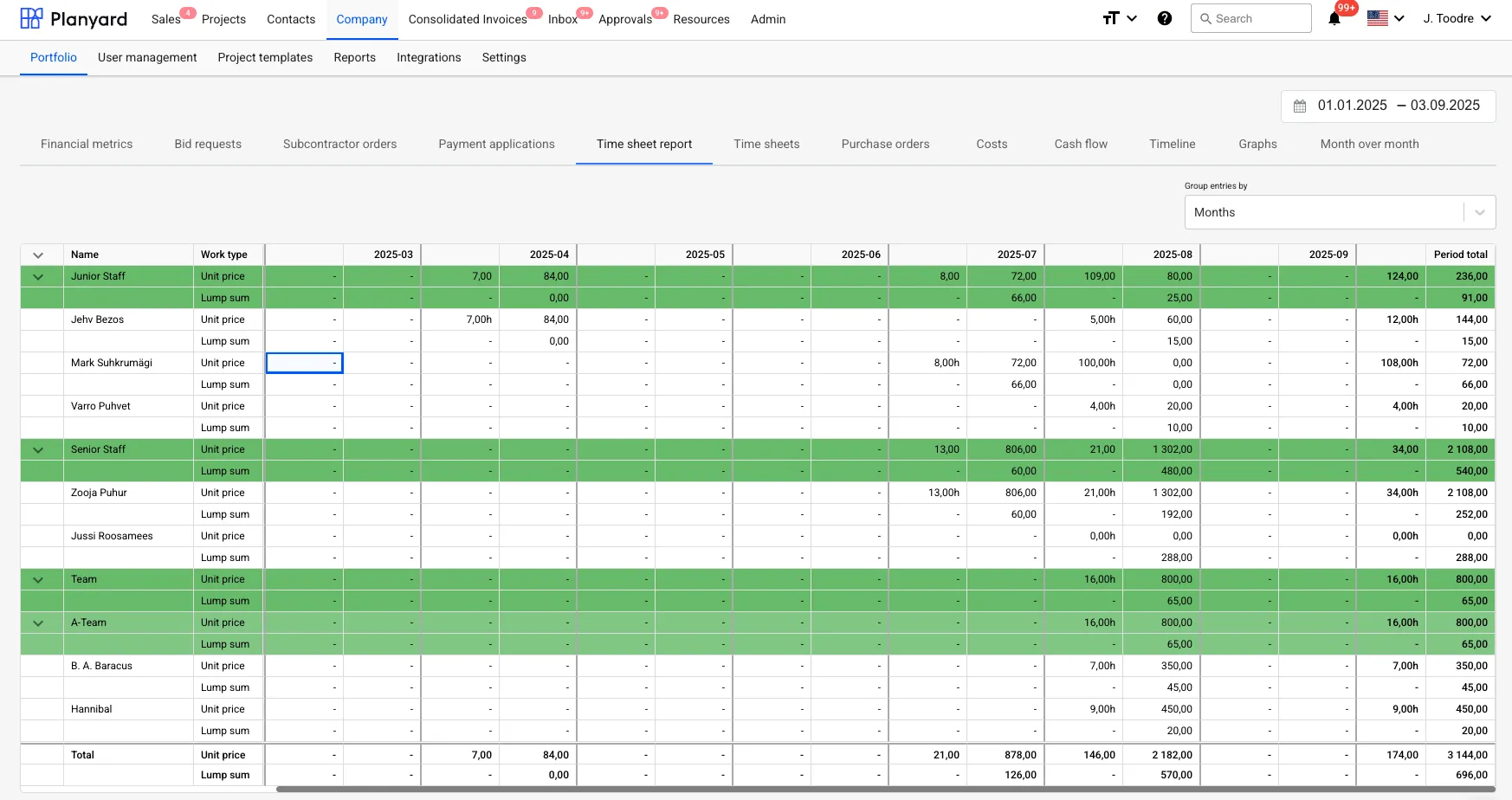
- Time sheets rolled up to the company level – this makes it much easier for accountants to compile everything needed for paying salaries and preparing taxes.
Why it matters
Without portfolio-level tools, finance teams usually:
- Pull exports from accounting,
- Match them to project lists by hand,
- Maintain separate management-report spreadsheets that are always slightly out of date.
By giving you these portfolio-level reports directly in Planyard, you can:
- Spot problem projects early, instead of when they show up in annual accounts.
- See if margin slippage is a one-off or a trend.
- Give lenders, owners, or the board a consistent view of performance without manual number crunching.
- Simplify the effort needed to put together a month-end and to pay out the salaries.
Estimating improvements: from better pricing to cleaner PDFs
Estimating is where profit is either set up or compromised. The latest round of updates makes estimates more accurate, easier to manage, and clearer to share with clients.
What’s new
- Profit summary row in the estimate table:
- Clearly see profit at the estimate level, not just costs.
- Calculate the material required for the whole row, not just a single item.
- Mark estimates as “completed”:
- Distinguish between drafts, in-progress estimates, and final versions.
- If you mark an estimate as completed, it won’t show any red reminders for follow-ups or deadlines.
- Some of the estimate PDF improvements:
- Quantities are better formatted for clarity and professionalism.
- Page numbers added to PDFs.
- Layout fixes, including resolving issues where the body and footer overlapped on some exports.
Why it matters
These changes address several recurring pain points from estimators and commercial teams:
- Profitability is easier to see, so less time is spent exporting and recalculating margins in Excel.
- Consistent markup rules reduce internal confusion and pricing errors.
- Finished PDFs look more professional and easier for clients to understand, which helps when you’re competing on both price and clarity.
The result is a smoother path from estimate to budget to live cost control—without reinventing the logic in separate tools.
Budget improvements: more control without more manual work
Once a job moves from estimating to delivery, the budget is the backbone of cost control. Several improvements make budgets more flexible and easier to adjust as reality changes.
What’s new
- Profitability forecast column in the budget:
- See not just the cost and revenue, but also the expected profit per line.
- Helps identify where you are making or losing money at a granular level.
- Categorising client variations within the budget:
- Variations can be categorised and tracked directly inside the budget structure.
- This allows you to group similar costs just like you could always do on the cost side.
- Smarter budget imports and updates via Excel:
- You can set quantities, prices, or totals to 0 directly via import, instead of having to edit each line manually.
- You can choose to only update the rows you care about – fields left empty will not be changed.
Why it matters
Once a project starts, changes are constant: new scope, revised prices, reallocated quantities. If the only safe way to make changes is “one row at a time in the UI,” budgets quickly drift away from reality.
These improvements mean that:
- Commercial teams can keep the budget structure clean and truly up to date.
- You can run controlled mass updates from Excel without breaking everything.
- Profitability is always visible, so you can make earlier decisions about where to reduce risk or recover margin.
AI-based invoice OCR & inbox changes: faster and more accurate prefilling
Invoice processing is one of the most repetitive parts of construction cost control. The newer AI-based OCR engine is now used to prefill invoice data more accurately.
What’s new
- The OCR engine has been updated to use a more advanced model.
- More accurate extraction of key invoice fields, including supplier, date, totals, tax, and references.
- You can now choose which files you want to have uploaded from the emails – whether only documents (PDFs, docx, excel) or also the images.
- You can also choose whether invoices should be routed automatically to the corresponding project – disabled by default.
Why it matters
Manually retyping invoice details is slow, error-prone, and unpleasant work. Even traditional OCR can struggle with real-world invoices that come in different formats and layouts.
With the new AI-based engine:
- More invoices are correctly prefilled on the first pass.
- Approvers spend their time checking and matching, not typing.
- Finance and project teams can process higher volumes without adding headcount.
Permissions and admin: more control, less bottlenecking
As Planyard gets used by larger teams, permissions and admin workflows become just as important as the features themselves. Recent changes give you more flexibility in who can do what, without losing control.
What’s new
- Explicit project-level rights on top of company-level rights:
- You can give users access to specific projects even if they shouldn’t have specific company-wide permissions.
- Company project admins can finalise or override approval workflows:
- Project admins can keep things moving when an approval chain gets stuck, without needing a system super-admin for every exception.
- Resource manager role:
- A dedicated role for the person responsible for time sheets and workforce planning, separate from finance and project managers.
- Accounts payable email manager:
- A specific role that allows managing and deleting files in the invoice inbox without granting full admin rights elsewhere.
Why it matters
In small teams, one or two people often “have access to everything” and handle all exceptions. As you grow, that model stops working:
- It creates bottlenecks when those people are busy or away.
- It increases the risk of errors or accidental changes.
- It makes it harder to align permissions with real-world responsibilities.
Finer-grained permissions mean you can:
- Give each role the tools they need, and nothing they don’t.
- Keep audit trails and approvals meaningful.
- Scale Planyard usage across more projects and regions without losing control.
Discover What’s New in Planyard
Together, these updates push Planyard further towards one connected system for construction cost control—from estimates and budgets, through work orders and time sheets, to invoices, approvals, and portfolio-level reporting.
Try the new features today or book a demo to see how Planyard can simplify your construction cost management.