If your UK construction firm runs on Xero, you already have a world-class general ledger. However, as of March 2026, the gap between “Accounting” and “Commercial Management” has never been wider. While Xero handles your balance sheet perfectly, it wasn’t built to manage subcontractor valuations, retention tracking, or live CVRs.
Planyard is our product. We rank it where it fits, say what it does not do, and checked every other tool’s price on the vendor’s own site.
For contractors in the £2M-£30M turnover bracket, the “Xero + Excel” combo is no longer a viable strategy. With the latest HMRC digital audit requirements, relying on manual spreadsheets to bridge the gap between your project site and your accounts office is a major business risk.
In this guide, we review the best construction-specific layers for Xero that offer immediate relief from manual data entry.
"Planyard is exactly what I’m after as a business owner: a good-value system that keeps everything in one place, saves me money and makes sure I’m not losing any money on projects. As a businessman, that’s a no-brainer."
Read more
The “Xero Gap” Methodology: How We Evaluate
To make this list, a tool must do more than just “connect” to Xero. It must solve the three primary headaches of a UK construction finance team:
- Two-Way Sync: Does it send approved invoices to Xero while pulling back payment status?
- QS-First Workflows: Does it handle Applications for Payment (Valuations) and cumulative billing natively?
- CIS & Retention Automation: Does it calculate CIS deductions and track both held and released retentions without manual calculation?
- Real-Time CVR: Does it show you your “Anticipated Final Cost” inside the project, rather than just “Paid Invoices” in Xero?
1. Planyard

Best for: The “Excel Escape” & Real-Time Commercial Control
Planyard is the dedicated commercial management layer designed specifically to sit over Xero. It allows your project team to manage budgets, POs, and subcontractor claims in a “QS-friendly” environment, while your accountant keeps Xero clean and clutter-free.
- The 2026 Edge: Planyard solves the “Accountant vs. QS” conflict. The site team gets live budget visibility, and the accounts team gets approved, CIS-compliant invoices synced directly into Xero with zero double-entry.
- Pros: Fastest “Immediate Relief” implementation (live in days); handles complex UK retentions; automated CVR reports.
- Cons: It is not a payroll or HR tool; it focuses strictly on project financial health.
2. Payapps

Best for: Subcontractor Valuation Management
Payapps is a powerful addition for Xero users who are drowning in subcontractor paperwork. It focuses heavily on the “Application for Payment” workflow to ensure compliance with the UK Construction Act.
- The Difference: Payapps is excellent at the process of certifying payments. It ensures your supply chain is paid the right amount at the right time.
- The Catch: While it handles valuations perfectly, it doesn’t provide the full “Cost to Complete” or budget-management features that a Main Contractor needs for a full CVR.
3. Procore (with Xero Integration)

Best for: High-Volume Enterprise Contractors
Procore offers a robust Xero connector for firms that need an all-in-one suite covering drawings, site diaries, and financials.
- Pros: Unmatched for field-to-office communication. If your site team needs to mark up drawings and your office needs to track budgets, Procore does both.
- Cons: The Xero integration can be complex to configure; pricing is significantly higher than specialised “layer” tools.
Planyard vs Procore: Which fits your Xero setup? →
4. Xero Projects (Native)
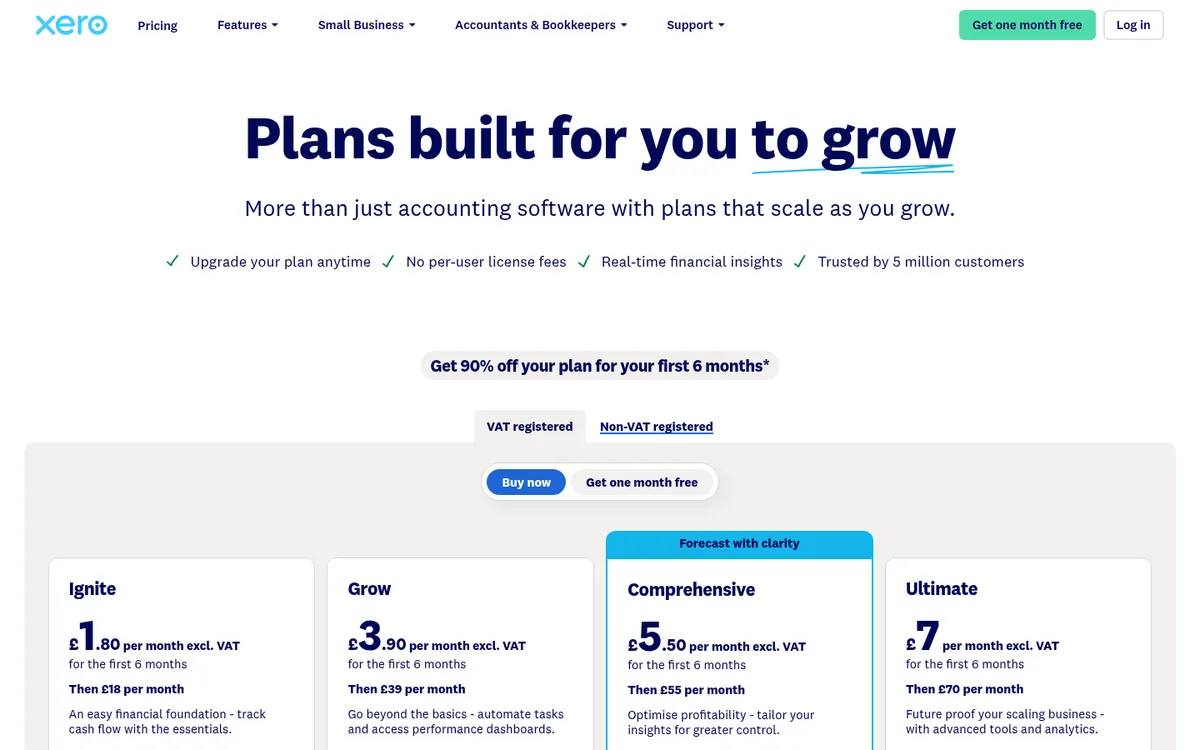
Best for: Micro-Contractors & Sole Traders
If you are a small specialist firm with only one or two simple projects, Xero’s own “Projects” module might be enough to get you started.
- Pros: Built into Xero, with no separate system to learn. Projects is only on the Ultimate plan (£70 a month including 10 project users, then £5 per extra user).
- Cons: The “Hard Ceiling.” It cannot handle cumulative valuations or retentions. Xero has purchase orders on every plan, but Projects does not track them as committed costs against a budget. For any contractor managing subcontracts, you will outgrow this almost immediately.
Compare Planyard vs Xero Projects →
Summary: Xero Construction Stack Comparison
| Feature | Xero Projects | Payapps | Planyard |
| Direct Xero Sync | Native | Yes | Yes |
| CIS & DRC VAT | Basic | Yes | Automated |
| Subcontractor Valuations | No | Yes | Yes |
| Real-time CVR/Forecasting | No | No | Yes |
| Implementation Time | Instant | 2-4 Weeks | 1-2 Weeks |
Immediate Relief for Your Commercial Team
Stop trying to make Xero do things it wasn’t built for. If you are a UK contractor managing between £2M and £30M in turnover, you need a commercial engine that speaks “Construction” while Xero speaks “Accounting.”
 Go to site for