Last verified: October 2026
A main contractor with £2m to £30m turnover usually runs on three things: an accounting package, a site app of some kind, and a set of spreadsheets that the QS rebuilds every month for the CVR. The spreadsheets are where margin goes missing. A variation agreed on site never reaches the cost report, and the directors find out the job lost money at final account.
Search for “general contractor software” and most results are written for US home builders. UK main contractors also need subcontract orders and applications for payment under JCT or NEC, retention, CIS and domestic reverse charge VAT flowing correctly into Sage, Xero or QuickBooks, and a cost value reconciliation the board can trust.
This guide compares ten tools UK main contractors actually shortlist, from commercial tools that sit on top of your accounts to full construction ERPs and site apps. Prices are taken from each vendor’s own website in October 2026.
"When we used to do our month-end CVRs it could usually take 3-4 days to put them together. It now takes me 10-15 minutes to just quickly go through the jobs and check that I haven’t missed anything."
Read more
What Main Contractors Need From Their Software
Software fixes either the site side (drawings, snagging, RFIs, diaries) or the commercial side (budgets, orders, valuations, CVR), and a few platforms try to do both. Decide which costs you more money before you book demos.
Subcontract control from order to payment
Most of a main contractor’s cost is subcontracted. The software should hold the subcontract order, record variations against it, take in the subcontractor’s application, certify it, deduct retention and pass the approved amount to your accounts. If any of those steps happens in email, your committed cost is wrong.
A CVR that builds itself
Cost value reconciliation compares what you have earned with what the work has cost and will cost. If budgets, commitments, actual invoices and client valuations live in one place, the CVR is a report you open rather than a week of spreadsheet work at month end. Our CVR software page explains how that works in Planyard.
UK tax handled where it belongs
CIS deductions and domestic reverse charge VAT have to end up correct in your ledger and on your monthly return. Some tools calculate and file them; others, Planyard included, pass approved bills with the right split to Sage, Xero or QuickBooks, which apply the deduction and file. Either approach works if bills reach your ledger with the split already set. A tool that ignores CIS leaves your bookkeeper fixing every bill by hand.
How long rollout takes
A full ERP replaces your ledgers, payroll and often your processes, and implementation is normally a paid project of its own. A commercial layer on top of your existing accounts can be live on one project in days.
Main Contractor Software Compared
Starting prices are per month unless stated, excluding VAT. “Quote only” means the vendor publishes no price.
| Tool | Best for | Starting price | Accounting | UK commercial (valuations, retention, CIS) | Verdict |
| Planyard | Commercial control on top of Xero, QuickBooks or Sage | £82 per project manager (Essential) | Xero, QuickBooks, Sage | Client valuations, variations and retention from Professional; subcontractor applications in Ultimate. CIS and reverse charge applied in your accounts | Fastest route from spreadsheets to a live CVR |
| Procore | Large contractors running site and finance on one platform | Quote only (annual fee on turnover) | 200+ accounting integrations incl. Sage and Xero | Commitments, variations, budgets | Broadest platform, highest cost and effort |
| Access Coins Evo | Established contractors replacing their whole finance stack | Quote only | Own ledgers (full ERP) | Financials, procurement, payroll and CVR in one system | Proper ERP with an ERP-sized rollout |
| Causeway Project Accounting | Contractors with a commercial department on JCT and NEC | Quote only | Sits beside your finance system | CVR, payment applications, JCT and NEC contracts | Strong commercial depth for larger firms |
| Eque2 Construct and EVision | Sage, Xero or Business Central users who want construction job costing | Quote only | Sage 50, Sage 200, Sage Intacct, Xero, Business Central | CIS, retentions, applications and valuations | Established UK choice for finance-led firms |
| Archdesk | Firms wanting one configurable platform across estimating, projects and finance | Quote only (per user or by annual volume) | Accounting and ERP sync | Payment applications, subcontractor pay applications, WIP | Wide scope, needs setup work |
| Autodesk Forma Build | Contractors already working in Autodesk design data | Per user via Autodesk; no GBP list price found | 400+ integrations incl. ERPs | Cost tracking, RFIs, submittals | Document and site control first |
| Fieldwire | Site teams needing drawings and tasks on a phone | Free; Pro £33 per user | App integrations (Business and up) | Change orders and budget on Business Plus (£76) | Cheap, good site tool, light on money |
| PlanRadar | Snagging, inspections and handover | Basic £23 per user | No accounting focus | None; quality and defects only | Best for snagging, not for cost |
| Payapps | Main contractors certifying applications for payment | Quote only (fixed annual fee) | Construction ERP integrations | Applications, variations, retention, Construction Act notices | Point solution for valuations |
The 10 Best Software Tools for UK Main Contractors
1. Planyard – Best for Commercial Control on Top of Xero, QuickBooks or Sage
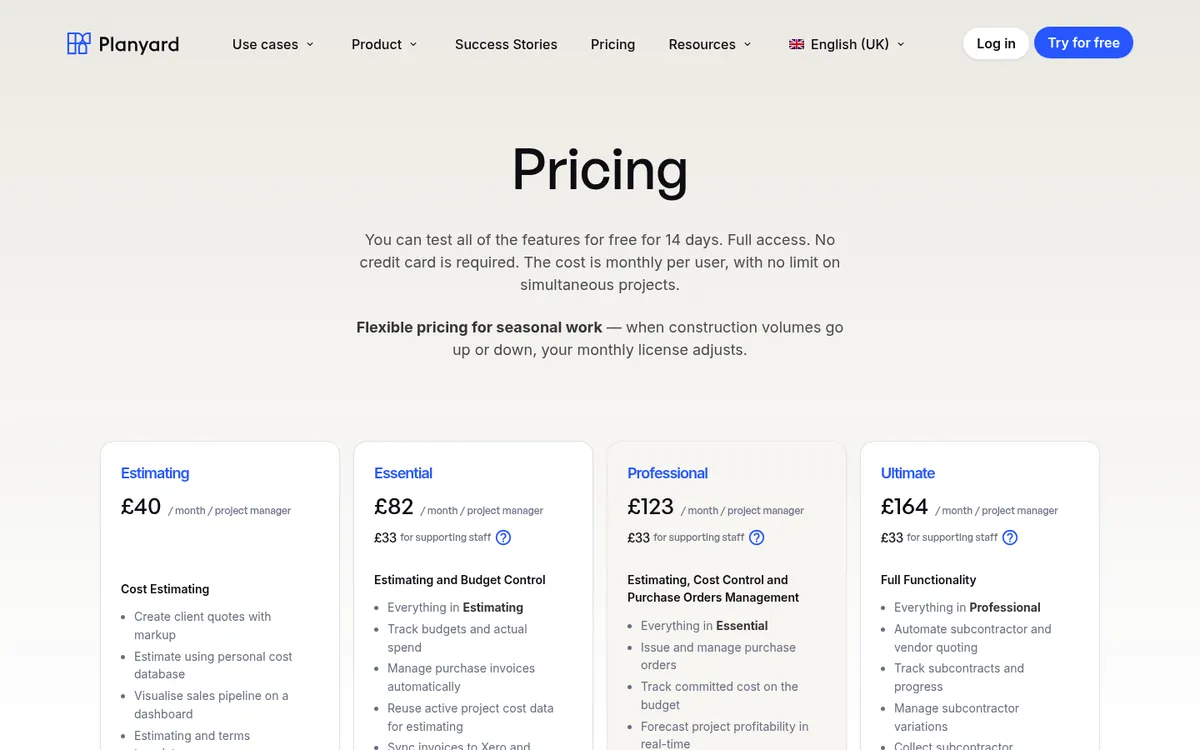
Planyard is construction cost control and commercial management software for main contractors who have outgrown the CVR spreadsheet but do not want to replace their accounting system. You load the budget, raise purchase orders and subcontract orders against it, and approve supplier invoices and subcontractor applications in the same place. Approved bills go to Xero, QuickBooks or Sage, coded to the right job and cost line.
Because orders, invoices and client valuations sit against the same budget lines, the CVR is always current. Professional adds committed cost tracking, purchase order and invoice approval workflows, client valuations with variations and automatic retention, and invoice scanning. Ultimate adds subcontract orders with their own retention and variations, subcontractor applications that subbies submit through a link without an account, tendering to subcontractors with bid comparison, CVR version history and limited roles for site teams.
Planyard is not a site app. It has no drawings, snagging, programme or health and safety forms, and no takeoff. It also does not file CIS: the bill arrives in your accounts with the labour and materials split, and Xero, QuickBooks or Sage apply the deduction and file the return. If you already run Procore on site, Planyard has a Procore integration. See the financial management software for main contractors page for the full workflow.
Best for: SME main contractors whose commercial team spends days on month-end CVRs and chasing approvals.
Watch out for: No site management, drawings or snagging. Firms that want one vendor for ledgers, payroll and site will need an ERP instead.
Pricing: Essential £82, Professional £123 and Ultimate £164 per project manager per month; supporting staff £33. Estimating only is £40. Client valuations, variations and retention start on Professional; subcontract orders and subcontractor applications are on Ultimate. 14-day free trial, see Planyard pricing.
"It easily saves half of a Quantity Surveyor’s time. When you're looking at a £70,000 annual salary, that level of cost-effectiveness makes the decision to implement the system very simple."
Read more
2. Procore – Best for Large Contractors Running Site and Finance on One Platform

Procore is the best-known construction management platform worldwide. It covers documents, drawings, RFIs, quality and safety, and its Project Financials tools add budgets, main contracts, commitments (subcontracts and purchase orders), change events, variations and direct costs. Procore says it connects to more than 200 accounting systems, including Sage and Xero, and has a marketplace of over 500 integrations.
The main drawbacks are cost and effort. Procore charges an annual fee per product based on your construction turnover, and a full rollout across site and commercial needs an internal owner. Read our Procore vs Planyard comparison or the list of Procore alternatives.
Best for: Tier 2 and larger main contractors that want one system for site, documents and project financials.
Watch out for: Price scales with turnover, so it is a big step for an SME. UK commercial processes such as CVR usually need configuration or reporting work.
Pricing: Quote only. An upfront annual fee per product, based on annual construction turnover.
"The price disparity between a system like Planyard versus something like Procore or Sage is absolutely vast. For a business of our size, finding a solution that offers this level of professional functionality without the massive overhead of those larger systems is a significant advantage."
Read more
3. Access Coins Evo – Best for Established Contractors Replacing Their Whole Finance Stack

Access Coins Evo (formerly Coins) is a construction ERP from The Access Group. It brings financials, job costing, procurement, payroll and project management into one platform configured for UK and Irish contractors, with real-time CVR reporting and portfolio dashboards. Access also sells estimating (ConQuest), site management (Fonn), document management and workforce tools around it.
It replaces your accounting system, which suits a contractor with a finance team, several companies and in-house payroll. It is more than most £5m firms need. See Access Coins vs Planyard and Access Coins alternatives.
Best for: Larger main contractors and housebuilders that want ledgers, payroll and commercial in one ERP.
Watch out for: Implementation is a project in its own right, and you leave Xero, QuickBooks or Sage behind.
Pricing: Quote only, through a pricing request form on the Access website.
4. Causeway Project Accounting – Best for Contractors With a Commercial Department on JCT and NEC
Causeway Project Accounting is commercial cost management software that sits between your finance system and your projects. It tracks committed, accrued and actual costs for labour, plant, materials and subcontractors, pulls live cost data into project workbenches for CVR and payment applications, and handles JCT and NEC contracts. Causeway also sells estimating, tendering and e-invoicing, and says it serves more than 1,000 construction contractors.
Best for: Mid-sized and large contractors with a dedicated commercial department and NEC contracts.
Watch out for: Priced and implemented for larger firms. Small teams may find it more system than they need.
Pricing: Quote only.
See your live CVR without the spreadsheet
Budgets, orders, subcontractor applications and client valuations in one place, synced to Xero, QuickBooks or Sage. 14-day free trial, no credit card.
5. Eque2 Construct and EVision – Best for Finance-Led Firms on Sage, Xero or Business Central

Eque2 is a long-standing UK vendor. Construct adds job costing and contract management to Sage 50, Sage 200, Sage Intacct and Xero: CIS, retentions, applications and valuations, plus CVRs, variation tracking and subcontractor exposure reports. EVision is Eque2’s full construction ERP on Microsoft Dynamics 365 Business Central. Eque2 also sells estimating (EValuate) and housebuilding modules.
Construct suits firms where the finance director owns the system. Its packages are tiered by user numbers, with purchase orders and approvals in the higher tiers and mobile apps charged separately. See Eque2 vs Planyard and Eque2 alternatives.
Best for: Contractors who want to stay on Sage or Xero and add construction accounting, CIS and retention handling around it.
Watch out for: Finance-first design; site teams and QSs may find day-to-day ordering and approvals slower than in newer cloud tools. Mobile apps cost extra.
Pricing: Quote only. Packages are tiered by number of users.
"With the other vendor, there was a lump sum for onboarding – you're paying out a lot of money before you've even got anything. Planyard didn't have that."
Read more
6. Archdesk – Best for One Configurable Platform Across Estimating, Projects and Finance

Archdesk is a construction platform with more than 30 modules: estimating, subcontractor bidding, procurement, project cost control, job costing, payment applications, subcontractor pay applications, WIP reporting, site forms, diaries and timesheets, plus sync to your accounting software or ERP. Every quote includes all modules, implementation and support, and external collaborators are free.
Because it covers so much and can be set up many ways, you have to decide how you want each process to run before it goes live. See Archdesk vs Planyard.
Best for: Growing contractors that want estimating, site and commercial in one configurable system.
Watch out for: Setup takes real time and decisions. No published prices, so you cannot compare cost without a sales call.
Pricing: Quote only. Pay per user (office and site users counted separately) or an unlimited-user package priced on annual construction volume.
7. Autodesk Forma Build – Best for Contractors Already Working in Autodesk Design Data
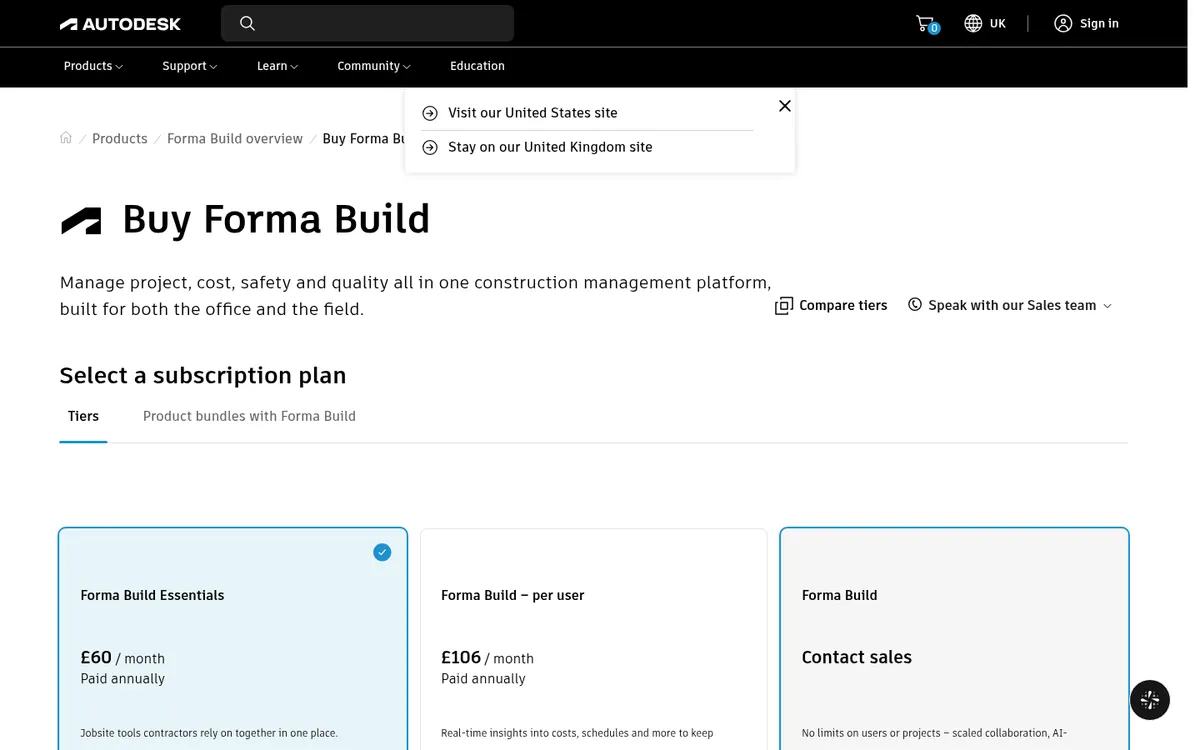
Forma Build (previously Autodesk Build) is Autodesk’s construction management platform. It centralises project documents, tracks costs, and runs RFIs, submittals, meetings, issues and forms for quality and safety. It connects to Autodesk design tools and, Autodesk says, to more than 400 other systems including ERPs.
For a UK main contractor it is mainly a document and site control platform with cost tracking added. You will still need your accounting system, and possibly a commercial tool, for valuations, retention and CIS.
Best for: Contractors working on BIM-heavy projects with designers already in Autodesk tools.
Watch out for: UK commercial processes are not its focus. Pricing is per user and adds up across a large site team.
Pricing: Sold per user through the Autodesk store and resellers. We could not confirm a current GBP list price on the UK site, so ask for a quote.
8. Fieldwire – Best for Site Teams Needing Drawings and Tasks on a Phone

Fieldwire, owned by Hilti, is a site management app: plan viewing, task management, specifications, photos and checklists, with reports, sheet compare and templates on Pro. Business adds custom forms, app integrations and a BIM viewer; Business Plus adds RFIs, submittals, change orders, budget and custom contracts.
It is a good, cheap way to get drawings and snagging lists off paper. It is not a commercial system, so you would pair it with an accounting package and a cost tool. See Fieldwire vs Planyard.
Best for: Site managers and supervisors on any size of main contractor.
Watch out for: Budget and change orders only arrive on the top plan, and there are no valuations, retention or CIS.
Pricing: Basic free; Pro £33, Business £54 and Business Plus £76 per user per month, billed annually.
9. PlanRadar – Best for Snagging, Inspections and Handover
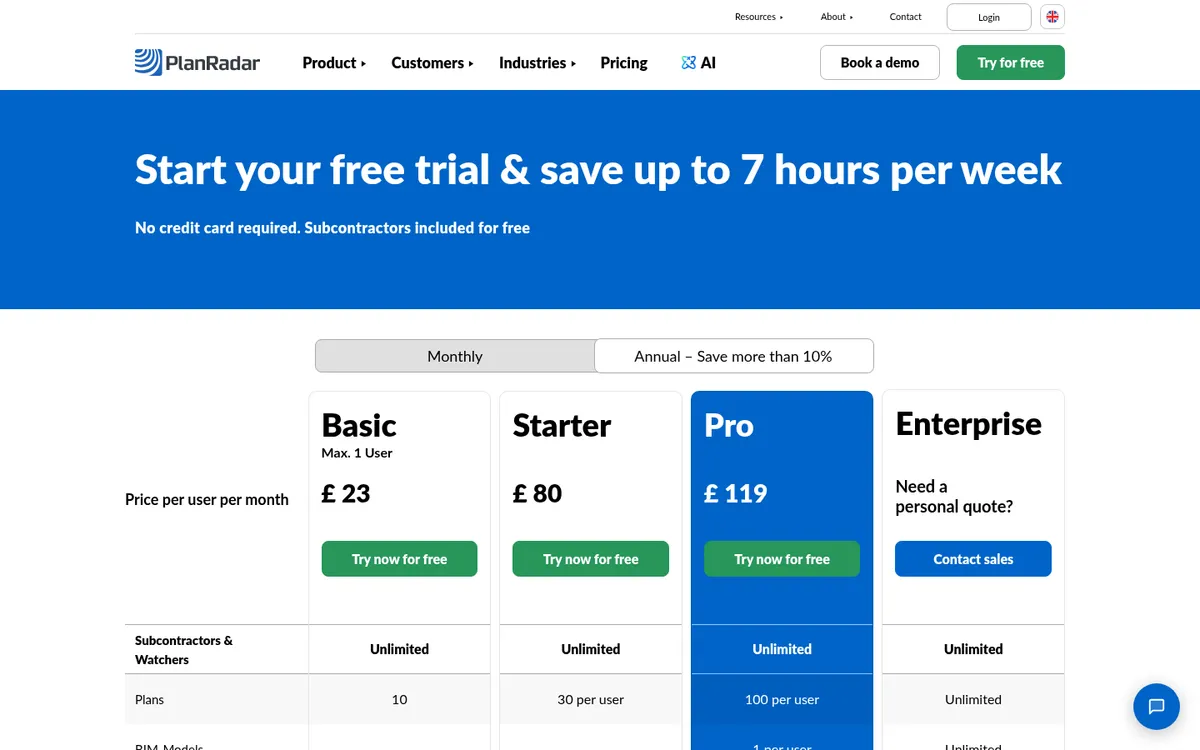
PlanRadar is a defect management and site documentation platform; the company says it has over 200,000 users in more than 75 countries. Teams pin snags, inspections and checklists to drawings, then produce reports for handover. Subcontractors and watchers are free, and the Pro plan adds BIM models and a custom template builder.
If quality and handover documentation is your weak point, PlanRadar fixes it quickly. For cost and payments you need something else.
Best for: Contractors with heavy snagging, fire safety or handover documentation needs.
Watch out for: No commercial or accounting features. Per-user pricing, with a 4% innovation fee added from the second billing period.
Pricing: The UK pricing page lists Basic (one user) at £23, Starter at £80 and Pro at £119 per user per month, with more than 10% off for annual billing. Enterprise by quote.
10. Payapps – Best for Certifying Applications for Payment

Payapps digitises the application for payment process between a main contractor and its subcontractors. Subcontractors submit applications in a standard format, the contractor reviews and certifies them with built-in reminders and an audit trail for the Construction Act, and variations and retention are tracked alongside. It integrates with construction ERP and finance systems.
It solves one problem, the monthly flood of applications, and leaves budgets, purchase orders and CVR to other systems. See Payapps vs Planyard and Payapps alternatives.
Best for: Contractors with many subcontractors whose main pain is applications and payment notices.
Watch out for: A point solution: you still need a commercial tool or spreadsheets for budgets, orders and CVR. Subcontractors pay for their own plans.
Pricing: Quote only for main contractors: a fixed annual fee based on the number of projects and claims you certify each month, with unlimited users.
How to Choose
Start with turnover and the shape of your team. A £3m to £30m main contractor with a small commercial team and Xero, QuickBooks or Sage in place gets the quickest return from a commercial tool on top of its accounts: Planyard, or Eque2 Construct if you are a Sage shop that wants CIS handled inside the construction module. Add a site app such as Fieldwire or PlanRadar if drawings and snagging are the bigger problem.
Above that, with a finance team, several companies and in-house payroll, a construction ERP such as Access Coins Evo or Eque2 EVision starts to make sense. Contractors that want one platform for site, documents and project financials, and can afford the turnover-based fee, look at Procore or Autodesk Forma Build. Causeway suits formal commercial departments on NEC work.
Whatever you shortlist, ask each vendor to run one of your live jobs in the demo: a subcontract order, a variation, an application with retention, and the CVR at the end. Our CVR software comparison goes deeper on that last step, and the commercial construction management page shows the Planyard version.
How we chose
We started from the tools UK main contractors name in demos, in Reddit threads and on review sites, then kept the ones with a UK presence and a clear fit for contractors who subcontract most of their work. We checked every price and plan name on the vendor’s own website in October 2026 and left out anything we could not confirm. Planyard is our product; we have placed it where we think it fits and listed what it does not do.
"The transition from making the decision to getting our first project live in the system took only about one day of work. Even for a large, complex project, we were able to get everything fully set up and operational within that single day."
Read more
Next Step
If your month-end CVR still takes days, try Planyard on one live job: load the budget, raise the next subcontract order and let the subcontractor apply through the link. The JCT payment application and subcontractor management pages show how valuations and retention work.
Run your next job in Planyard
Budgets, subcontract orders, applications and a live CVR on top of your accounts. 14-day free trial, no credit card.
 Go to site for